8.3. SWITCHING THE EQUIPMENT ON/OFF
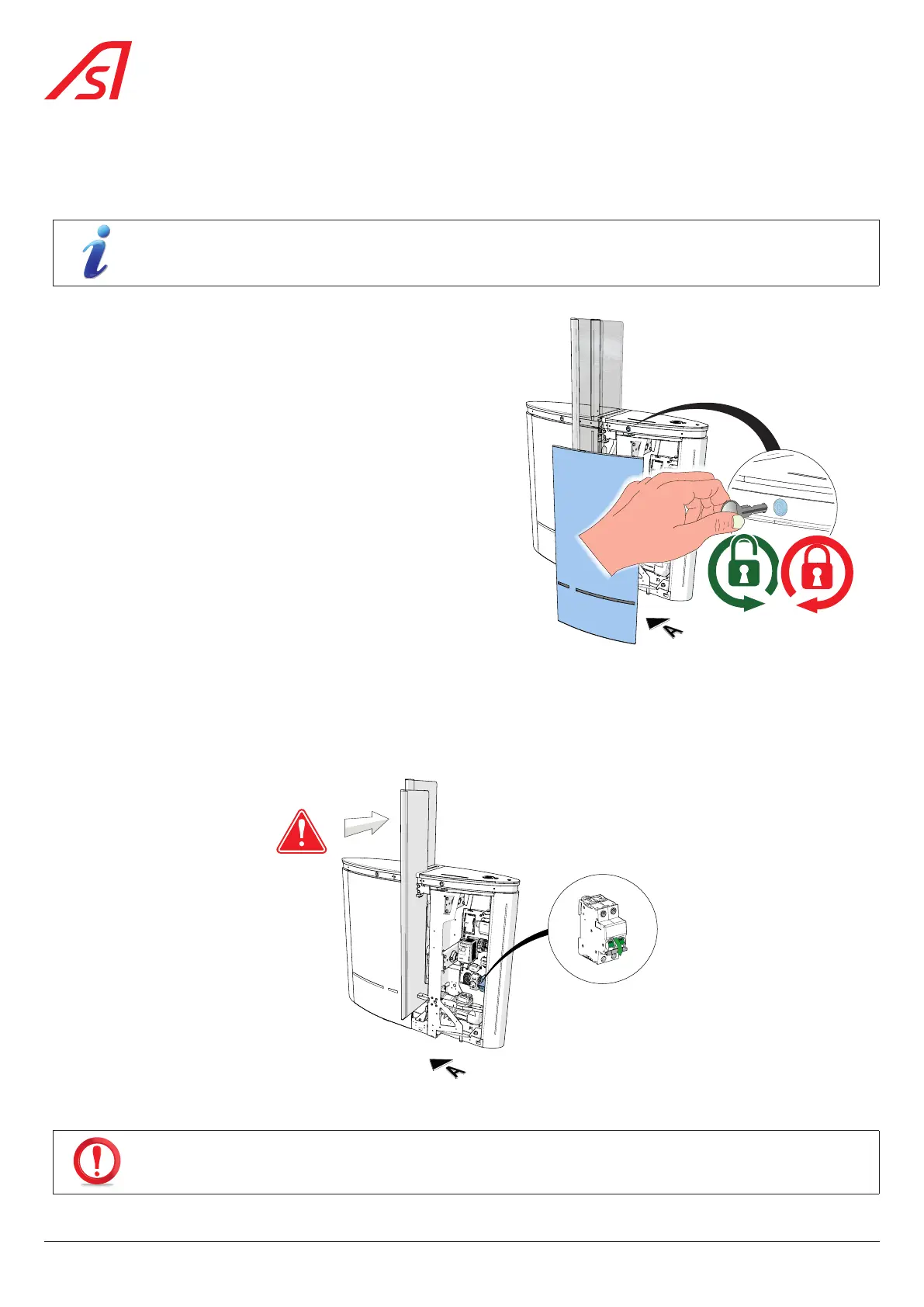
8.3.1. REMOVING THE SIDE PANEL ON THE RIGHT - DIRECTION A
The following procedure is identical for all panels.
For an end panel, it is necessary to operate both locks to unlock the panel.
1. Insert the key(s) into the lock(s) located in the band above
the panel and turn counter-clockwise (90°) to unlock;
( Fig. 58)
2. Tilt the panel slightly towards you and pull it upwards
without tearing the ground strap;
3. Unplug the ground strap.
4. Place the panel in a safe place, out of the way, so that it
cannot be damaged.
Fig. 58 - Right side panel removal - side A
8.3.2. POWER OFF
Remove the right side panel - side A / direction A, as described in the previous chapter ( Chap. 8.3.1), and turn the main circuit
breaker to OFF.
OFF
Fig. 59 - Power off
IF THE MOBILE OBSTACLES ARE IN THE CLOSED POSITION WHEN THE POWER IS SWITCHED OFF, THEY WILL OPEN
AND RETRACT INTO THE CABINET, FREEING THE WAY!
54
SmartLane



 To Next Page