6. DESCRIPTION
6.1. SOUND AND LIGHT ALARMS
6.1.1. DYNAMIC FUNCTION AND ORIENTATION LIGHTS
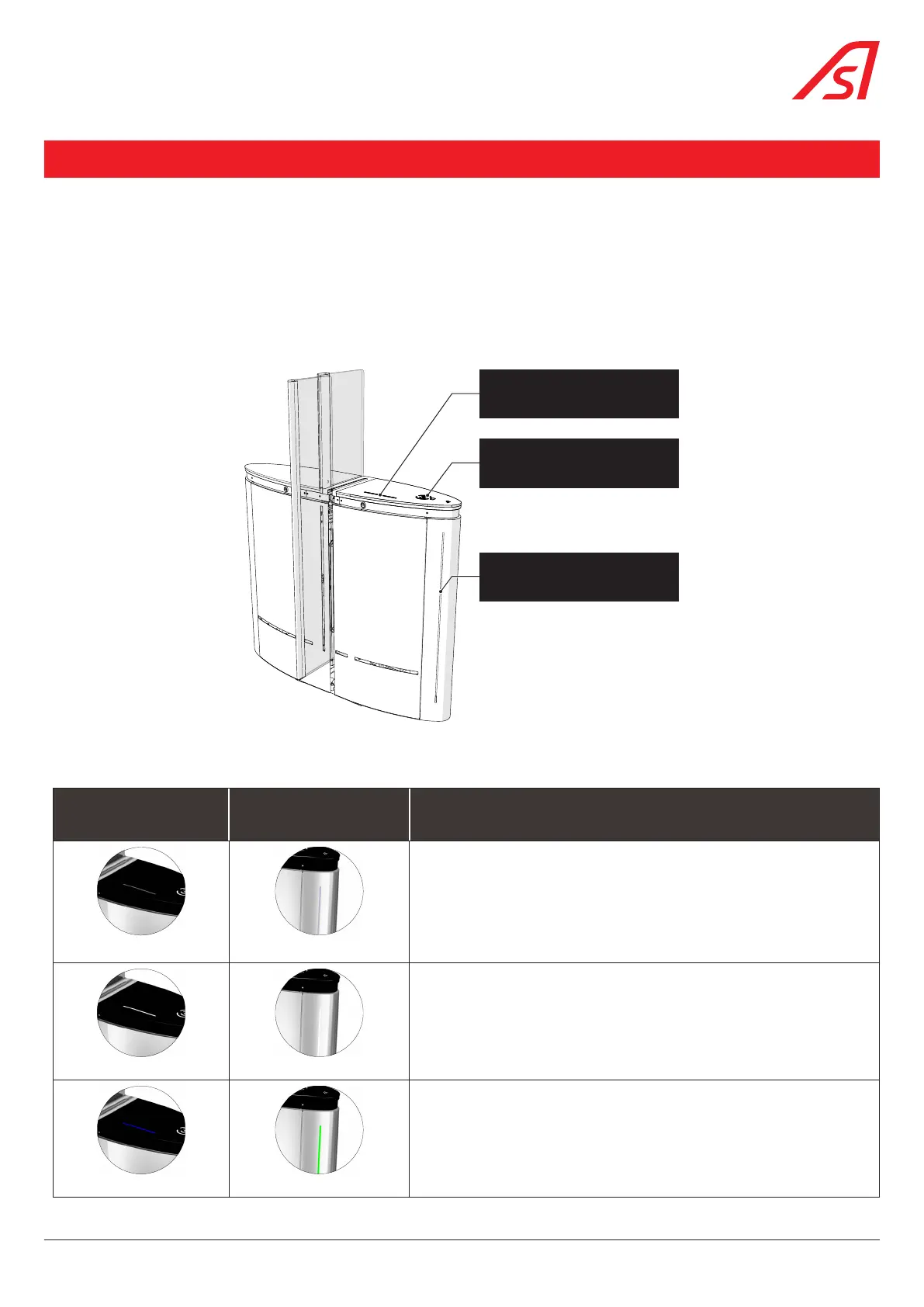
The dynamic status light is integrated into the glass upper plate and located near the reader integration area. It indicates the
user’s access authorization and operates independently in both directions.
The dynamic orientation light is integrated in the front panel. It indicates the status of the lane and allows good visibility from
a distance to ensure a large flow of passage.
Reader integration zone
Dynamic orientation light
Dynamic status light
Fig. 37 - Dynamic lights
By default, the dynamic lights will work as follows:
DYNAMIC STATUS LIGHT DYNAMIC ORIENTATION LIGHT MEANING
OFF
OFF
• Lane powered off
WHITE (FIXED)
WHITE (FIXED)
• Lane initialising (Only during factory installation of the product or if the
initial configuration of the product has been changed via the service
interface)
BLUE (FIXED) GREEN (FIXED)
• Lane in Controlled mode, waiting for a request for passage authorization
39
SmartLane



 To Next Page