8.17. REMOVING A HOUSING EXTENSION
1. Turn off the power supply to the device ( Chap. 8.3, page 54);
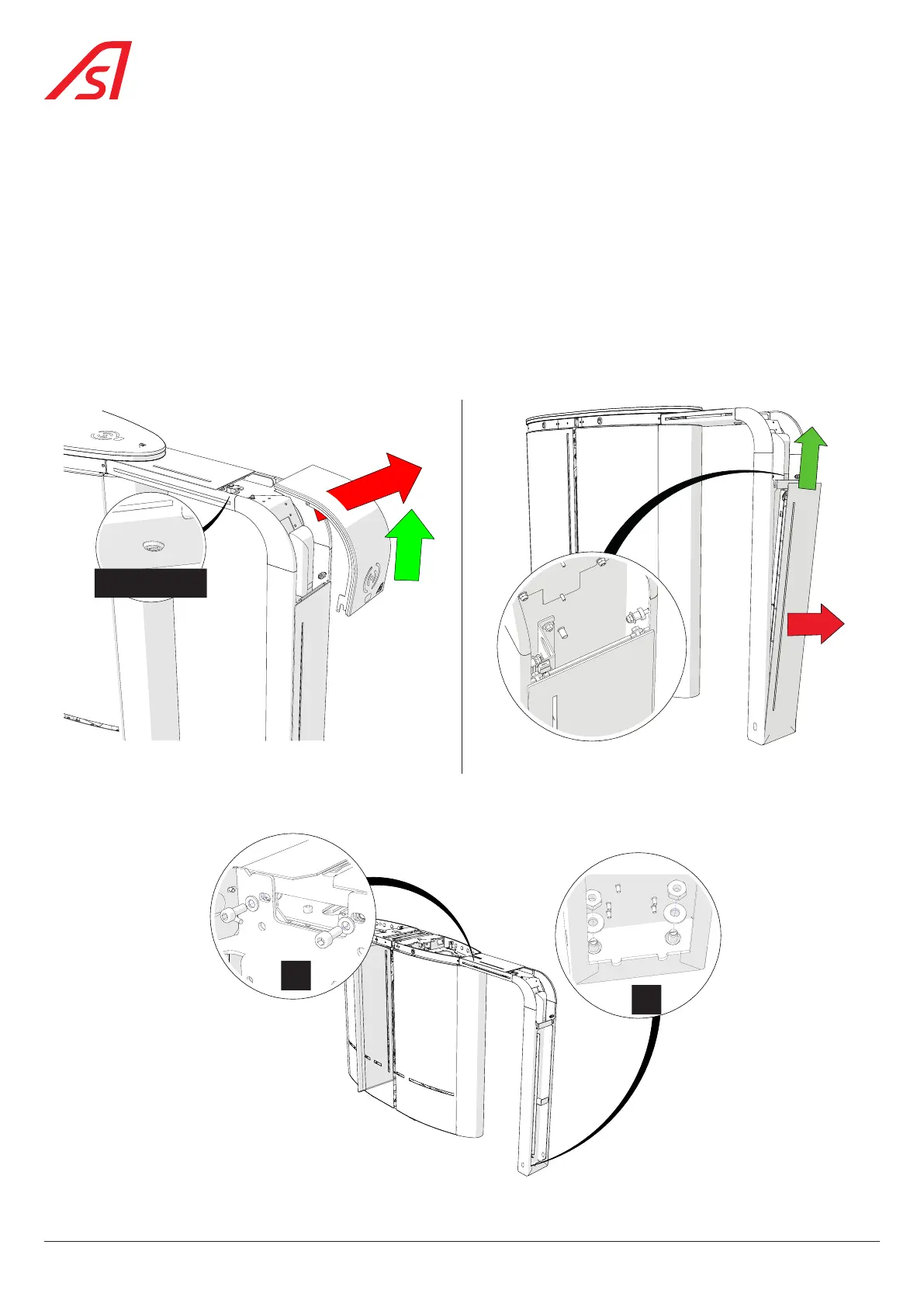
2. Remove the cover ( Fig. 80) :
- Insert the key in the lock, located under the horizontal strip of the extension, and turn counter-clockwise;
- Pull the cover upwards;
- Place the cover in a safe place, out of the way, so that it cannot be damaged.
3. Remove the front panel of the extension ( Fig. 81):
- Slightly unscrew the two (2) nuts with integrated lock washers so that the front panel can be removed:
κ Pull the front panel upwards and out of the extension frame;
κ Place it in a safe place, out of the way, so that it cannot be damaged.
Lock
1
2
2
1
Fig. 80 - Removing the extension cover Fig. 81 - Removing the extension front panel
4. Unscrew the two (2) nuts and remove the washers from the two (2) fixing points located in the foot of the extension frame,
as shown in detail A in the figure below;
A
B
Fig. 82 - Housing extension fixing points
72
SmartLane



 To Next Page