Technical / Programming Manual
FT128 Rev 2.2
143
19.2.2 Tree view
This is opened by default at first start up
after installation.
If the tree view for some reason has been
closed it can be opened again via menu
"View" and "Tree view".
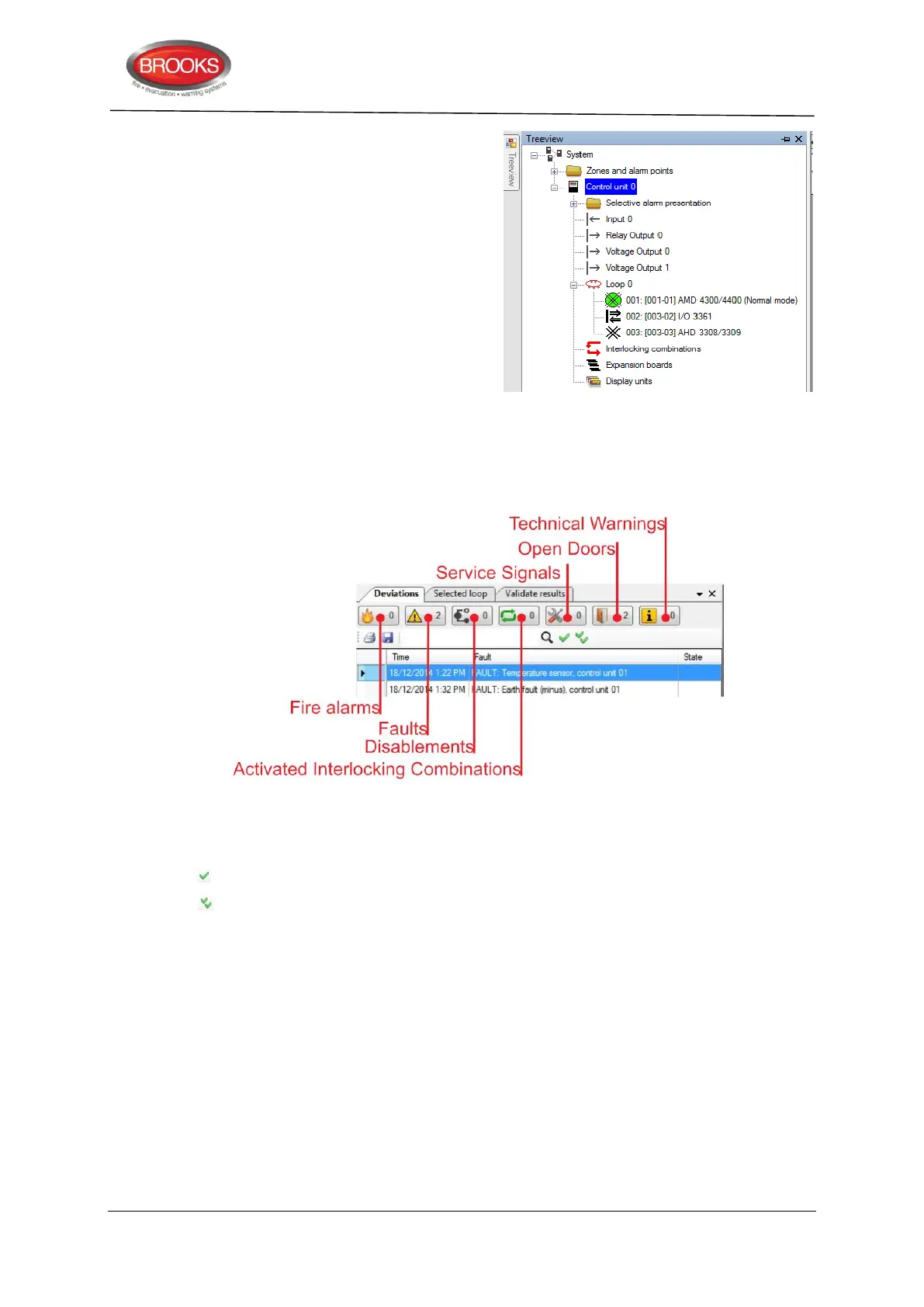
The tree view shows the system and will be
updated for every unit added to the system.
The colour of the control unit symbol is
black in a new system or if its properties
have been revised or units have been
added or deleted after the latest download
of SSD.
19.2.3 Deviations
To the right of the tree view, the "Deviations" tab in Figure 45 below is available by default.
Any list of faults, fire alarms, disablements, etc. can be either printed or saved.
Figure 45 Deviation Tab
Selecting any of the buttons under this tab as shown in Figure 45 above will open a list of
the events.
Acknowledges, resets, re-enables individual items in the lists
Acknowledges, resets, re-enables all items in the lists. Wednesday
19.2.4 Selected loop
To the right of the tree view, the "Selected loop" tab is available by default.
COM loop units can be added two ways:
Via the tree view (COM loop pop-up menu) or
Via the "Selected loop" tab. Click on the COM loop unit symbol just under the tab
to add the unit to the list. Then edit its properties by double clicking on it.
The "Selected loop" list and the tree view will show the same information.



 To Next Page