Technical / Programming Manual
FT128 Rev 2.2
94
12 Interlocking Function
The interlocking function is used to verify that an output has been activated, i.e. by
"combining" an output with an input (feed-back from the equipment controlled by the
corresponding interlocking output).
12.1 Interlocking Programming
Up to 100 Interlocking Combinations can be programmed using EBLWin.
Note: Each interlocking input and each interlocking output can only be used in one
interlocking combination.
Area and Point fields are unique identifiers for each paired interlocking combination
synonymous to Zone-Address. They are presented in this format NN-NN with the first 2
digits representing the Area and the last 2 digits representing the Point. Both Area and
Point numbers range from 1-99.
It is advantageous to have a numbering system planned correlating to the location (“Area”)
when assigning a Name to the interlocking combinations. Having some form of structure
to the numbering will greatly help organise the SSD file and make it easier to understand
and assist with troubleshooting later. One should also consider including all I/O devices
into this numbering structure so that it will be easier to select from the list of interlocking
combinations.
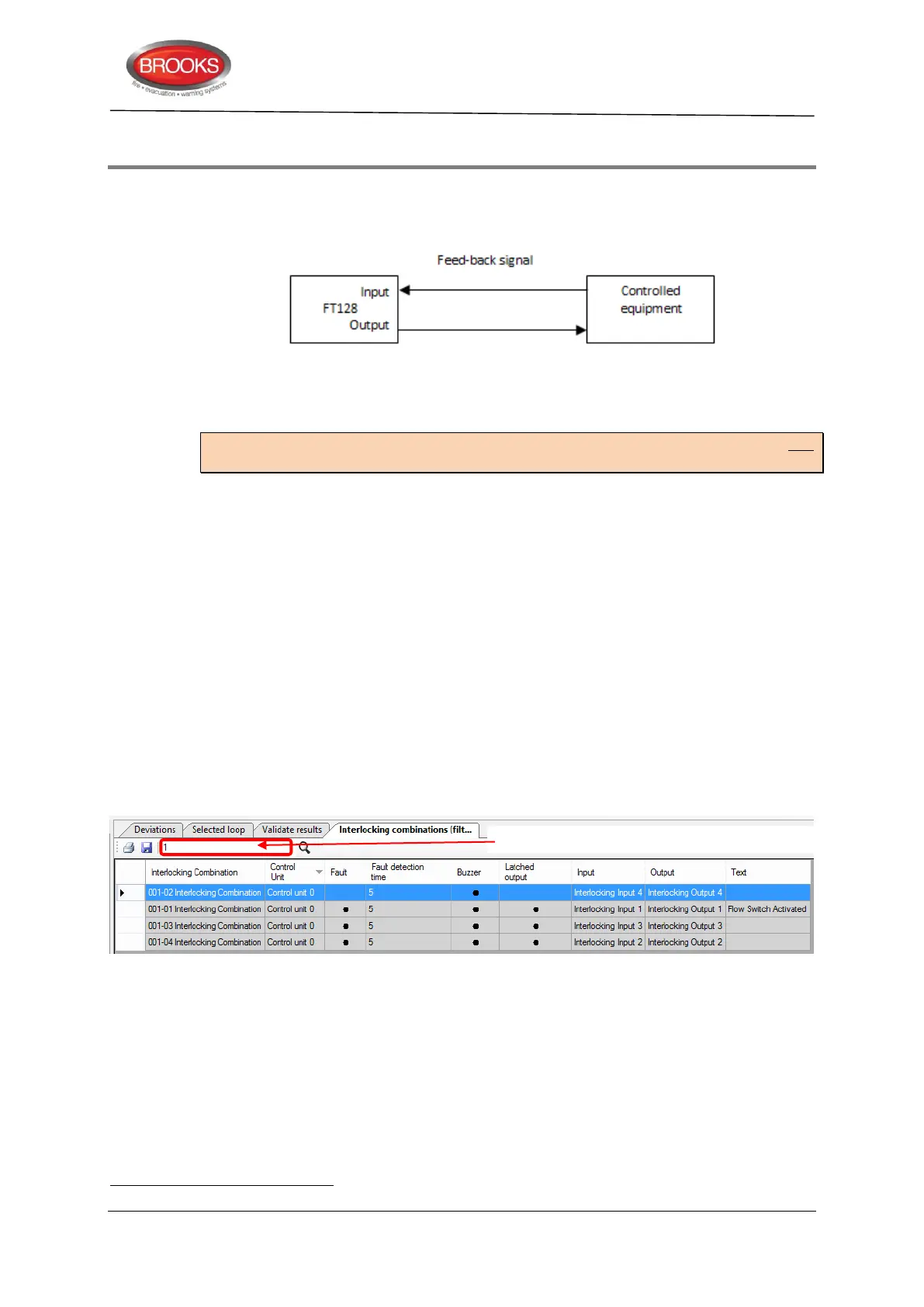
A Filter Function Box as shown in Figure 32 below, is available to assist with listing only
those interlocking combinations of interests. This will become more powerful when some
sort of numbering structure is in place. Figure 32 was from a list of 100 interlocking
combinations, typing in “1”
in the filter function box quickly narrows down the lists with
anything containing “1”. One can see the usefulness of having a planned numbering
structure in place from this example should all interlocking combinations on containing 1
were called for.
Figure 32 Filter function
Available interlocking inputs and/or outputs will appear in the EBLWin dialog box shown in
Figure 33 page 95, only when each input and output have been configured with Type =
Interlocking
12.1.1 Interlocking Output
The "Voltage Output" / "Relay Output" dialog boxes are used to configure the interlocking
output.
Type: "Interlocking" is to be selected.
Filtering search texts are case sensitive. For this reason, ensure that naming convention is consistent throughout.
Filters the lists of interlocking with anything containing “1”



 To Next Page