40 Chapter 2: Unpacking and Setup Operator's manual
L2786 Rev. M
The Extended Systems Test (EST)
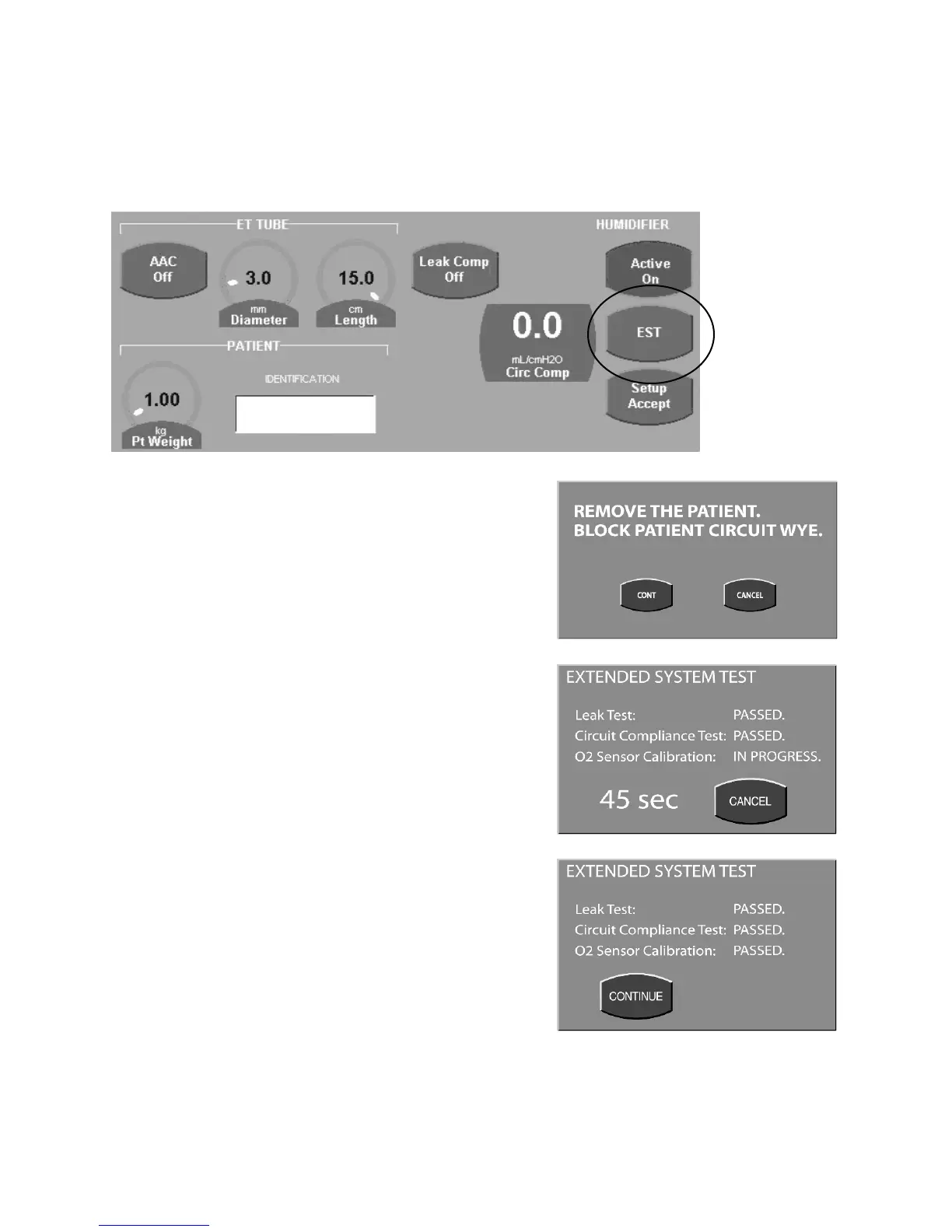
The EST function is accessed from the Setup screen as shown here. Press the SETUP membrane button to the lower
left of the UIM to open this screen.
Figure 2–44: Setup Screen
Press the EST touch screen button to select it.
A message will appear instructing you to remove the patient and
block the patient wye.
After confirming that the patient has been disconnected and the
circuit wye blocked press the Continue (Cont) button.
The ventilator will perform the EST and display a countdown clock.
During this test the ventilator will perform:
• Patient circuit leak test
• Patient circuit compliance measurement
• Two point calibration of the oxygen sensor
The patient circuit compliance measurement and leak test are
performed simultaneously with the oxygen sensor calibration. The
maximum time for the EST is 90 seconds. To restart the EST at
any time select the Cancel button to return to the set up screen.
After each test is complete the ventilator will display a “Passed” or
“Failed” message next to the corresponding test.
Once the test is complete press the continue button to return to the
set up screen.
Figure 2–45: EST Screens
Figure 2.46a Remove Patient Instruction
Figure 2.46b In progress EST
Figure 2.46c Completed EST



 To Next Page