DMD1050TS Satellite Modem Board
Revision 1
Web Browser 7–42 MN-DMD1050TS
7.7.3 Interface Menu
The Interface Menu has the following submenus:
• TX Setup
• RX Setup
• General
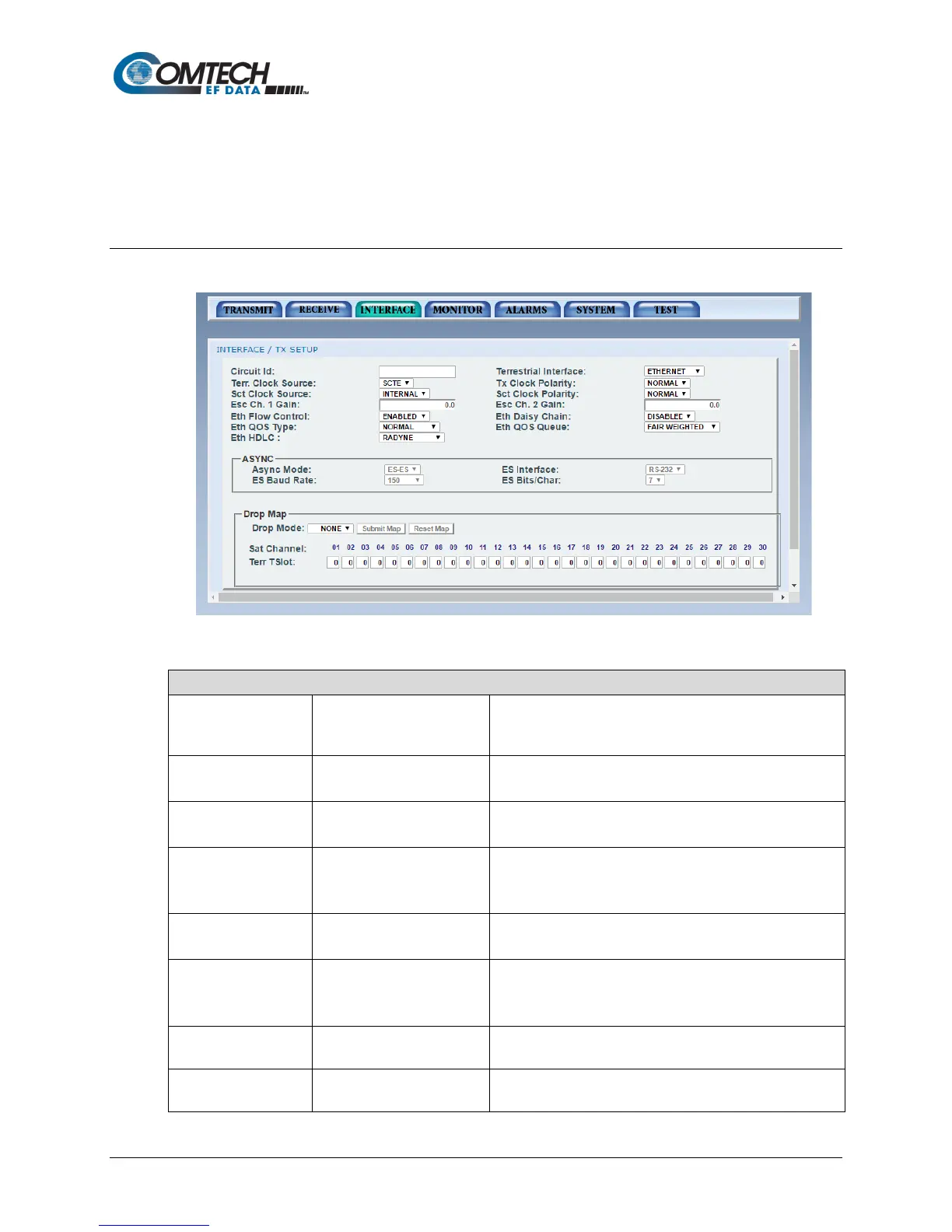
7.7.3.1 Interface | TX Setup Page
Figure 7-24. Interface | TX Setup Page Example
Interface | TX Setup Page
Use to enter a Tx Circuit Identifier. Circuits can have an
identifier of up to 11 alphanumeric characters, such as
LINK1.
Terrestrial Interface • ETHERNET
• MIL 188 114A
Use to select the Transmit type.
•
• SCT
Use to select the Transmit Clock source.
Tx Clock Polarity • AUTO
• NORMAL
• INVERTED
Use to select the Clock Polarity for the Tx Terrestrial Clock
relative to the Tx Data. Select Auto to cause the unit to
detect wrong polarity and correct it automatically.
SCT Clock Source • INTERNAL (SCT)
• SCR (Rx SAT CLK)
Use to select the SCT Source to be the SCT Oscillator or
the RX Satellite Clock. Rx SAT CLK is for loop timing.
•
• NORMAL
• INVERTED
Use to select the Clock Polarity for the Tx Terrestrial Clock
relative to the Tx Data. Select Auto to cause the unit to
detect wrong polarity and correct it automatically.
•
Use to select ESC Voice Channel Gain. Only displayed
when IDR NETWORK and VOICE Channel are selected.
• -20 to +10 dB
Use to select ESC Voice Channel Gain. Only displayed
when IDR NETWORK and VOICE Channel are selected.



 To Next Page