Configuring System Information 169
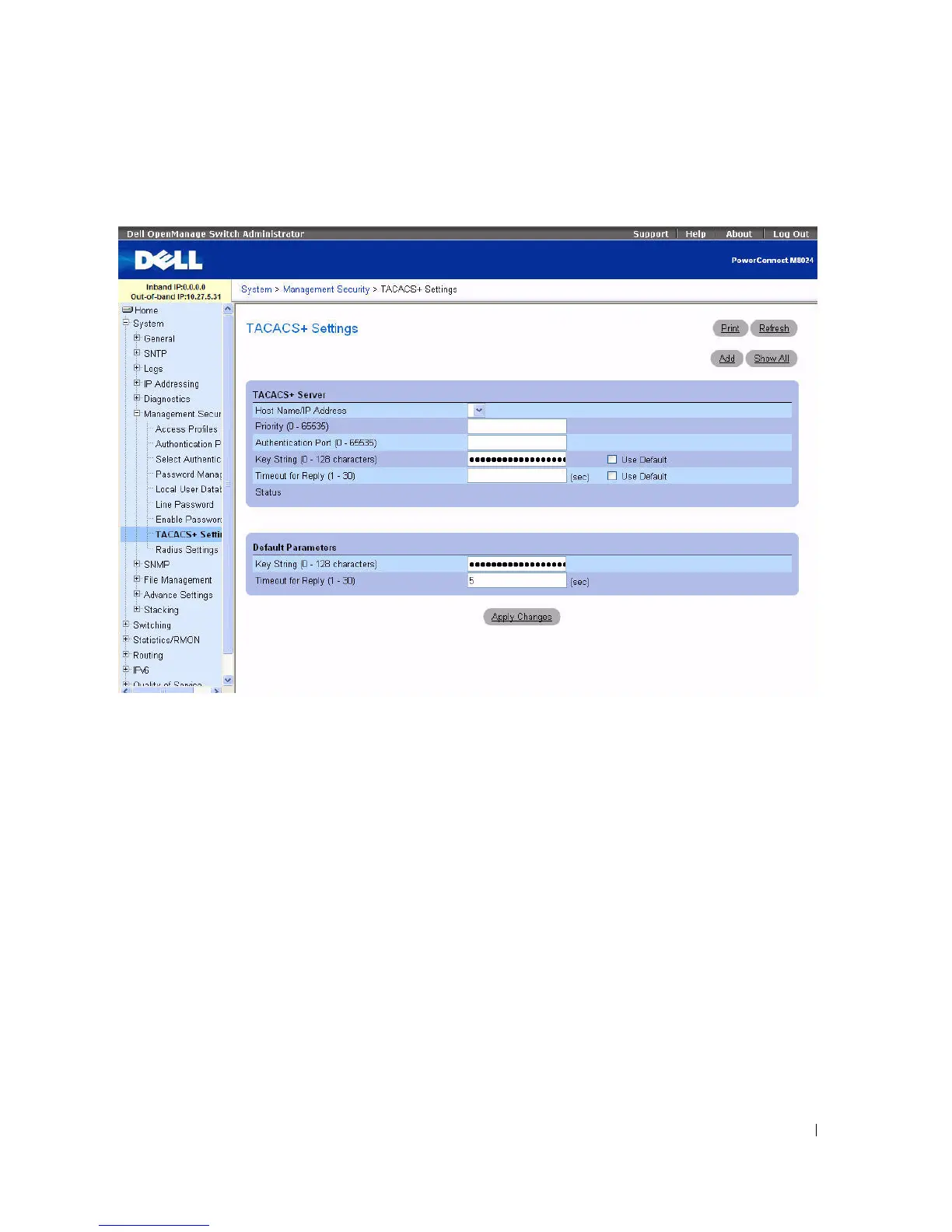
Figure 6-53. TACACS+ Settings
The TACACS+ Settings page contains the following fields:
•
Host Name / IP Address —
Specifies the TACACS+ Server.
•
Priority (0
–
65535) —
Specifies the order in which the TACACS+ servers are used. The default is 0.
•
Authentication Port (0
–
65535) —
The port number through which the TACACS+ session occurs.
The default is port 49.
•
Key String (0
–
128 Characters) —
Defines the authentication and encryption key for TACACS+
communications between the device and the TACACS+ server. This key must match the encryption
used on the TACACS+ server. Check
Use Default
to use the default value.
•
Timeout for Reply (1
–
30) —
The amount of time that passes before the connection between the
device and the TACACS+ server times out. The field range is from 1 to 30 seconds. Check
Use
Default
to select the factory-default value.
•
Status —
The connection status between the device and the TACACS+ server. The possible field
values are:
–
Connected —
There is currently a connection between the device and the TACACS+ server.


 To Next Page