434 Viewing Statistics and Remote Monitoring
RMON History Control Statistics
Use the RMON History Control page to maintain a history of statistics on each port. For each interface
(either a physical port or a port-channel), you can define how many buckets exist, and the time interval
between each bucket snapshot.
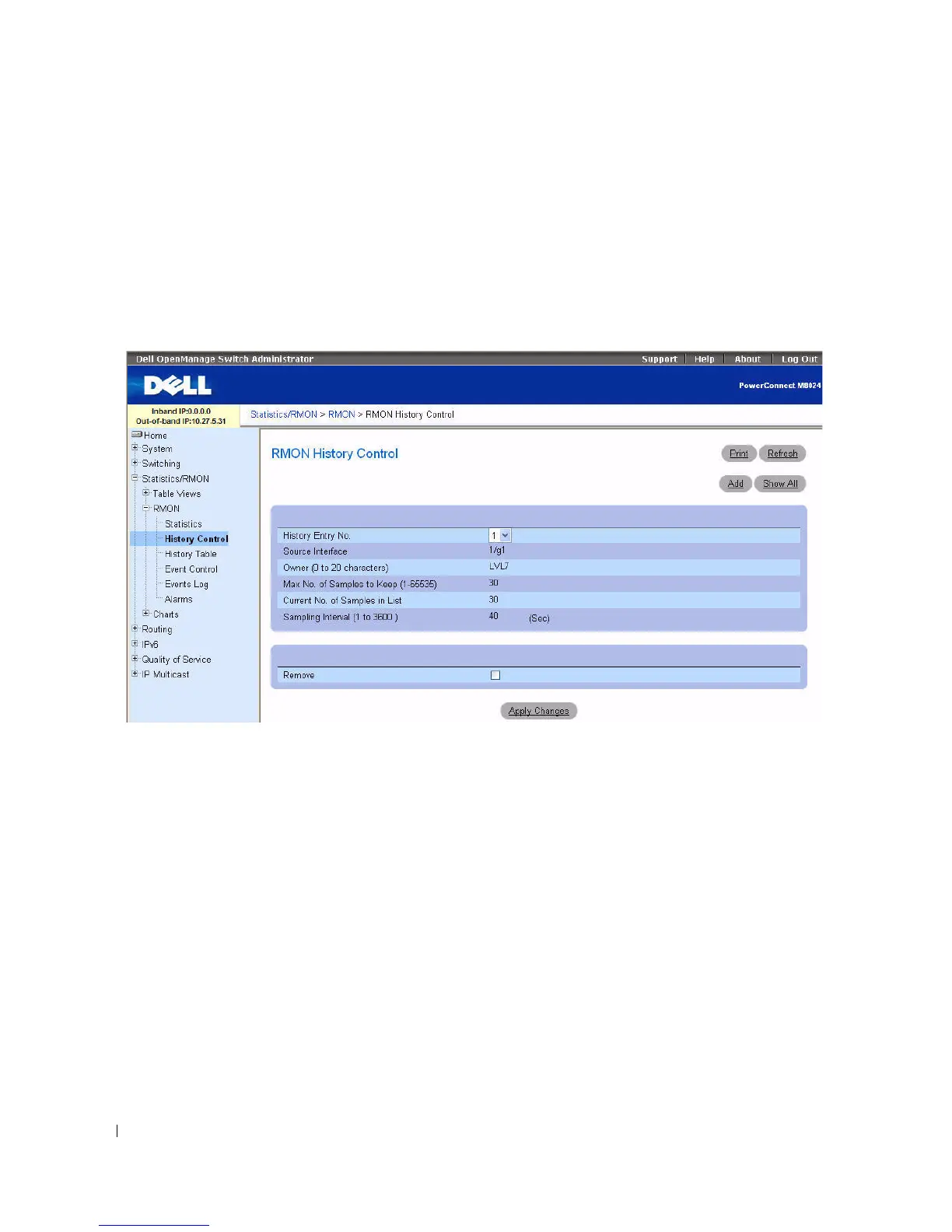
To display the page, click Statistics/RMON > RMON > History Control in the tree view.
Figure 8-8. RMON History Control
The RMON History Control page contains the following fields:
•
History Entry
— Selects entry number on the
RMON History Control Table
.
•
Source Interface
— Specifies interface from which the history samples are taken.
•
Owner (0–20 characters)
— Indicates RMON station or user that requested the RMON information.
•
Max No. of Samples to Keep (1–65535)
— Sets the number of historical buckets for this interface.
•
Current No. of Samples in List
— Displays the current number of samples taken.
•
Sampling Interval (1–3600)
— Sets the frequency at which samplings are taken from the ports. The
possible values are from 1 to 3600 seconds. The default is 1800 seconds (30 minutes).
•
Remove
— Removes the
RMON
History Control Table
entry displayed when checked.



 To Next Page