Chapter 4 Connect the Front End
110 Storage Center SC8000 Controller Deployment Guide
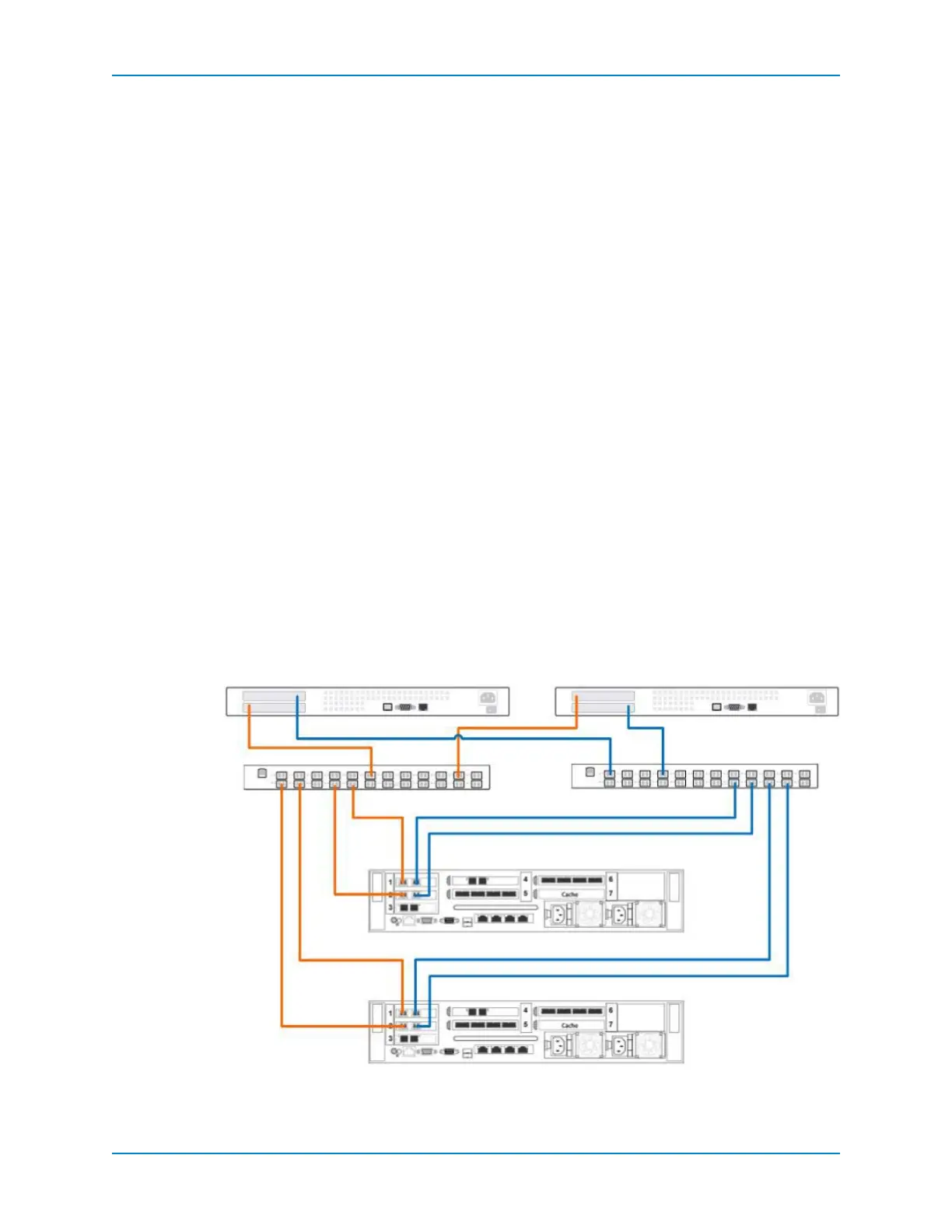
Virtual Port Mode with Dual-Fabric Fibre Channel
UsetwofabricswithvirtualportmodetopreventaFCswitchfailureorcontrollerfailure
fromcausinganoutage.
Inthisconfiguration,thereisonefaultdomainforeachFCfabric.Eachcontrolleris
connectedtobothfabricsbytwoFCconnections.Ifasingleportfails,itsvirtualport
fails
overtoanotherportinthesamefaultdomain.Ifacontrollerfails,thevirtualportsonthe
failedcontrollermovetoportsontheothercontrollerinthesa mefaultdomain.
Prerequisites
EachcontrollermusthavetwoavailableFCfront‐endportsforeachFCfabric.
Therequirementsforvirtualportmodemustbemet.
Steps
1 ConnecteachservertobothFCfabrics.
2 Connectfaultdomain1(showninorange)tofabric1.
ControllerA,slot1,port1→Fabric1
ControllerA,slot2,port1→Fabric1
ControllerB,slot1,port1→Fabric1
ControllerB,slot2,port1→Fabric1
3 Connectfaultdomain2(showninblue)tofabric2.
ControllerA,slot1,port2→Fabric2
ControllerA,slot2,port2→Fabric2
ControllerB,slot1,port2→Fabric2
ControllerB,slot2,port2→Fabric2
4 ConfigureFCzoningtomeetthelegacymodezoningrequirements.
Figure 95. Dual-controller with Dual-Fabric FC in Virtual Port Mode
Controller B
Fabric 1
Server 1
Controller A
Server 2
Fabric 2
1 2
1 2



 To Next Page