Complete the Startup Wizard
Dell Compellent 159
4 (Optional)Changethepreferredphysicalportforoneormorevirtualports.
a ClickEditVirtualPorts.Thewizarddisplaysalistofvirtualports.
b Foreachvirtualportthatyouwanttomodify,selectthepreferredphysicalportIn
thePreferredPhysicalPort.
c Whenyouarefinished,clickApply
Changes.TheiSCSItabappears.
5 Confirmthatunusedportsarenotconfigured.
a Setthe PurposefieldtoUnknown.
b ConfirmthattheFaultDomainfieldissetto<none>.
c (Optional)TypeadescriptivenameintheUserAliasfield.
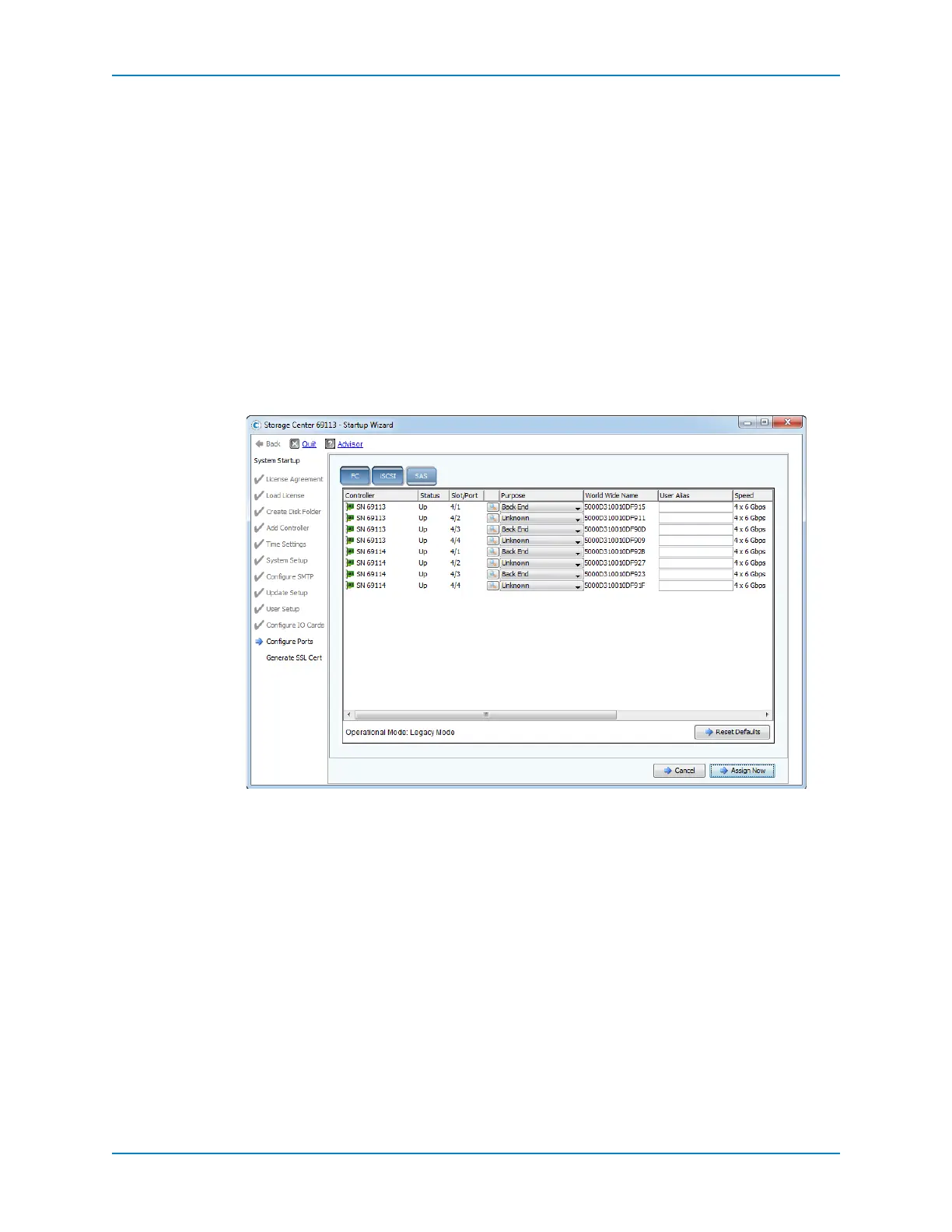
Configure SAS Ports
Configuretheback‐endSASports.
1 ClicktheSAStab.
2 Configureeachback ‐endSASport.
a Setthe PurposefieldtoBackEnd.
b ConfirmthattheFaultDomainfieldissetto<none>.
c (Optional)TypeadescriptivenameintheUserAliasfield.
3 Configureeachportthatisunusedor
usedforIPCbetweencontrollers.
a Setthe PurposefieldtoUnknown.
b ConfirmthattheFaultDomainfieldissetto<none>.
c (Optional)TypeadescriptivenameintheUserAliasfield.



 To Next Page