Chapter 2 Install the Hardware
42 Storage Center SC8000 Controller Deployment Guide
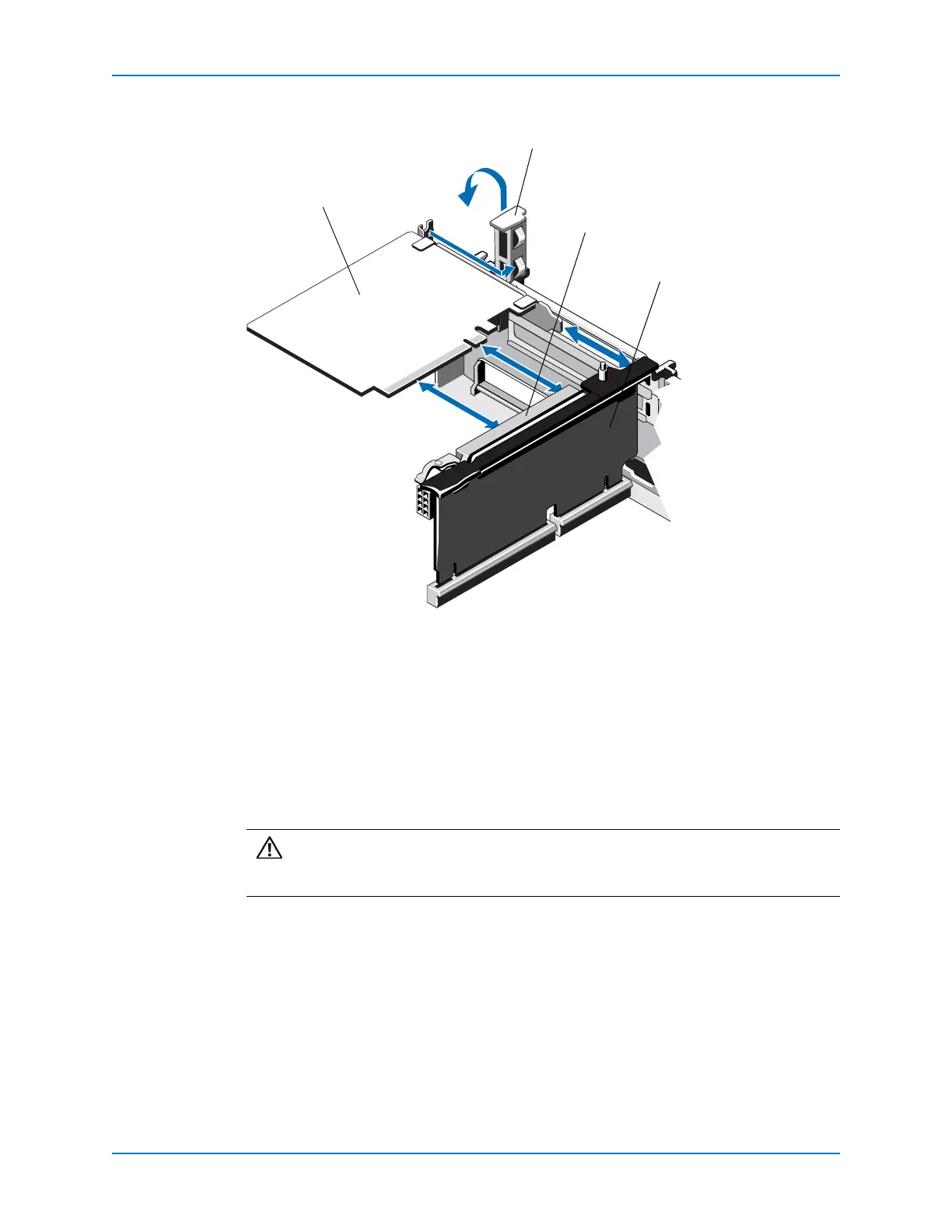
2 LifttheIOcardlatchoutoftheslot.
Figure 38. Replacing the IO Card in Riser 2 or 3
3 Unpackthe replacementIOcardandprepareitforinstallation.Forinstructions,seethe
documentationaccompanyingtheIOcard.
4 HoldtheIOcardbyitsedgesandpositionthecardsothatthecard‐edgeconnector
alignswiththeIOcard
connectorontheriser.
5 Insertthecard‐edgeconnectorfirmlyintotheIOcardconnectoruntilthecardisfully
seated.Usethesupportsprovidedonthecoolingshroud.
1 IO card 3 IO card connector
2 IO card latch 4 Riser
Caution: MakesurethattheIOcardisfullyseatedintheIOcardconnector.IO
cardsthatarenotinfullcontactwiththeconnectorcauseunpredictablefailures
inStorageCenter.



 To Next Page