Chapter 8 Advanced Copy Management
8.2 Functions in the Action Area for Advanced Copy
ETERNUS Web GUI User’s Guide
226
Copyright 2011 FUJITSU LIMITED P2X0-1090-02ENZ0
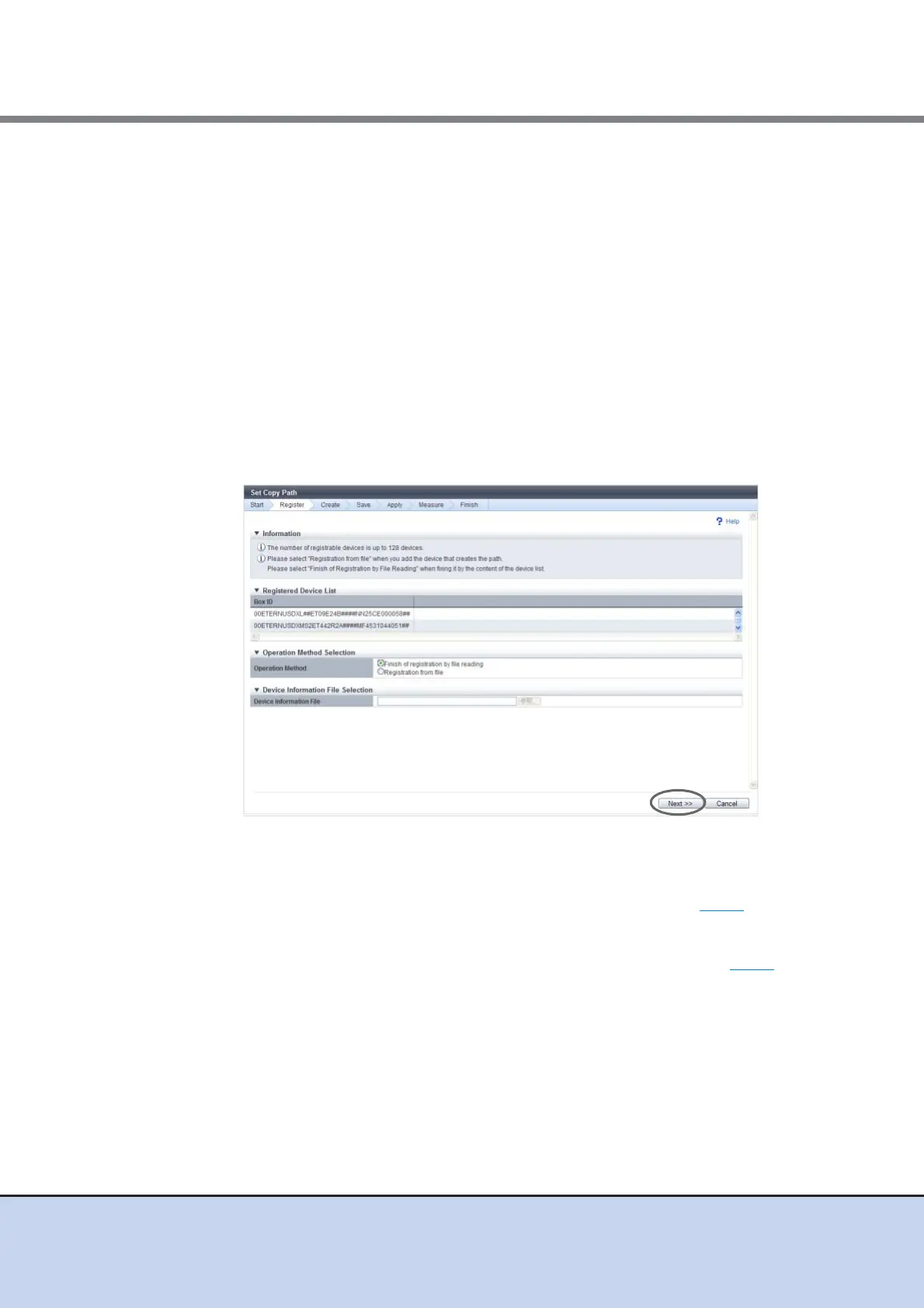
7 Specify whether to use the device information file, and click the [Next] button.
● Operation Method Selection
• Operation Method
Select whether to continue the device registration.
- Finish of Registration by File Reading
- Registration from File
When selecting "Registration from file", specify a file in the "Device Information File
Selection" field. When 128 devices are already registered, "Registration from file"
cannot be selected.
● Device Information File Selection
• Device Information File
Enter the location where the device information file is stored.
Click the [Browse...] button and specify the location, or directly input the path.
The displayed screen is different depending on the port setting status.
■ When selecting "Registration from File"
→ The [Device Configuration Setting] screen appears. Proceed to Step 5
.
■ When selecting "Finish of Registration by File Reading"
→ The [Device Information File Selection] screen appears. Proceed to Step 8
.



 To Next Page