4-15
Chapter 4 Connection to the External Devices Transcutaneous Blood Gas Monitor Data Input
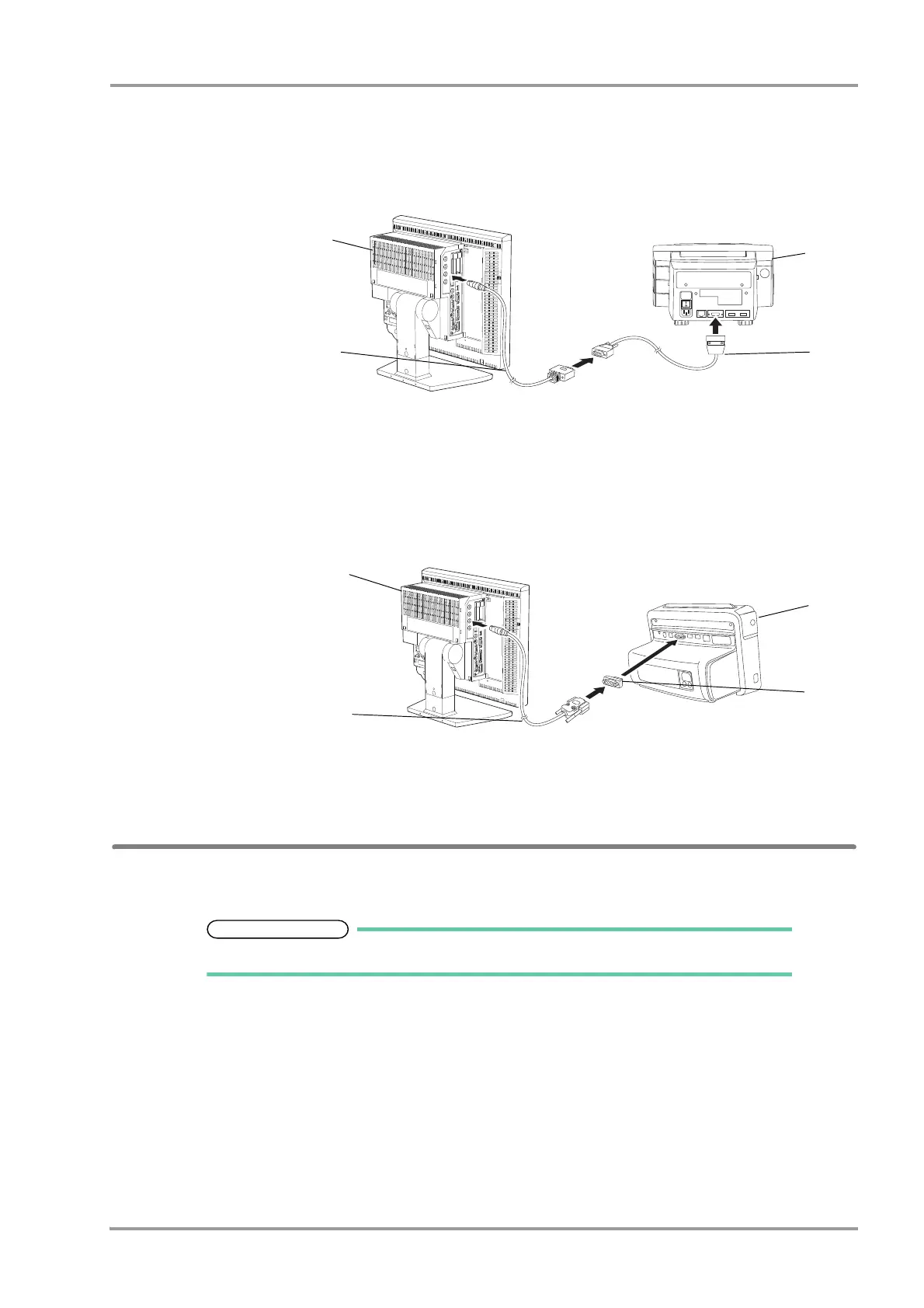
In case of TCM4:
1Use the CJ-726 connection cable and the cable specified by Radiometer Medical ApS to connect the TCM4 to
the serial connector on the DSC-8500.
1 DSC-8500
2 CJ-726
3 Cable specified by
Radiometer Medical
ApS
4TCM4
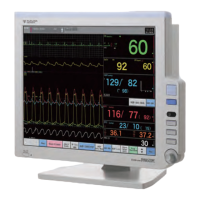
In case of TCM5 FLEX:
1Use the CJ-725 connection cable and the D-sub 9-pin male to male gender changer to connect the TCM5
FLEX to the serial connector on the DSC-8500.
1 DSC-8500
2 CJ-725
3 D-sub 9-pin male to male
gender changer
4TCM5 FLEX
External Device Setup
To monitor the transcutaneous blood gas monitor data, it is necessary to select the transcutaneous blood gas monitor
to be connected.
Refer to the following procedure. (
"External Device Setup" P4-16)



 To Next Page