iv
Preface About This Manual
Composition of This Manual
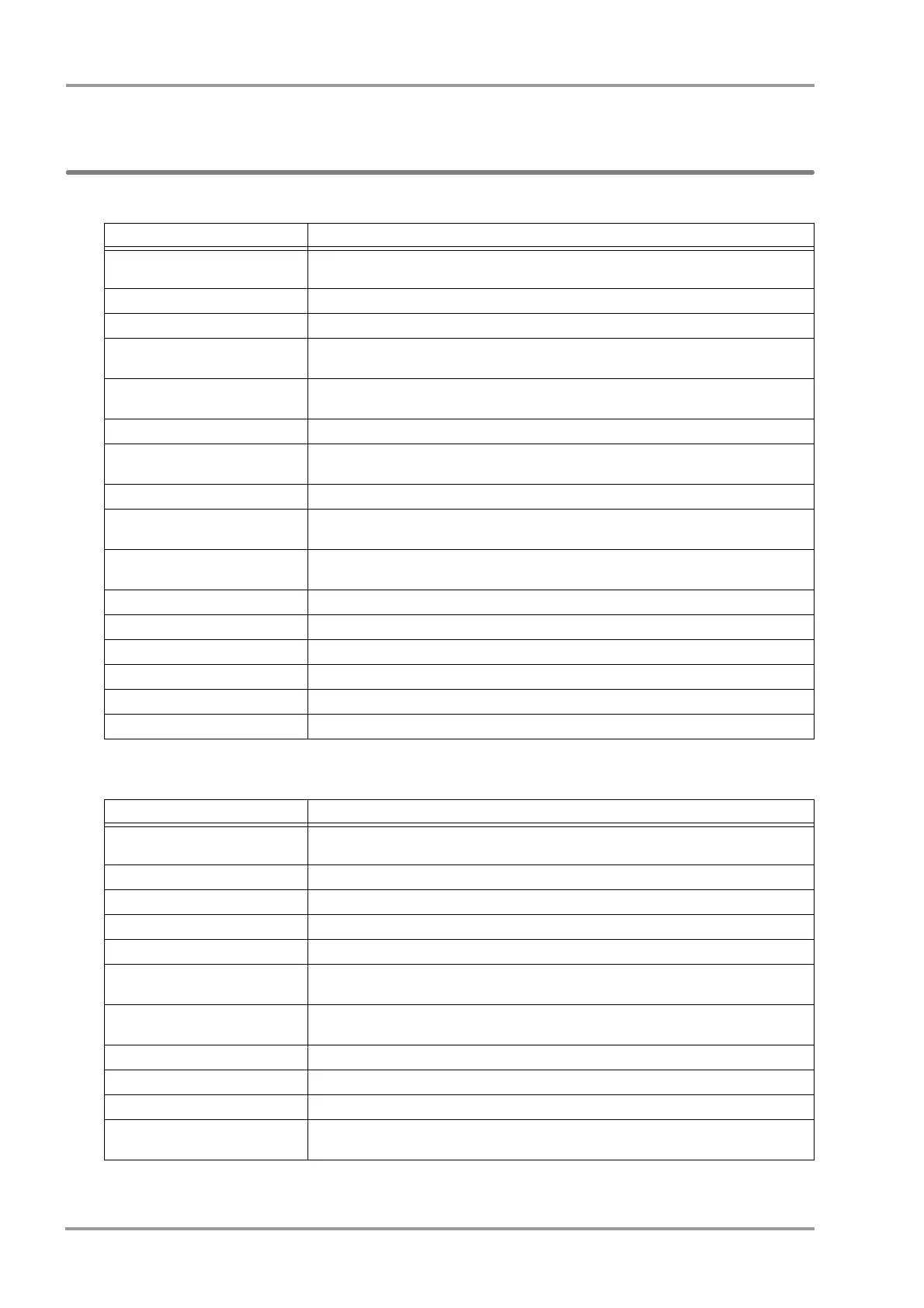
The operation manual is composed of the following chapters.
The maintenance manual is composed of the following chapters.
Chapter Title Description
Preface Outline and purpose of this manual
(Important Notice, About This Manual)
Safety Warning, Precautions for Safety
1.General Description Composition, features, menu configuration of this equipment
2.Name of Parts and Their
Functions
Name and function of each part, external appearance
3.Operation Procedure and Screen
Examples
Operation procedure, home display, window, procedure to return to the previous display,
user key setup
4.Preparation Installing the recording paper, power ON/OFF, time/date, daily checks
5.Admit/Discharge Entering patient information (name, age, etc.) at admittance, discharging the patient, user
mode selection, suspend monitoring
6.Alarm Function General description of alarm function, alarm-related setups
7.Monitoring Measurement condition setup of the monitoring parameters, size/scale setup, etc.
Setup of the stop watch, connector
8.Review Function Arrhythmia analysis, 12-lead analysis, trend, recall, NIBP list, ST measurement,
hemodynamics, lung function, alarm history, other bed display, full disclosure waveform
9. Printing Recorder output function
10. System Configuration Setup of the display configuration, tone/volume, color, etc.
11. Troubleshooting Message list, maintenance and troubleshooting of this equipment
12. Setup Item/Default Value Setup details and default value
13. Accessories List of accessories and optional accessories of this equipment
14. Specification Specification and performance of this equipment
Chapter Title Description
Preface Outline and purpose of this manual
(Important Notice, About This Manual)
Safety Warning, Precautions for Safety
1.Installation of the Unit Precautions about the operating environment, system construction, mouse connection
2.Network System Construction Network connection and setup
3.Using the CF card Procedure to use the CF card
4.Connection to the External
Devices
External equipment connection and setup
5.Initial Settings Initial setup, administrator setup, alarm/measurement setup, user I/F, user mode
registration
6.Setup Item/Default Value Default and backup of setup items
7.Replacement Parts Precautions about the periodic replacement parts, consumable parts
8.Cleaning/Disinfecting/Storing Procedure to handle, clean, store this equipment
9. Maintenance Check Daily and periodic checks, self-diagnosis function, software version
software install



 To Next Page