9-5
Chapter 9 Maintenance Check Daily and Periodic Check
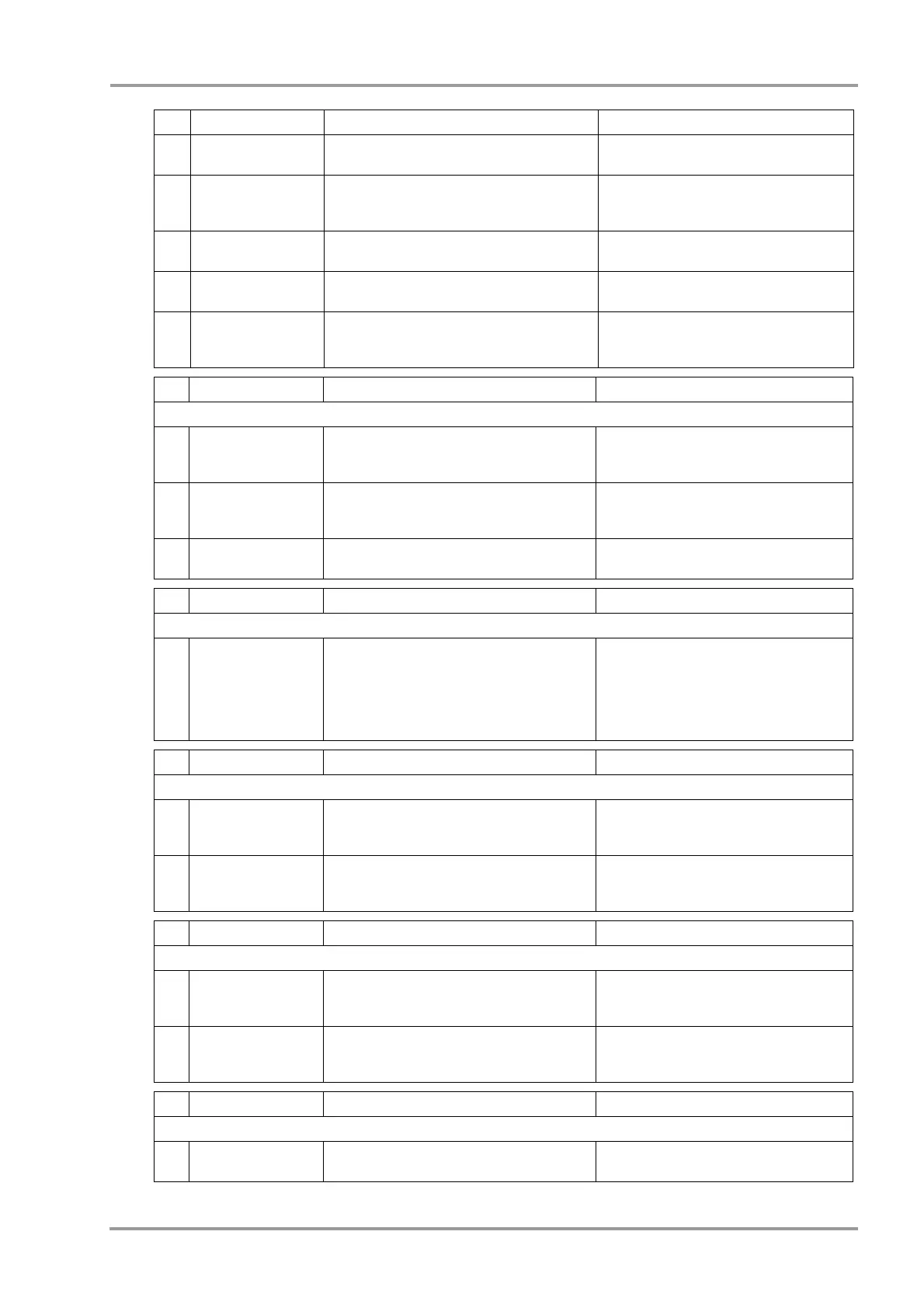
06 Date/Time Check the year, month, day, and time on the
display.
The year, month, day, and time should be
correctly displayed.
07 Printing Status Perform test printing on the maintenance menu.
Visually check the printing condition and also if
there are thin or missing points.
The printed characters should be clear and
legible.
08 Paper Speed Perform test printing on the maintenance menu.
Check by measuring the length of printed grid.
Error should be within ±5% for 25 mm/sec
and 50 mm/sec waveform traces.
09 Remote Control Check that the screen switches with the remote
control operation.
The screen should switch.
10 Telemetry Transmitter Check the receiving condition of waveforms
from the telemetry transmitter.
Correct waveforms and numeric data should
be displayed and receiving condition should
be stable.
No Check Items Check Procedure Criteria
4. ECG
01 ECG Display Size Input square wave of 1 mV amplitude from the
simulator, and check the displayed waveform on
the monitor with a waveform size of x1.
The amplitude of the displayed waveform
should be within 10 mm ± 1 mm.
02 Heart Rate Display
Accuracy
Set the heart rate to 60 bpm on the simulator,
and check the displayed heart rate on the
monitor.
The displayed heart rate should be within 60
bpm ± 3 bpm.
03 Lead OFF Remove each electrode from the simulator and
check that "Lead OFF" message is displayed.
The "Lead OFF" message for the removed
electrode should be displayed.
No Check Items Check Procedure Criteria
5. Respiration (Impedance Measurement)
01 Respiration Rate
display accuracy
Input the respiration signal of 20 Bpm with the
following setting from the simulator, and check
the displayed RR value on the monitor.
Baseline Impedance : 1500Ω,
Detection Lead: II (LL), Respiration Waveform:
Normal, Amplitude: 1 Ω
The displayed RR should be within 20 Bpm ±
3 Bpm.
No Check Items Check Procedure Criteria
6. Invasive Blood Pressure
01 BP Zero Input the blood pressure of 0 mmHg from the
simulator, perform zero balance, and check the
BP value on the monitor.
Zero balance should be properly performed,
and the displayed BP value should be within
0 mmHg ± 1 mmHg.
02 BP value display
accuracy
Set the BP value to 250 mmHg on the simulator,
and check the displayed BP value on the
monitor.
The displayed BP value should be within 250
mmHg ± 5 mmHg.
No Check Items Check Procedure Criteria
7. SpO
2
01 Oxygen Saturation
Display Accuracy
Input the oxygen saturation signal of 90%SpO
2
from the simulator, and check the displayed
oxygen saturation value on the monitor.
The displayed oxygen saturation value
should be within 90%SpO
2
± 2%.
02 Pulse Rate Display
Accuracy
Input the pulse rate signal of 60 bpm from the
simulator, and check the displayed HR value on
the monitor.
The displayed heart rate should be within 60
bpm ± 3 bpm.
No Check Items Check Procedure Criteria
8. NIBP
01 NIBP Test Connect the 500 ml tank, and perform the NIBP
test under the test menu.
All the test results should be "OK".
No Check Items Check Procedure Criteria



 To Next Page