9-9
Chapter 9 Maintenance Check Gas Measurement Accuracy Check Procedure (MGU-800/MGU-810)
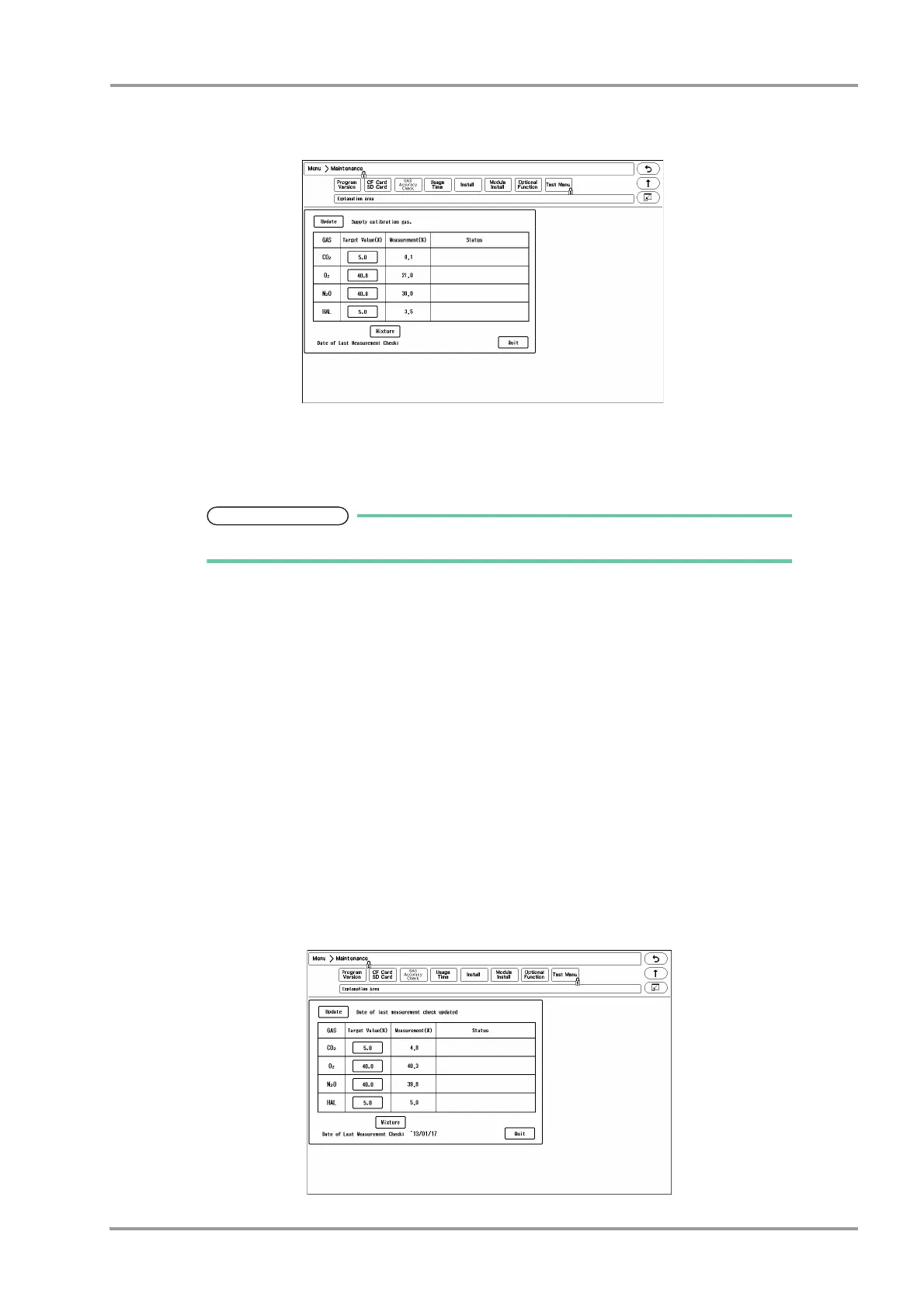
2Press the [Menu], [Maintenance], [Gas Accuracy Check] keys.
The "Gas Accuracy Check" screen will be displayed.
If the multigas unit is not connected, "Not connected" will be displayed.
While the multigas unit is in process of warming up, "Warming Up" message will be displayed, and the gas
measurement accuracy check cannot be started.
The warming up process will take about 10 minutes from start-up of the gas unit.
When the warming up process completes, "Supply calibration gas" message will be displayed.
3Connect the calibration gas cylinder to multigas unit.
4Supply the calibration gas, and wait for 30 seconds until the gas measurement value becomes stable.
5Check the measurement accuracy of each gas.
The measurement accuracy criteria of each gas are as follows.
CO
2
: 5.0±1.1%
O
2
: 45.0±5.7%
N
2
O: 45.0± 5.3%
ISO: 5.0±0.7%
6When the measurement accuracy of each gas is within the acceptance criteria, press the [Update] key.
The message, <Date of last measurement check updated> will be displayed.
Verify that the date under "Date of Last Measurement Check" was updated.



 To Next Page