GE MEDICAL SYSTEMS
D
IRECTION 5184024-100, REVISION 5 LOGIQWORKS® BASIC SERVICE MANUAL
Chapter 3 Installation 3-133
3-5-4 Connection Service Properties up to LOGIQworks 1.3
3-5-4-1 General
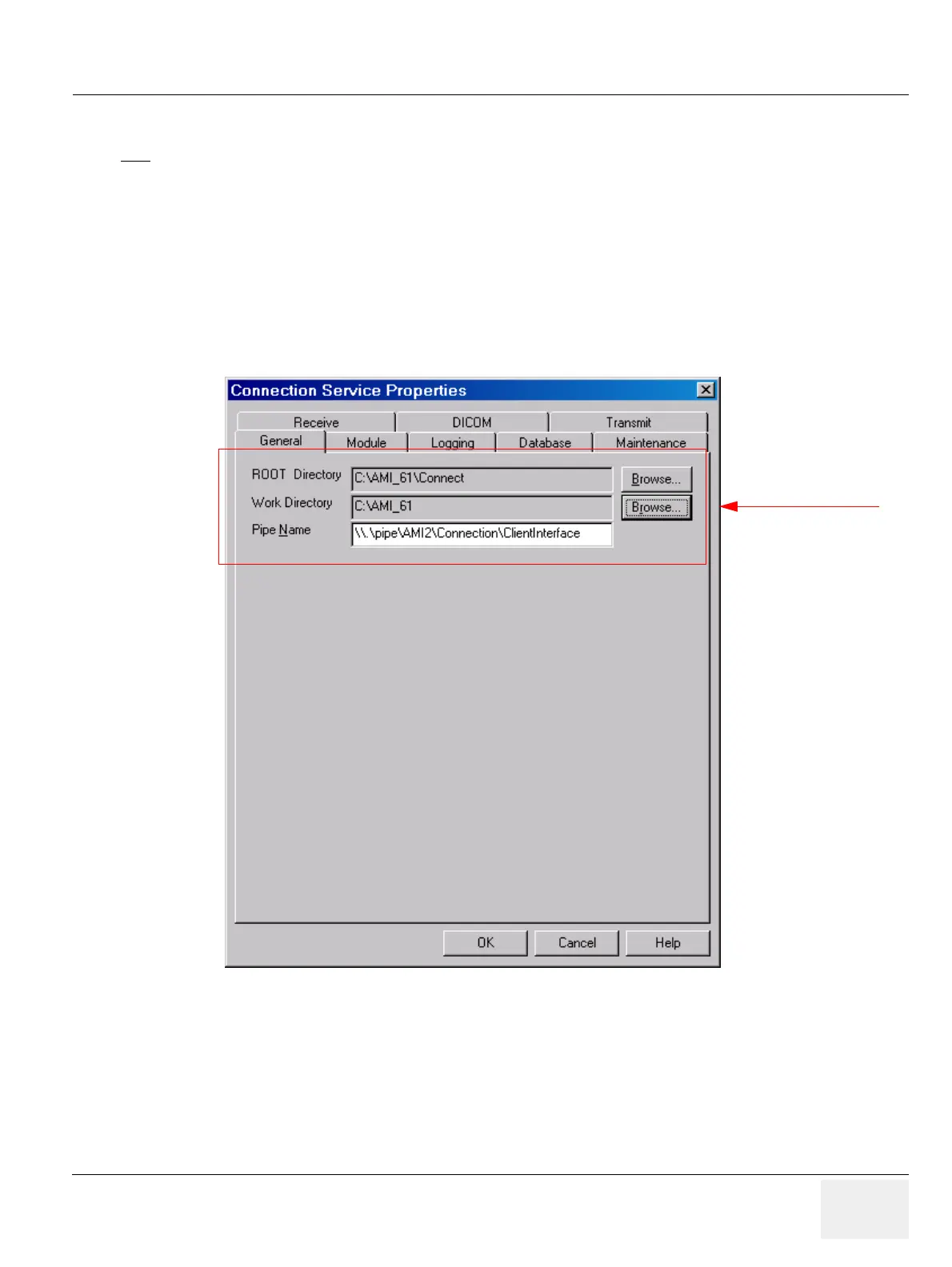
The General Tab contains a collection of generic settings for the Connection Service.
To view these setting:
1.) Select Configuration > Connection Service... from the Data Selector menu.
2.) Select the General tab from the Connection Service Properties page.
• ROOT Directory: Root directory for the files for the Connection Service. This is where the file to
start the Connection Service (connect.exe) resides.
• Work Directory: Directory to create temporary files used by the Connection Service.
• Pipe Name: General pipe used by RadWorks to interface to the Connection Service
NOTE
ONLY CHANGE THE DEFAULT SETTINGS IN THE CONNECTION SERVICE PROPERTIES IF YOU
ARE AN EXPERT!
Figure 3-119 Connection Service Properties - General (Default Settings)
Administrator only



 To Next Page