GE MEDICAL SYSTEMS
D
IRECTION 5184024-100, REVISION 5 LOGIQWORKS® BASIC SERVICE MANUAL
Chapter 3 Installation 3-79
3-5-2 General Application Level Configuration for LOGIQworks up to Rev. 1.3
3-5-2-1 TruAccess Plugin Definition
Verify that the TruAccess Raw Data Processing plugin is already defined and activate the plugin if not
yet done.
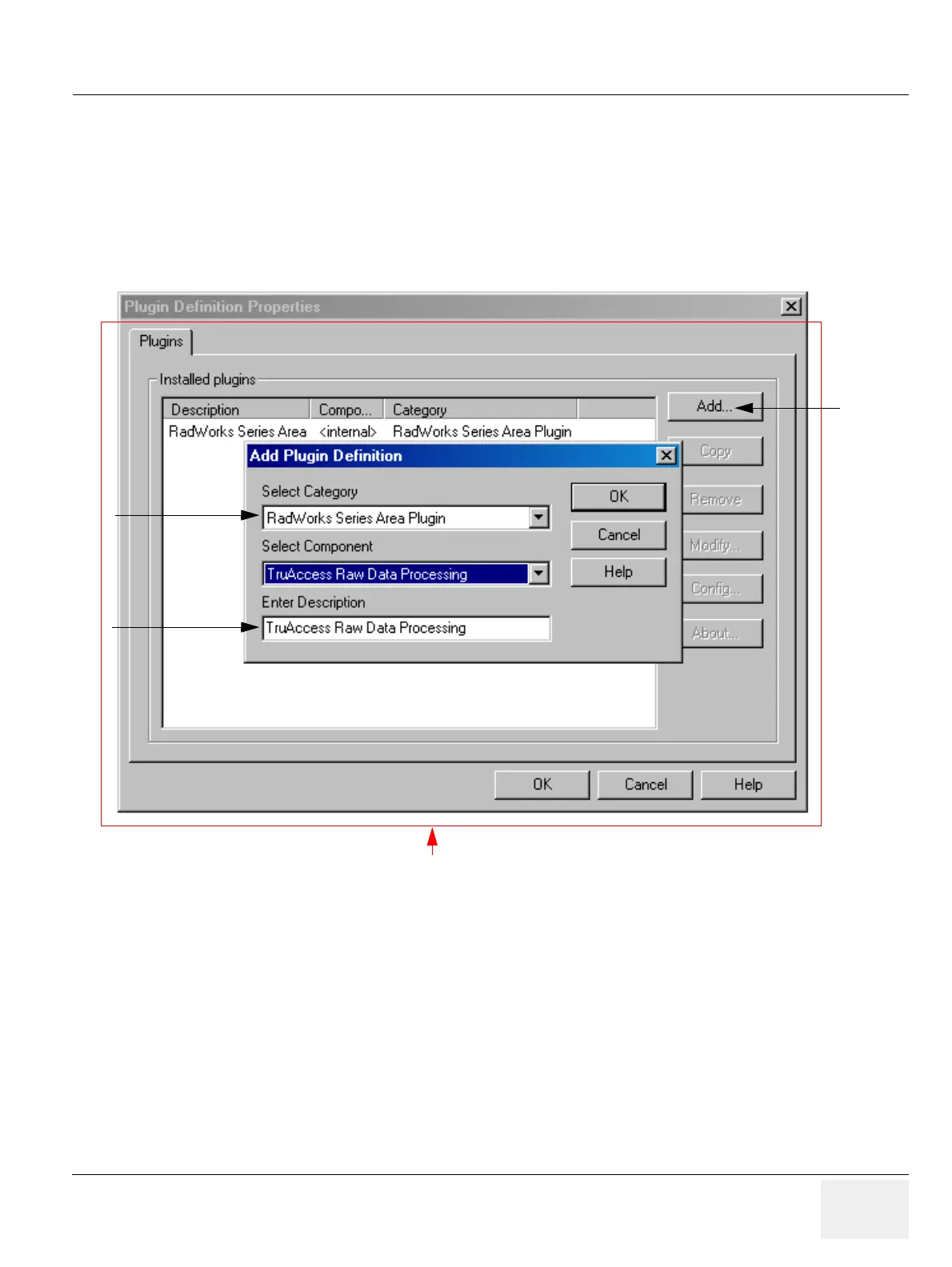
1.) Select Configuration -> Plugin Definitions... from the Data Selector menu.
2.) If TruAccess Raw Data Processing is not yet listed in the Installed Plugins window, click Add... to
open the Add Plugin Definitions dialog box. If it is already listed quit the dialog by clicking on
“Cancel”.
3.) From the Select Component drop-down list, select TruAccess Raw Data Processing.
4.) You can change the default description in the Enter Descriptions field. The entered text will be
displayed in the Series Area Plugin menu (right click popup menu).
5.) Click OK to apply the changes.
Figure 3-68 LOGIQworks-Plugin Definition Properties (1)
3
4
2
Administrator only; not available as menu option for non-admin users.



 To Next Page