GE MEDICAL SYSTEMS
D
IRECTION 5184024-100, REVISION 5 LOGIQWORKS® BASIC SERVICE MANUAL
Chapter 3 Installation 3-171
3-5-7-5 Maintenance (cont’d)
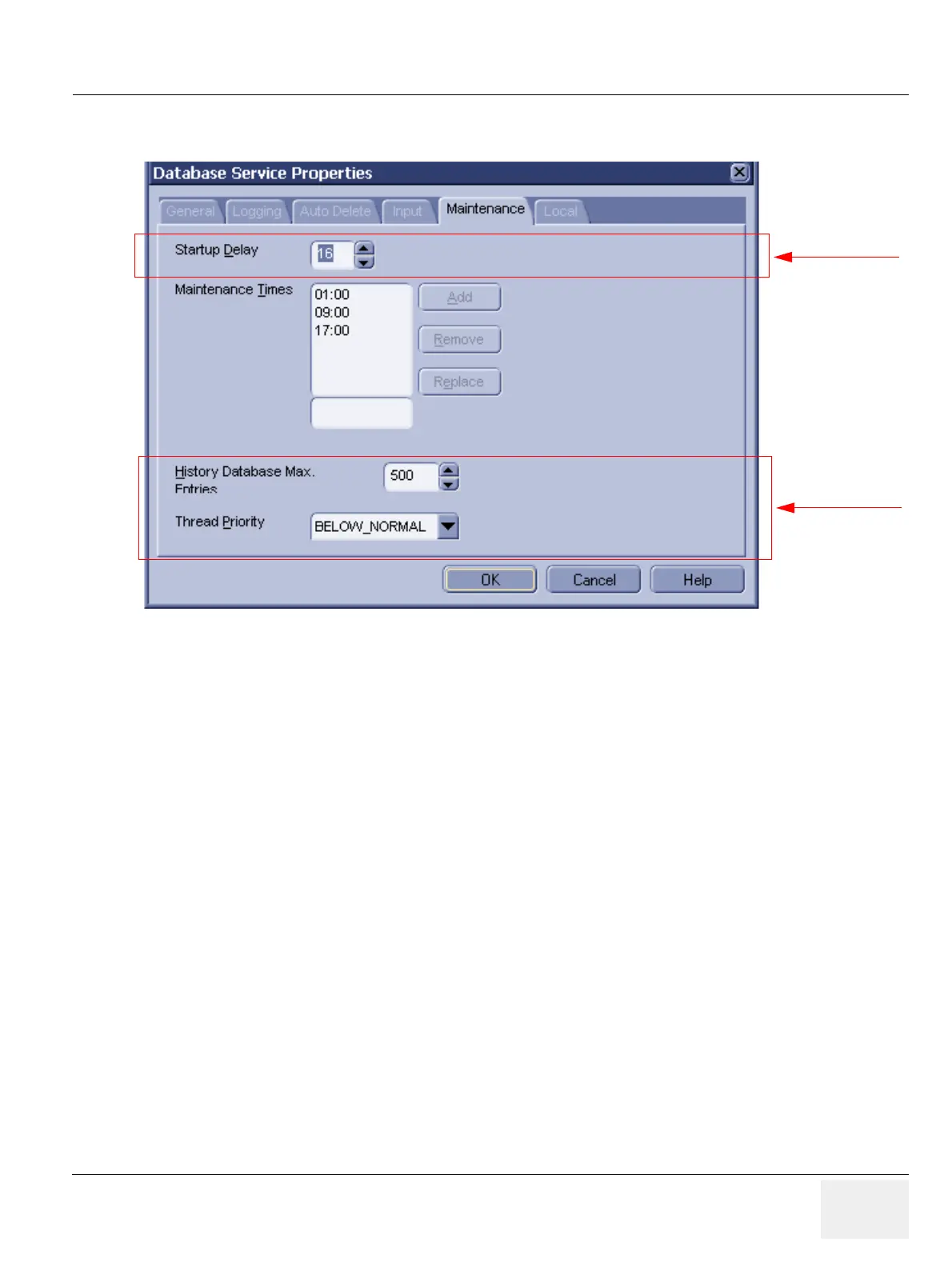
• Startup Delay: Specify the delay (in seconds) after start-up before the first maintenance check will
be performed.
• Maintenance Times: Specify at which times of the day (24-hour clock) a maintenance check will
be performed. These checks will be performed each day, but only if the system is running at the
scheduled time.
* Add a time by filling in the field beneath the list of Maintenance Times and clicking on the
Add button.
* Remove a time by selecting the time in the Maintenance Times list and clicking the
Remove button.
* Replace one maintenance time with another by filling in the field beneath the list of
Maintenance Times, selecting the time you want to replace and clicking the Replace
button.
• History Database Max. Entries: Specify the maximum number of entries which are to be included
in the history database. The least recent entries will be removed to make way for new entries once
the figure you specify here is reached.
• Thread Priority: Set the priority of the maintenance thread within the service. Changing this setting
may influence system performance.
Figure 3-144 Database Service Properties - Maintenance (Default Settings)
Administrator only
Administrator only



 To Next Page