SC201(1900A/1903A) Operation Instruction
35
returns to the normal mode.
3. Setting Whether the Calling of Pattern Data is Operative or Not
By making inoperative the calling of the unnecessary pattern, this setting
prevents the different pattern from calling by mistake.
Also, it is possible to call and use the necessary pattern.
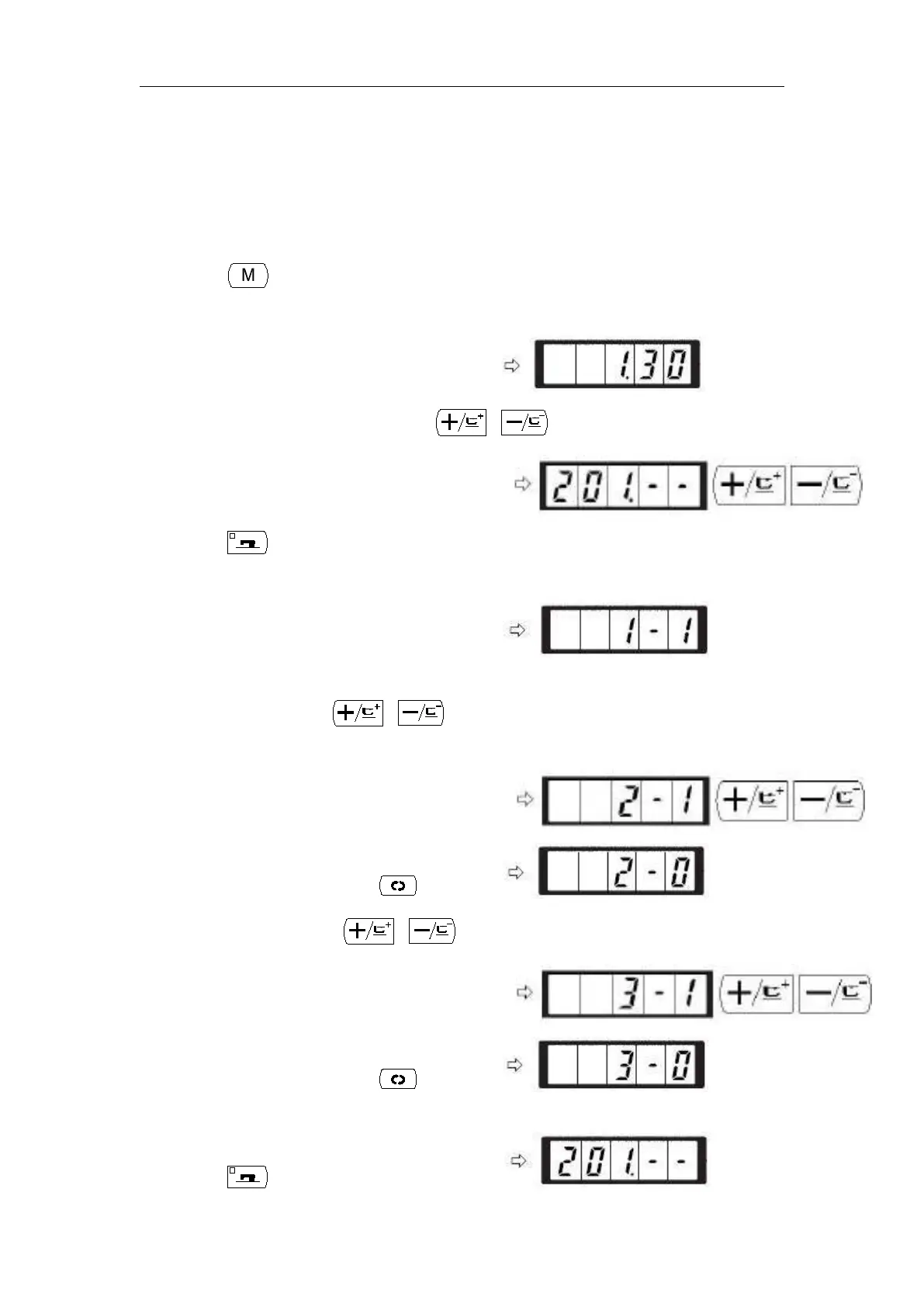
Setting Example: Make the calling of pattern Nos.2 and 3 inoperative.
1) Press key in the state that the sewing LED
is put out.
2) Indicate memory switch No.201 with or key.
3) Press key. The sewing LED lights up and
the set value of pattern No.1 is indicated.
Set value 1: Calling is operative.
Set value0: Calling is inoperative.
4) Set pattern No.2 with or key
5) Set the set value to “0” with key.
6) Set the pattern No.3 with or key.
7) Set the set value to “0” with key.
8) Press key to register the set value. The



 To Next Page