Connect your dock connector to
the iPod correctly and securely.
Install the dock connector to the
USB adapter cable securely.Some devices cannot be powered
or charged via the USB adapter. If
this is the case, use the accessory
adapter to supply power to your
device.
We recommend backing up your
data before playing it.
Do not use an extension cable
between the USB adapter cable
equipped with your vehicle and
your dock connector.
Do not keep the iPod and dock
connector cable in the vehicle.
Direct sunlight and high heat will
damage it.
Do not connect your iPod using a
hub.
UseonlycompatibleiPodswiththe
latest software. iPods that are not
compatible will not work in this audio
unit.
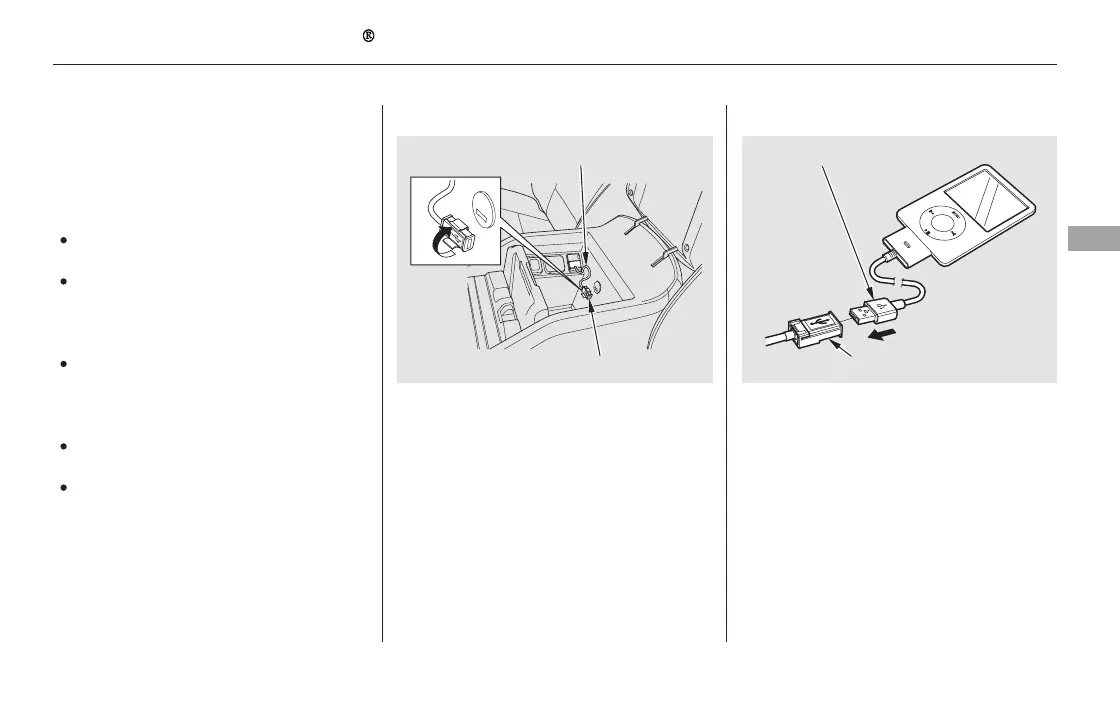
Unclip the USB connector by
pivoting it, and pull out the USB
adapter cable in the console
compartment.
1. 2.
3.
CONTINUED
Connecting an iPod
Playing an iPod (EX-L and Canadian EX models without navigation system)
Features
267
NOTE:
DOCK CONNECTOR
USB ADAPTER CABLE
USB ADAPTER CABLE
USB CONNECTOR
11/08/01 09:02:24 31SZA630_274













 To Next Page