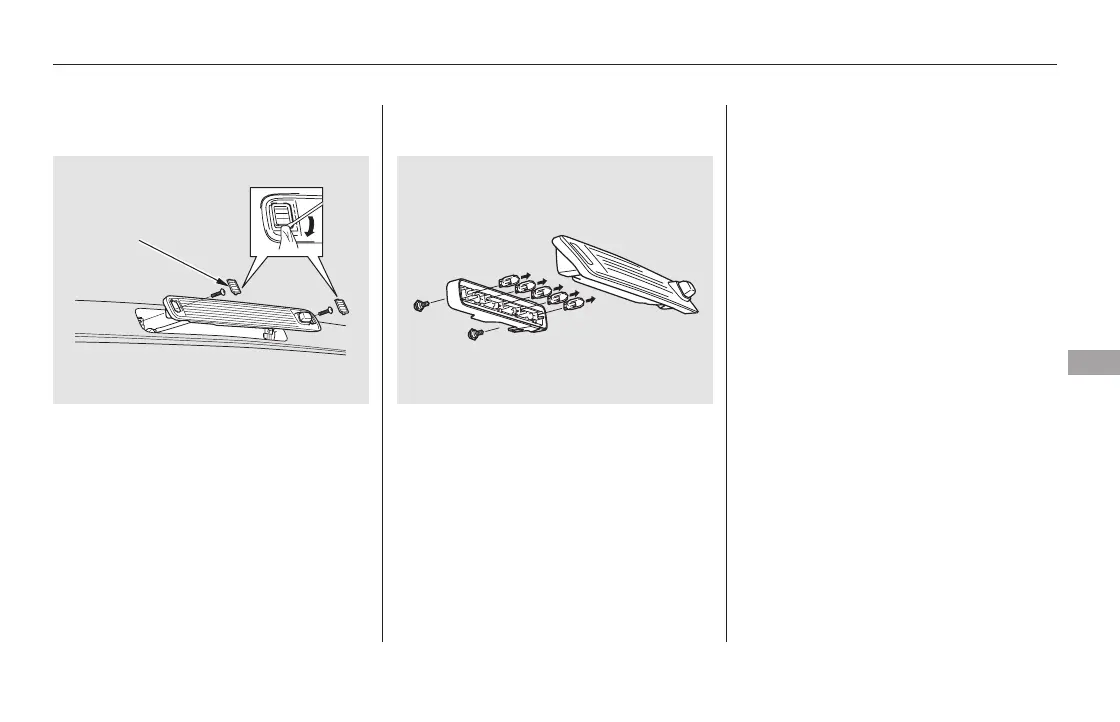
Place a cloth on the edge of the
lens segment to prevent scratches.
Remove each lens segment by
carefully prying on its edge with a
small flat-tip screwdriver.
Remove the screw under each lens.
Pull the high-mount brake light
assembly out of the vehicle.
Remove the lens from the light
assembly.
Pull the bulb straight out of its
socket. Push the new bulb straight
into the socket until it bottoms.
Turn on the lights to make sure
the new bulb is working.
Put the lens back on the light
assembly, and tighten the
mounting bolts securely.
Put the light assembly back into
the vehicle. Install the screws and
tighten them securely.
Reinstall the lens segments.
Remove the two mounting screws
from the light assembly.
1.
2.
3.
4.
5.
7.
8.
9.
6.
Replacing a High-mount Brake
Light Bulb
Lights
Maintenance
591
LENS SEGMENT
11/08/01 11:07:23 31SZA630_598













 To Next Page