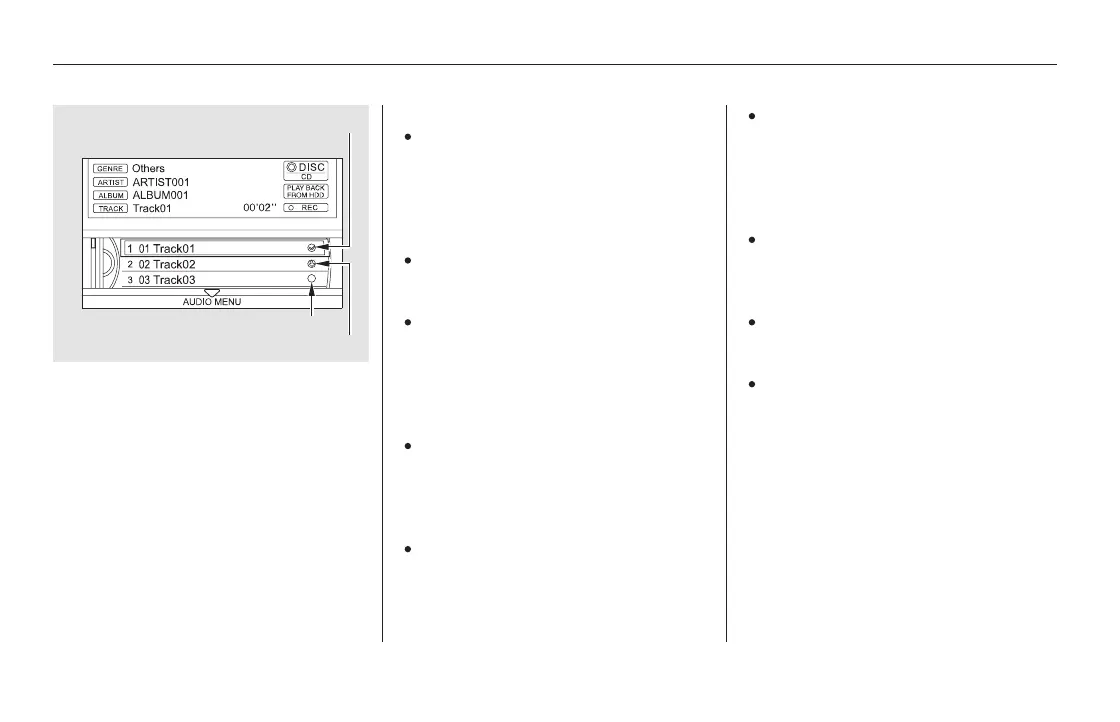
The icons show the recording
conditions for each track:
Rec icon: Now recording
Rec ready icon: Next to be recorded
Rec done icon: Recording finished
Please note that there will be no
compensationofferedinthecase
of unsuccessful recording of audio
data or the loss of audio data due
to any cause whatsoever.
During recording, operation of this
product may be slower.
If you stop the engine or the
power system is turned off while
recording a CD, there may be
pauses between songs when you
play back from the HDD.
Tracks from music CDs are
recorded at four times the
playback speed. You can listen to
tracks as they are being recorded.
Forward/rewind, repeat, random
and scan functions are not
available during recording.
With the factory settings, all of the
songs on a music CD are
automatically recorded.
Recording settings cannot be
changed during recording.
If the number of songs in the
playlist exceeds 999, the oldest
song will be overwritten each time
you add a new song.
Youcanlistentotracksfromother
playlists that have already been
recorded while recording. Press
the HDD button and switch over
to HDD Audio.
Playing Hard Disc Drive (HDD) Audio (Models with navigation system)
338
NOTE:
REC READY ICON
REC DONE ICON
REC ICON
11/08/01 09:14:22 31SZA630_345













 To Next Page