−
−
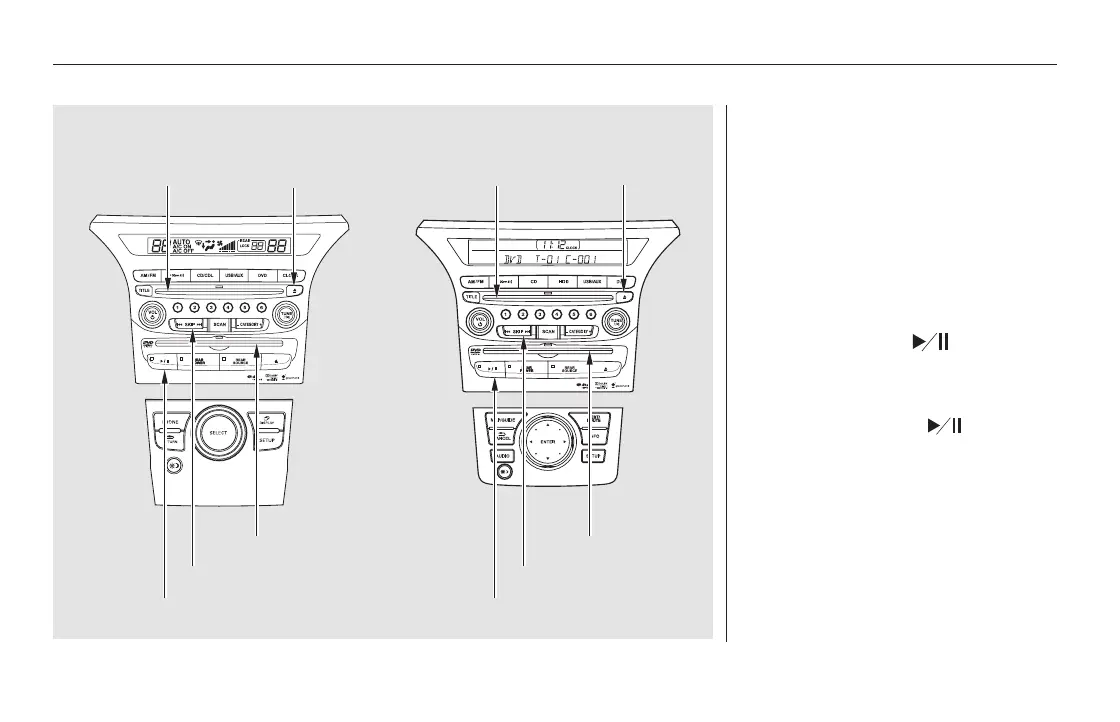
Insert a DVD into the lower DVD/
CD slot in the audio unit.
Push the DVD in halfway, the drive
will pull it in the rest of the way.
When you insert a DVD, the system
automatically starts to play. To turn
this feature off, see pages and
.
Press the button if
the DVD does not start playing
automatically.
Press the button to
pause the DVD. Press the button
again or press PLAY to resume.
Pause works only with the DVD
player.
402
405
Rear Entertainment System
PLAY
PAUSE
400
On vehicles without navigation system On vehicles with navigation system
EJECT BUTTONCD SLOT
DVD/CD SLOT
SKIP BAR
PLAY/PAUSE BUTTON
EJECT BUTTONCD SLOT
PLAY/PAUSE BUTTON
SKIP BAR
DVD/CD SLOT
11/08/01 09:25:05 31SZA630_407













 To Next Page