Bluetooth
HandsFreeLink (Models with navigation system)
466
Voice commands can be used for all above options. Voice commands for the HFL system can only be used from the PHONE
screen. To quickly access the PHONE screen, press the Pick-Up button on the steering wheel. Press and release the Talk
button each time you give a command. From any other screen, you can press the Talk button and say ‘‘Dial by voice tag’’ or
‘‘Dial by number.’’ The system will guide you through the process.
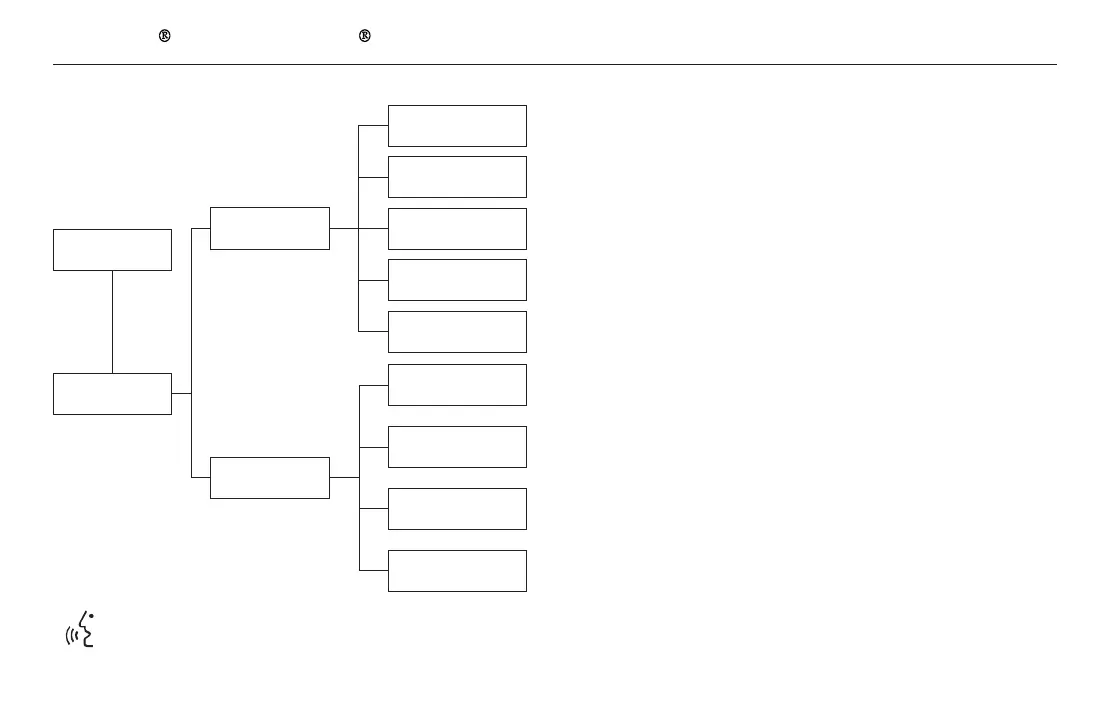
Add New Phone
Connect
Disconnect
Delete
Store Voice Tag
Delete
Speed Dial
Store
Speed Dial
Delete Voice Tag
Pass-key
Phone
Connection
Phone
Setup
Disconnect a paired phone from the system.
Delete a previously paired phone.
Create a Pass-key number for a paired phone.
Delete a previously stored speed dial number.
Create a voice tag for a speed dial number.
Delete a voice tag for a speed dial number.
Edit
Speed Dial
Select a number from the Call History, Phonebook, or manual entry
to store as a speed dial number.
Pair a new phone to the system.
Connect a previously paired phone to the system.
11/08/01 09:37:23 31SZA630_473


 To Next Page
 Loading...