ifm Vision Assistant O3M
178
16.2 Text replacements and conditional codes
The O3M2xx series with internal overlay can e.g. display text. The text can be static text that never
changes. Alternatively, the text can indicate changing values, such as function results or the system
status (dynamically). Moreover, the text can only be displayed under certain conditions, e.g. if a certain
value is calculated or if a certain event occurs.
Procedure of the O3M2xx:
● Fixed text can be entered in the Vision Assistant exactly the way it is supposed to be displayed,
without additional "decoration" or property settings.
● Dynamic text that is also supposed to include system status information or function results requires
a code. This code is called "test replacement code" because the camera replaces this code with real
values during the runtime. These text replacement codes begin with a percentage sign ("%") that is
followed by 2 characters (letters and numbers); 2 or 3 additional numbers can follow.
● Sometimes the text replacement codes are replaced by a number, even if a word or a sentence would
be more informative. The reason for this are the different languages. In this case, different texts can
be set that are only shown if the referenced variable has a specific value. This is one way to use
conditional codes.
● Sometimes it only makes sense to display a text or an icon if "something" happens, i.e. if a certain
event occurs. This is expressed by adding a condition. The condition describes the occurrence or
absence of “something”. In most cases, the condition refers to a diagnostic status or the result of a
function, a process value (e.g. it could make sense to display a warning if a collision was predicted
- this is a function-related condition. Or it could make sense to display a message if something is
blocked or the sensor window is soiled - this is a diagnostics-related condition).
● The conditions are Boolean expressions. These expressions are evaluated for each frame. If an
expression is true, the attributed icon, text or graphic will be displayed.
16.2.1 Example
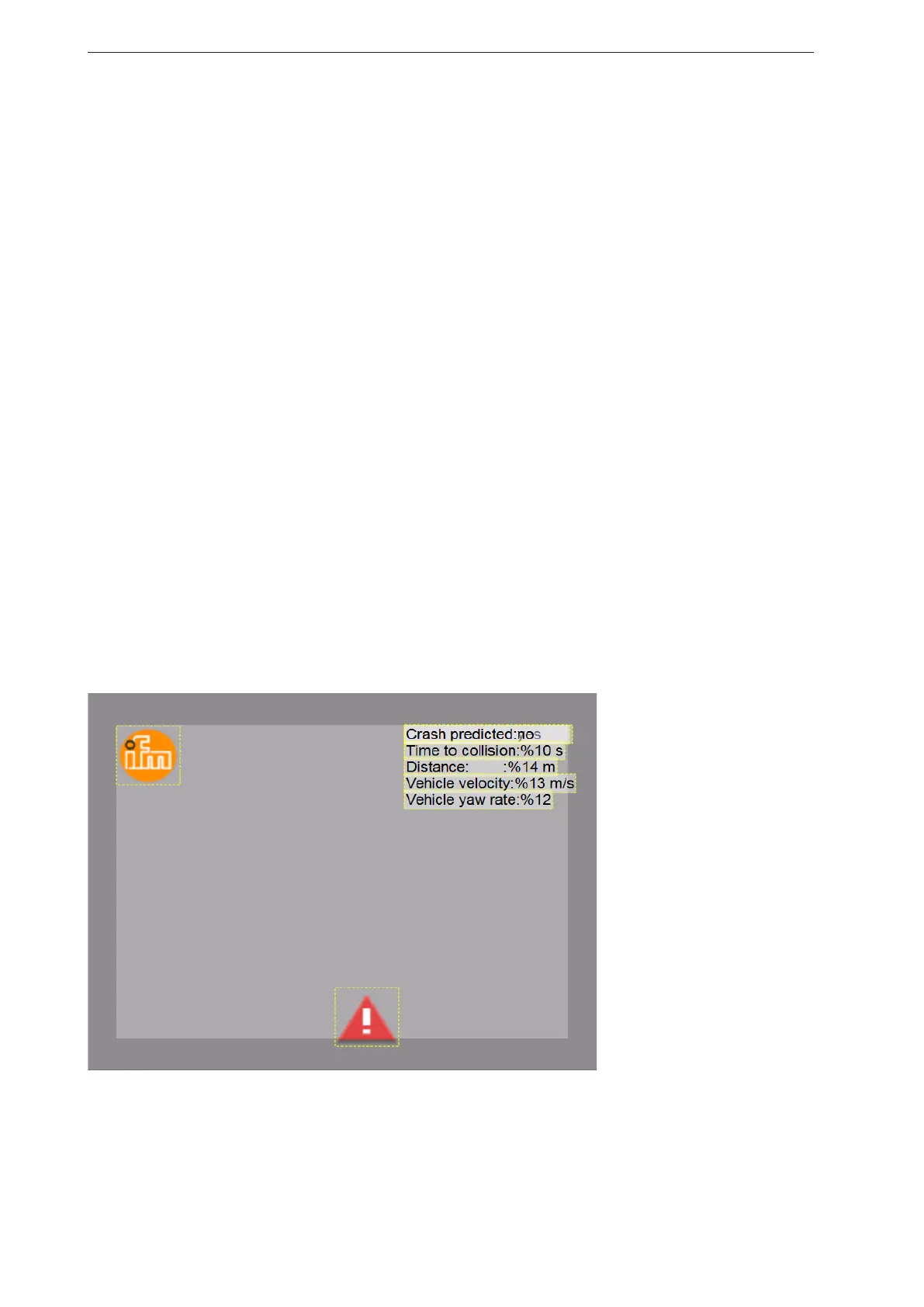
The following image demonstrates some text replacements and conditions. The explanation is below the
image:
Time to collision: %10 s: the %10 will be replaced by the actual time before a predicted collision. The
resulting text could be (in case the time to collision is e.g. 3sec.): Time to collision: 3 s
Distance 14 m: The %14 will be replaced by the current distance to the object for which the collision was
predicted. The text would be (in case the distance is e.g. 9m): Distance 9 m
Speed: %13 m/s: the %13 will be replaced by the own speed as indicated by a J1939 message on the
CAN bus, e.g. 8 m/s ( ~ 29km/h) : Speed: 8 m/s


 To Next Page