ifm Vision Assistant O3M
54
7.2 CAN settings
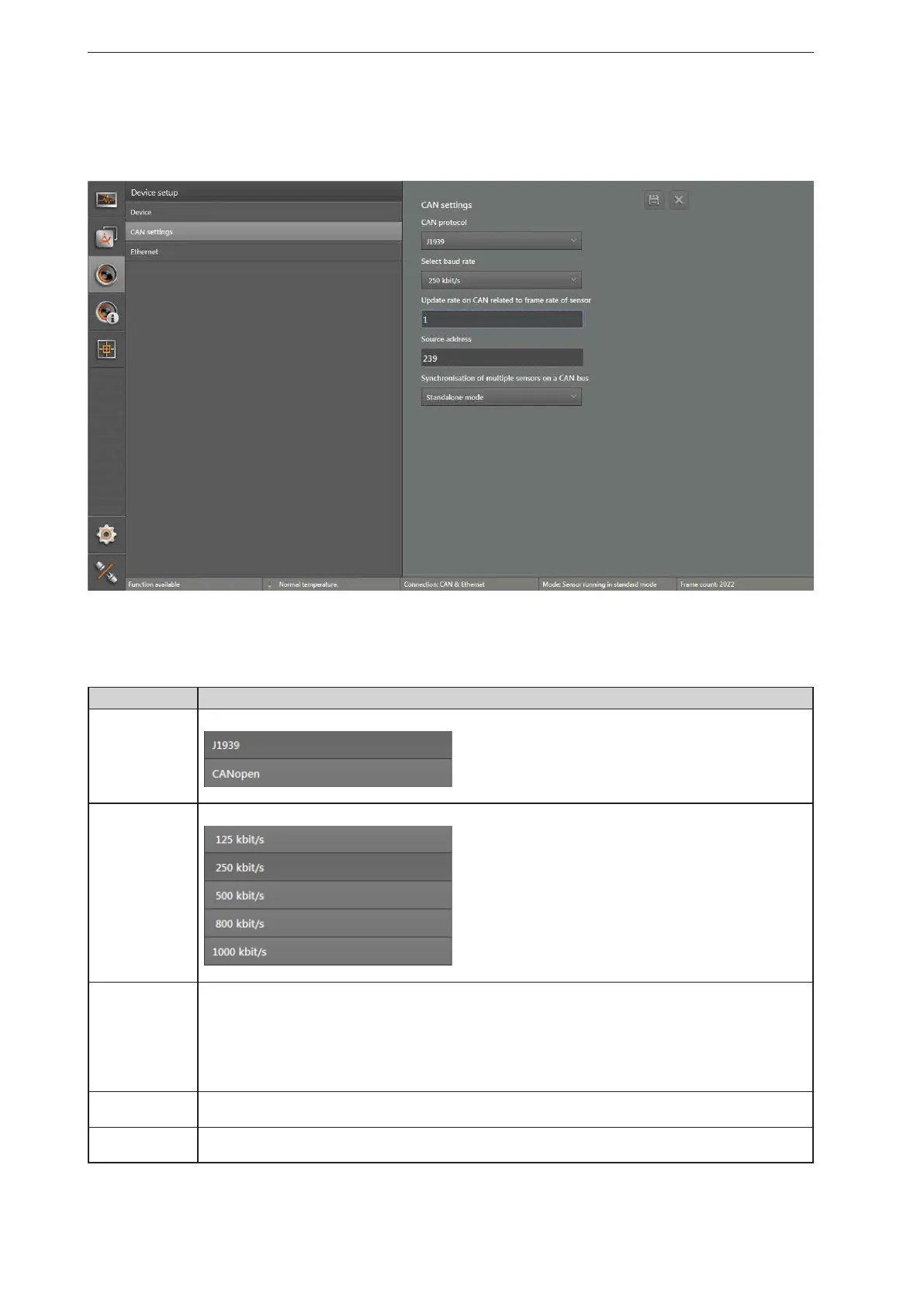
In the "CAN settings" window, different parameters of the CAN bus can be set.
► Click on [CAN settings].
> The "CAN settings" window appears.
Functions
Field Description
CAN protocol
Selection menu to set the CAN protocol:
Select baud rate
Selection menu to set the baud rate:
Refresh rate on
CAN relating to
frame rate of
sensor
Editable field to set data refreshing via the CAN bus. Frequent refreshing utilises more CAN bus capacity
which may slow down response times. The following refresh rates can be set:
● 1: Each image of the device updates the data via the CAN bus (high CAN bus capacity utilisation)
● 2: Every second image of the device refreshes the data via the CAN bus
● 3: Every third image of the device refreshes the data via the CAN bus
● 4: Every fourth image of the device refreshes the data via the CAN bus
● 5: Every fifth image of the device refreshes the data via the CAN bus (low CAN bus capacity utilisation)
Source address
Editable field to set the source address. Default value is "239". The field is only visible if the CAN protocol
"J1939" is set.
Node ID
Editable field to set the node ID, default value is "10". The field is only visible if the CAN protocol "CANopen"
is set.


 To Next Page