29
ifm Vision Assistant O3M
UK
6.1.3 3D view
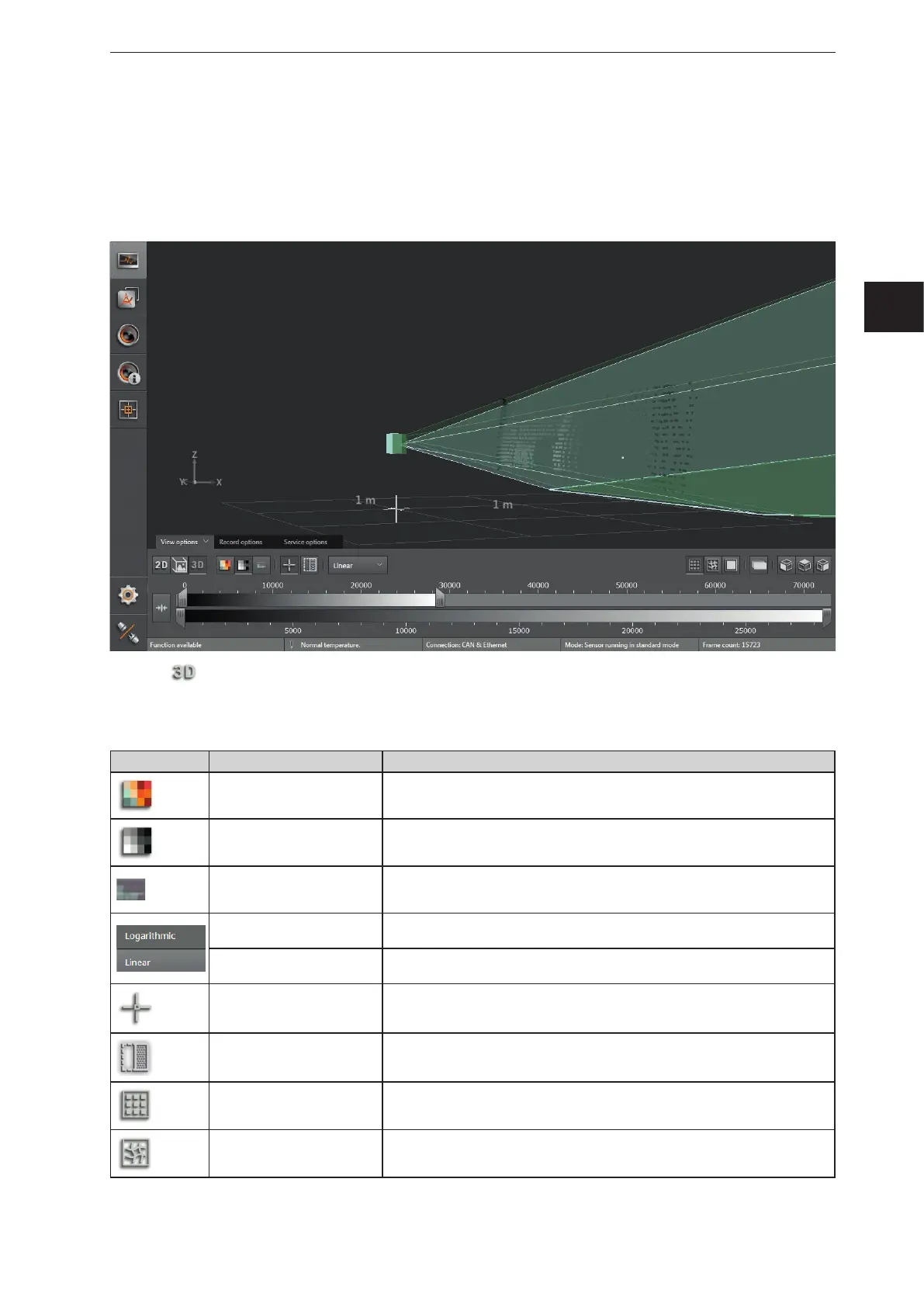
The 3D view is a visualisation of the 3D views of the device and the illumination unit. The individual vision
cones of the 3D views have different colours:
● Device: green
● Illumination unit: light green
► Click to show the 3D view.
► Adjust the 3D view.
The following settings are available in the tab "View options":
Button Name Description
Distance image Visualises the pixels in the 3D view in relation to the distance values.
Amplitude image
Visualises the pixels in the 3D view in relation to the amplitude values in levels
of grey (brightness).
Confidence
Shows the pixels of the 3D view with the corresponding status from the colour
legend (→ Pixel properties, previous page).
Logarithmic
Visualises the amplitude values of the 3D view in logarithmic levels of grey (only
available for the amplitude image).
Linear
Visualises the amplitude values of the 3D view in linear levels of grey (only
available for the amplitude image).
Origin Shows and hides the origin of the coordinate system in the 3D view.
Spatially filtered 3D data Shows the spatially filtered 3D data.
Dots Shows the data as a pixel cloud.
Grid Shows the data as a grid.


 To Next Page