Invacare®LiNX
6.3Step3–SetLoadCompensation
Loadcompensationreliesonaccuratemotorresistance
valuestoworkeffectively.Themotorresistancevaluescan
becalculatedmanually,fromobservation,orautomatically
withAdaptiveLoadCompensation(ALC).
Invacarerecommendsaddingthemotorresistance
valuesautomatically,usingAdaptiveLoad
Compensation.AdaptiveLoadCompensationis
aprocessthatlearnstheresistancevalueof
eachmotorautomatically,individuallyandwith
mΩaccuracy.Becauseaseparateandaccurate
resistancevalueisappliedtoeachmotor,the
wheelchair’sdriveperformanceissignicantly
improved.
AdaptiveLoadCompensationisenabledbydefault,
sotheMotorResistanceparametervalueisnot
used.
FormoreinformationaboutALCCalibrationapplication
withiOStool,referto6.3.1CalibratingAdaptiveLoad
Compensation(iOSTool),page72.
FormoreinformationaboutALCCalibrationapplication
withPCtool,referto6.3.2CalibratingAdaptiveLoad
Compensation(PCtool),page73.
AfterlearningthemotorresistancevalueswithALC
Calibrationapplication,drivethewheelchairandobserve
itsperformanceovervarioussurfacesandatdifferent
speeds.
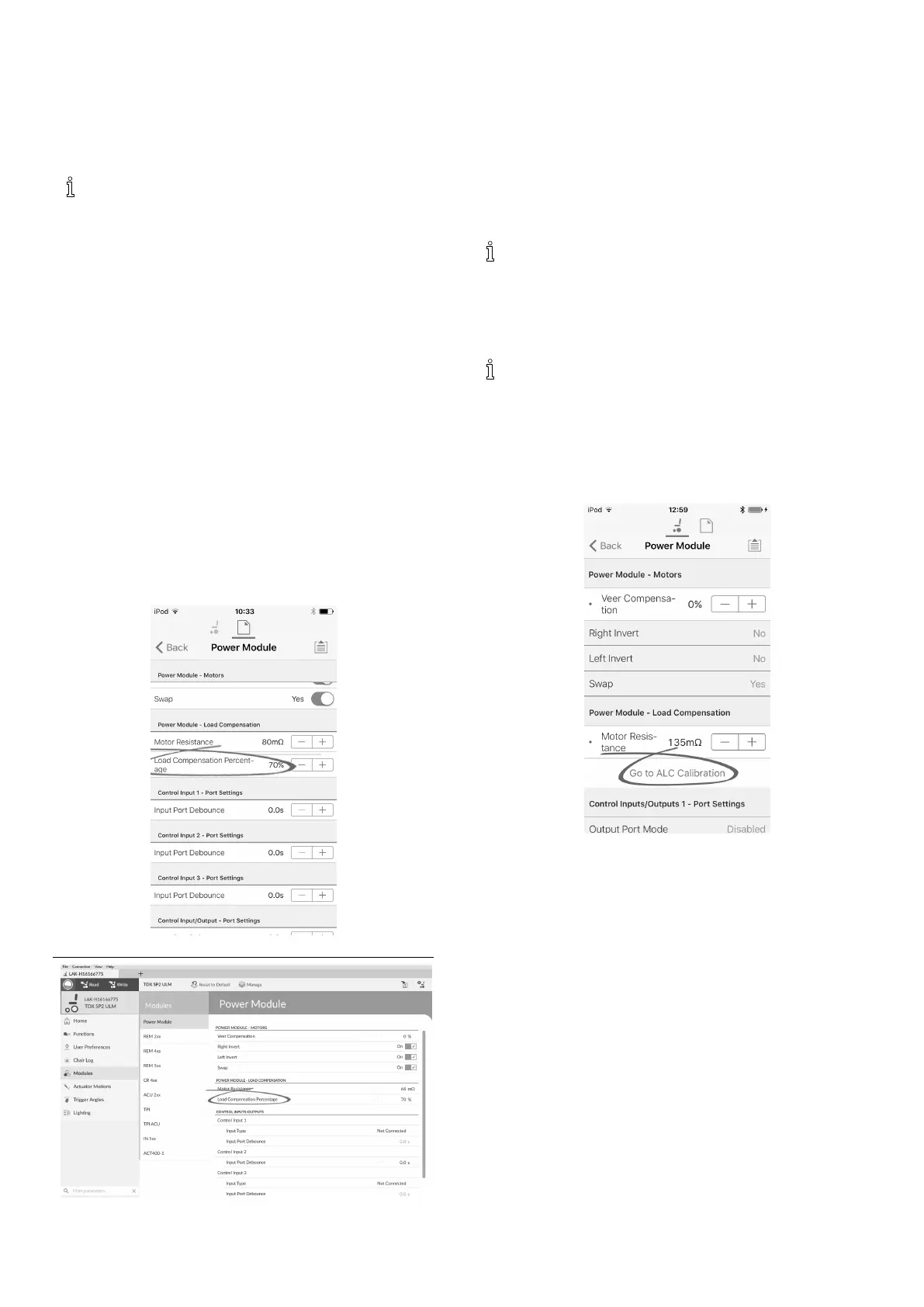
Fig.6-3
Fig.6-4
OpenModules–>PowerModule.
Ifthewheelchairdoesnotperformasdesired,theeffect
oftheadaptiveloadcompensationcanbeadjustedusing
theLoadCompensationPercentageparameter:
•reducevalueofthisparameterifwheelchairdrives
moreaggressivelythananticipated.
•increasevalueofthisparameterifwheelchairdrives
moresluggishthananticipated.
LoadCompensationPercentageisonlyapplied
whenAdaptiveLoadCompEnabledissettoon.
6.3.1CalibratingAdaptiveLoadCompensation
(iOSTool)
Iftheelectronicsorthemotorshavebeen
changed,youneedtocalibratetheAdaptiveLoad
Compensation(ALC).
1.FromHomescreenclickonModules.
2.ClickonPowerModule.
3.ScrolldowntoPowerModule–LoadCompensation
section.
4.
Fig.6-5
ClickonGoToALCCalibration.
72
1605129-G












 To Next Page