UsingtheLiNXAccessPCtool
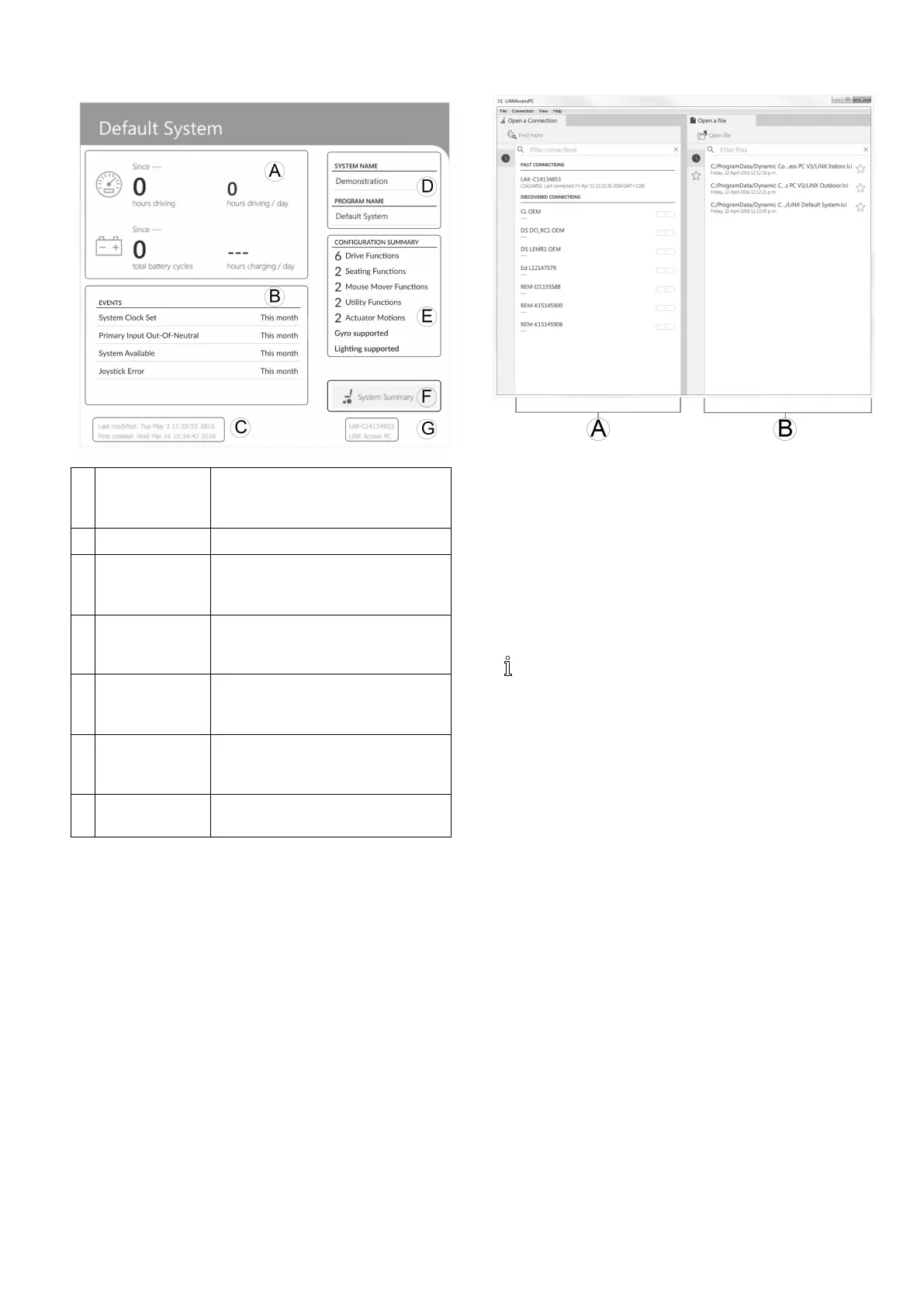
Systeminformation
A
Driving/
battery
information
Displaystimestatisticsfordriving
andbatteryuse.
B
Events
Displaysoverviewofevents.
C
FileinformationDisplaystimestampsforwhenthe
congurationwascreatedandlast
modied.
D
Systemname
andprogram
name
Displaysthesystemandprogram
name.
E
Conguration
summary
Overviewofmodules,features
andfunctionsfortheconnected
system.
F
System
summary
Clicktoviewversioninformation
aboutthemodulesinthe
connectedsystem.
G
LiNXAccess
information
DisplaysLiNXAccessKeyand
applicationdetails.
9.3Concepts
TheLiNXAccessPCtoolprovidesmanytoolsandfeatures
tosimplifyconguringandprogrammingLiNXmodules
andsystems.
Twoimportantconceptsare:
•contextmodes
•editingmodes
Contextmodes
Thecontextmodesallowyoutoworkwithconguration
lesbothonline(thatiswithaconnectedsystem)and
ofine(thatiswithlesstoredonyourcomputer)
simultaneously.Therearetwocontextmodes:
•ConnectioncontextA.ThePCtoolinteractswith
aconnectedsystem.FromtheOpenaconnection
tab,youcanconnecttoawheelchairthroughaLiNX
AccessKey.
•FilecontextB.ThePCtoolinteractswithstoredles
onyourcomputer.FromtheOpenaletab,youcan
accessalestoredonyourcomputer.
Theconnectiontabisalwaysfoundontheleftside
oftheapplication’sscreen.Youcanonlyhaveone
connectiontabopenatanytime.
Filetabsarealwaysplacedtotherightoftheapplication’s
screen.Theapplicationallowsmultipleletabstobe
openatanytime.
Editingmodes
TheLiNXAccessPCtoolofferstwoparameterediting
modesthatdenewhenparametersarewrittentothe
wheelchair.Thesemodesare:
•Liveedit(connectioncontextonly).
•Bulkedit.
Formoreinformationabouttheeditingmodes,referto
7.3.5ModifyingaProgram,page79
.
9.4CheckingandGettingLatestVersion
TheLiNXAccessPCtoolautomaticallychecksforupdated
softwareandrmware.ThisoperationrequiresanInternet
connectionandisonlyperformedina24hourperiod.If
applicationupdatesareavailable,anoticationisdisplayed
askingifyouwanttodownloadtheupdates.Clickon
Yesbuttontocontinue.Aftertheapplicationupdates
havebeendownloaded,anoticationisdisplayed,asking
ifyouwanttoinstalltheupdates.ClickonYesbutton
tocontinue.
Tomanuallycheckforupdates,youcaneither:
•checktheDynamicControlswebsiteat
www.dynamiccontrols.comor
1605129-G115












 To Next Page