UsingtheLiNXAccessPCtool
9UsingtheLiNXAccessPCtool
9.1Installingthesoftware
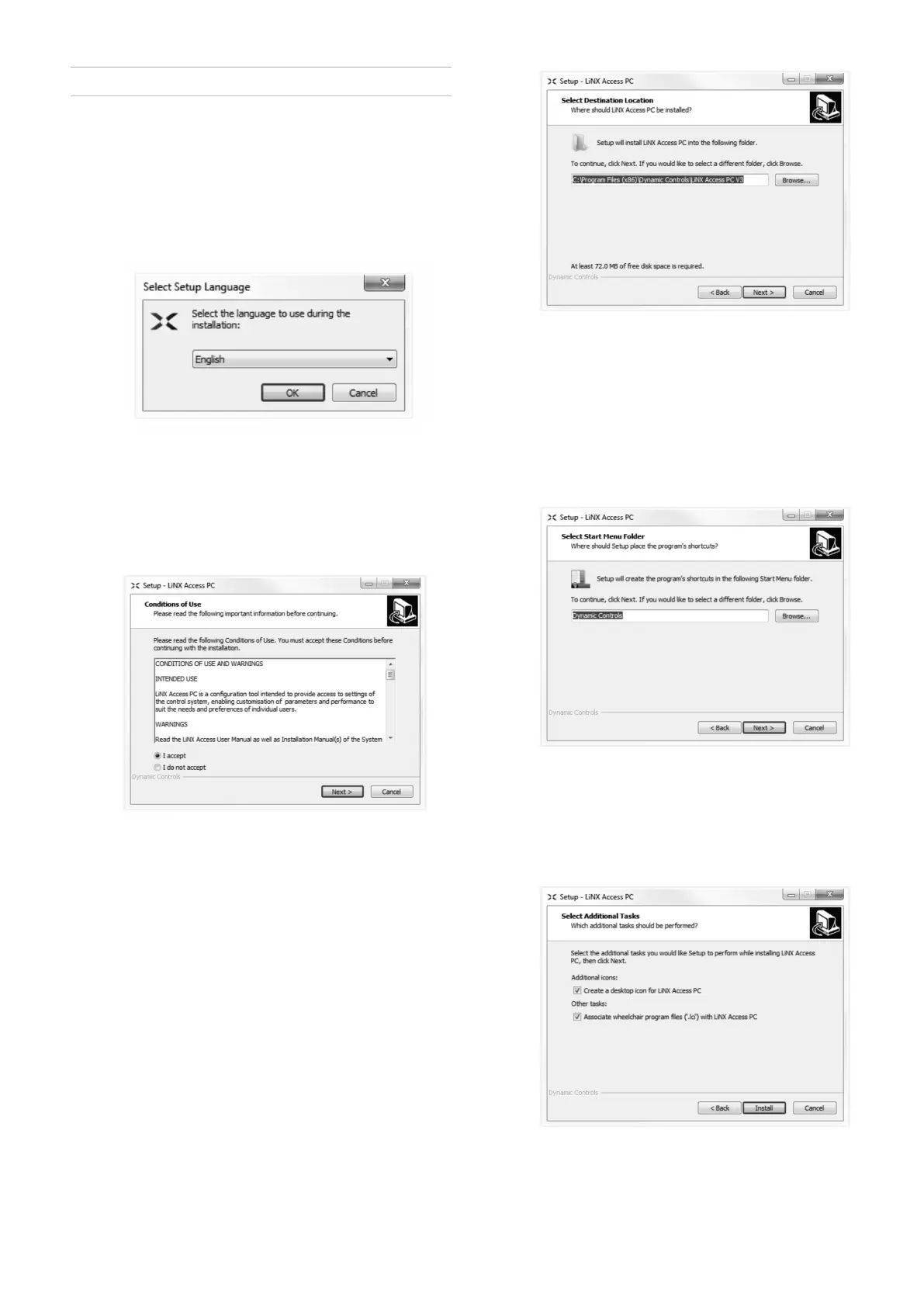
Double-clickontheLiNXAccessPCtoolinstallation
softwareandfollowtheon-screeninstructions.
Step1
Selectthelanguagetouseduringinstallation.
1.
Selectyourchoiceoflanguagefromdrop-downbox.
2.ClickOKtocontinue.
Step2
Beforeproceeding,makesurethatyoureadandfully
understandtheConditionsofUseandWarningspresented
inthedialogue.
1.
SelectIacceptoption.
2.ClickNextbutton.
Step3
Foryourconvenience,theapplicationcanbesavedtoan
alternativefolderinsteadofthesuggestedfolder.
Ifthesuggestedfolderissuitable,clickNexttocontinue
withthesetup.
Ifyouwanttochangethefolder:
1.
ClickonBrowsebuttonandselectdifferentfolder .
2.ClickNexttocontinue.
Step4
Theapplication’sshortcutcanbesavedtoanalternative
folderalso,insteadofthesuggestedfolder.
Ifthesuggestedfolderisappropriate,clickNextto
continuewiththesetup.
Ifyouwanttochangethefolder:
1.
ClickonBrowsebuttonandselectdifferentfolder .
2.ClickNexttocontinue.
Step5
Bydefault,adesktopiconwillbeaddedfortheLiNX
accessPCtoolandthewheelchairprogramles(*.lci)will
beassociatedwiththeLiNXAccessPCtool.
1.
Check/uncheckasappropriate.
2.ClickInstall.
1605129-G113












 To Next Page