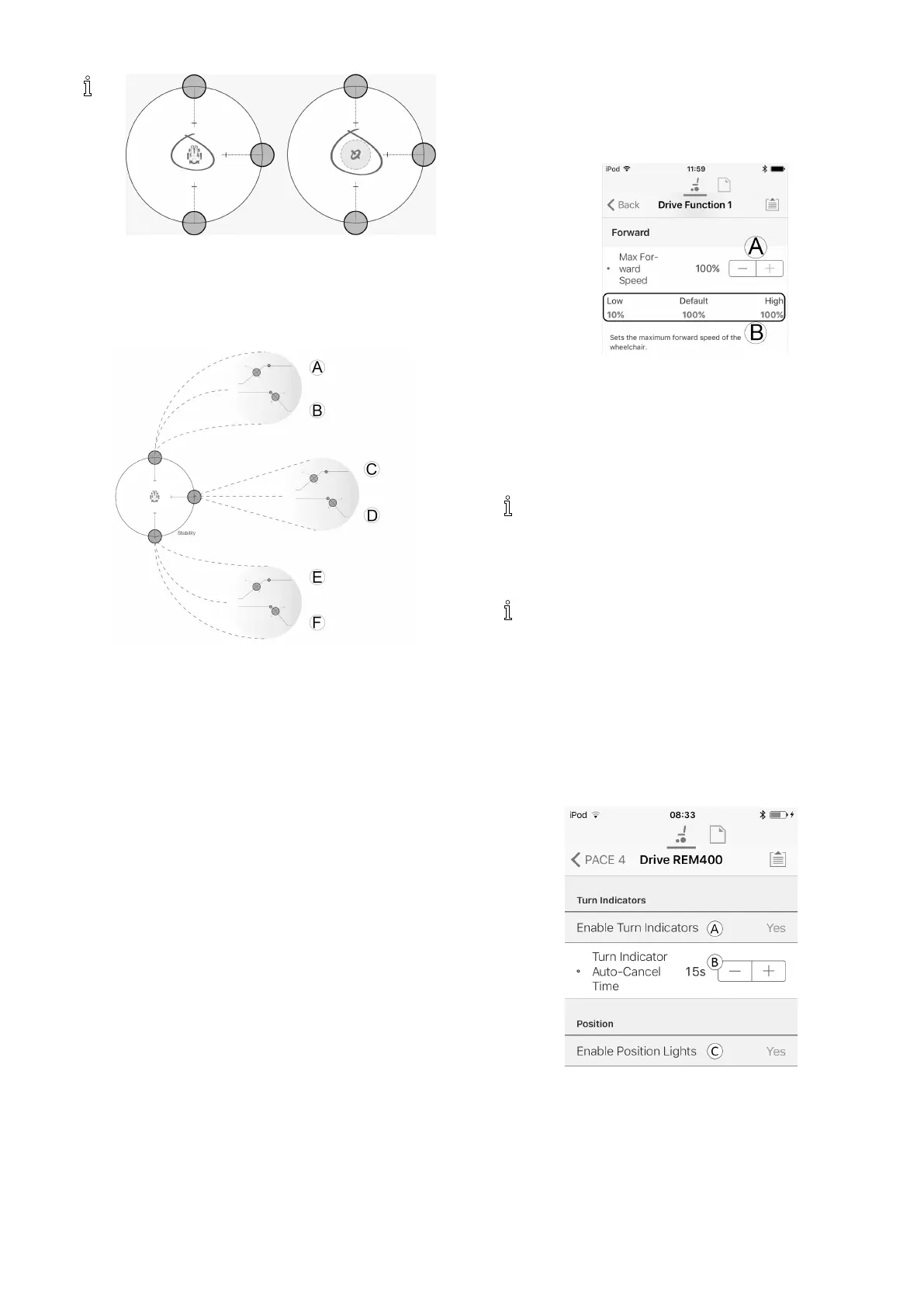
ModifyingwheelchaircongurationwithiOStool
Ifagyromoduleisenabled,thegraphicinthe
centerofthegraphchangesfromapersonina
wheelchairtoagyroscopetoindicatethatthe
parameterbeingchangedaregyro-specic.
Editingacceleration/decelerationsettings
Theacceleration/decelerationparametersareonly
accessiblethroughtheSpeedgraphscreen.Toeditoneof
theaccelerationordecelerationsettings,pressandhold
oneofthecoloredcirclesintheSpeedgraphscreen.
•PressandholdtheMaxForwardSpeedcircletobe
takentotheForwardaccelerationA/deceleration
Bscreen.
•PressandholdtheMaxTurnSpeedcircletobetaken
totheTurnaccelerationC/decelerationDscreen.
•PressandholdtheMaxReverseSpeedcircletobe
takentotheReverseaccelerationE/deceleration
Fscreen.
Foreachacceleration/decelerationparameter,the
accelerationvaluecanbemodiedwiththeuppergraph,
thedecelerationvaluecanbemodiedwiththelower
graph.
1.Pressanddragthecoloredcirclestodecreaseor
increasetheparametervalues.Allchangestothe
acceleration/decelerationvaluesaredisplayedatthe
topofthescreen.
8.4Modifyingdriveparameters
numerically
Alldriveparameterscanbeeditednumerically.
1.Selectaparametertoedit.
2.Clickontheparameter’snametoopentheparameter’s
details.Default,minimumandmaximumvalueswill
bedisplayed,aswellastheparameter’ssummary.
3.Therearedifferentwaystomodifytheparameters:
a.Incrementanddecrementtheparameterwith
theplus(+)andminus(-)buttonsA.Clickthese
buttonstochangethevalueindiscretestepsor
clickandholdthebuttonstochangethevalue
morequickly.
b.SettheparametervaluebyclickingontheLow,
DefaultorHighbuttonsB.
Whenyoueditaparameter’svalue,itsbackground
colorwillchangetoindicatethatithaschanged
fromitspreviousvalue.Oncethevalueiswritten
tothecontroller(orle),thebackgroundwill
reverttowhite.
Wheninliveeditmode,itmightbedifculttosee
theparameterbackgroundchangingsincethelive
editoperationcantakeplaceveryrapidly.
8.5ModifyingLightingParameters
Wheninstallinglightingsystem,replacingpowermodule
orresettingdefaultcongurationfrompowermodule
itcanbenecessarytoadjustlightingsettings.Insome
congurationslightingfunctionsaredisabledbydefault
andneedmanualactivation.
Fig.8-10
1.FromHomescreenclickonLighting.
2.Editparametersaccordingfollowingtable.
1605129-G89












 To Next Page