OverviewLiNXAccesstools
5OverviewLiNXAccesstools
TheLiNXsystemisprogrammedduringmanufacturing
withdefaultsettings.Thesesettingscanbemodiedwith
aprogrammingtooltosuittheuser.
TheLiNXsystemcanbeprogrammedwithoneoftwo
programminganddiagnostictools:
•LiNXAccessiOStoolusedwithApple’siPhone,iPad
andiPodtouchwithiOS9.0orlaterand
•LiNXAccessPCtoolusedwithWindows-basedPCs
orlaptops.
Theprogramminganddiagnostictoolscommunicatewith
aLiNXsystemviaBluetooth.TheBluetoothcapabilityof
aLiNXsystemisprovidedbyaLiNXAccessKeyinserted
intotheremotemodule’sXLRsocket.
IfyourPCdoesnothavebuilt-inBluetooth,thena
BluetoothadaptorpluggedintoaspareUSBportcanbe
usedinstead.
Both,theiOSandthePCprogrammingtools,offera
Liveeditmodethatallowscertainparameterstobe
programmed,andtakeeffect,whilethesystemislive
(e.g.whiledriving).Formoreinformation,referto7.3.5
ModifyingaProgram,page79.
5.1TheLiNXAccessKey
–TheLiNXAccessKeyisrecommendedfor
indooruseonly,oroutdoorsindryconditions.
–TheLiNXAccessKeymustnotbeplugged
inwheninradiofrequency(RF)sensitive
environments.
–AlwaysinspecttheLiNXAccessKeyfor
damagebeforeusingit.
–EnsurethattheLiNXAccessKeyisfully
insertedintotheXLRsocketbeforeuse.
–Conrmthattheconnectionismadetothe
wheelchairthatistobeprogrammedby
checkingtheLEDontheLiNXAccessKey.
–Takecarewhiledrivingaroundduringtuning
ofthewheelchairnottodamagetheLiNX
AccessKeybyhittingasolidobject.Always
keepacleardistancefromanyobjectsthat
coulddamagetheLiNXAccessKey.
–ThesurfaceoftheLiNXAccessKeycanget
hotifleftindirectsunlightforlongperiods.
–DonotleavetheLiNXAccessKeyconnected
tothesystemwhenthewheelchairis
powereddownorwhenthewheelchairis
tobestoredforalongtime,astheAccess
Keywillcontinuetodrawfromthebatteries
whenthesystemisoff.Ifleftinplace,the
expectedstoragelifeofthesystemwillnot
bemetandthebatteriesmaybedamaged.
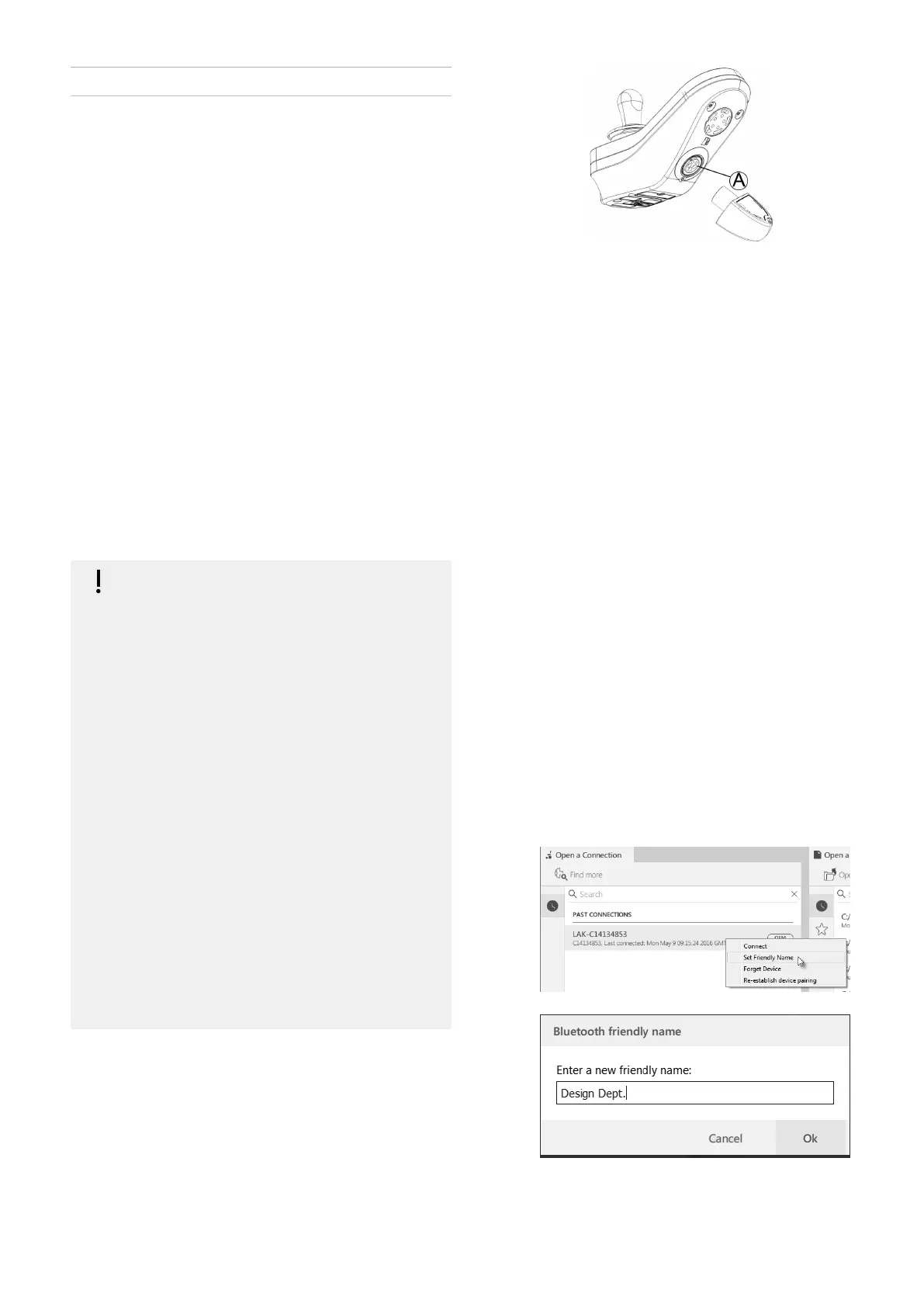
TheLiNXAccessKeyprovidestheBluetoothconnectionfor
aprogrammingtooltocommunicatewithaLiNXsystem.
TheLiNXAccessKeyplugsdirectlyintotheremote
module’sXLRportA.REM2xxdisplayedinpicture,works
forREM400andREM500thesameway.
TheLiNXAccessKeyhasabluestatusindicatortoshow
whenitis:
•poweredup,butnotconnected(indicatorashes
slowly),
•connecting(indicatorashesquickly)or
•connected(indicatorpermanentlyon).
Ifthebluestatusindicatorturnscompletelyoffwhile
tryingtoconnect,orwhileconnected,removetheLiNX
AccessKeyfromtheremotemodule,waitfor5seconds
andthereinsertitintotheremotemodulebeforetrying
toconnectagain.
Beforetheprogrammingtoolscanbeusedforprogramming
anddiagnostics,youneedtopairthedevices,whichis
theprocessofconnectingthedevicesviaBluetooth.The
pairingprocessdiffersdependingontheprogrammingtool
thatisused.
5.1.1RenameLiNXAccessKey(onlypossible
withLiNXAccessPCtool)
TheLiNXAccessKeyisnormallyidentiedwiththeletters
LAKfollowedbyaseriesofcharacters,forexample:
LAK-L12147605.Althougheachnameisunique,identifying
onekeyfromanothermaybecomedifcultwhenyou
havemorethanoneLiNXAccessKey.Asanoption,you
canchangethenamesofthekeystomorefamiliarnames.
1.Right-clickonLiNXAccessKeyinOpenaConnection
tab.Youmayhavetocloseyourconnectionifyouare
alreadyinaconnectioncontext.
2.
SelectSetFriendlyNameoptionfromcontextmenu.
3.
EnternewnameintotextboxandclickOKbutton.
AfterclickingOKbuttonthewheelchairispower-cycled
andthefriendlynameisupdated.Aconrmationscreen
1605129-G57












 To Next Page