Invacare®LiNX
ParameterDescriptionValues
A
EnableTurn
Indicators
Allowssystemto
useturnindicators
No/Yes
B
TurnIndicator
Auto-Cancel
Time
Setslengthoftime
aturnindicator
willbeonbefore
beingautomatically
turnedoff
0s...30s
C
EnablePosition
Lights
Allowssystemto
usepositionlights
No/Yes
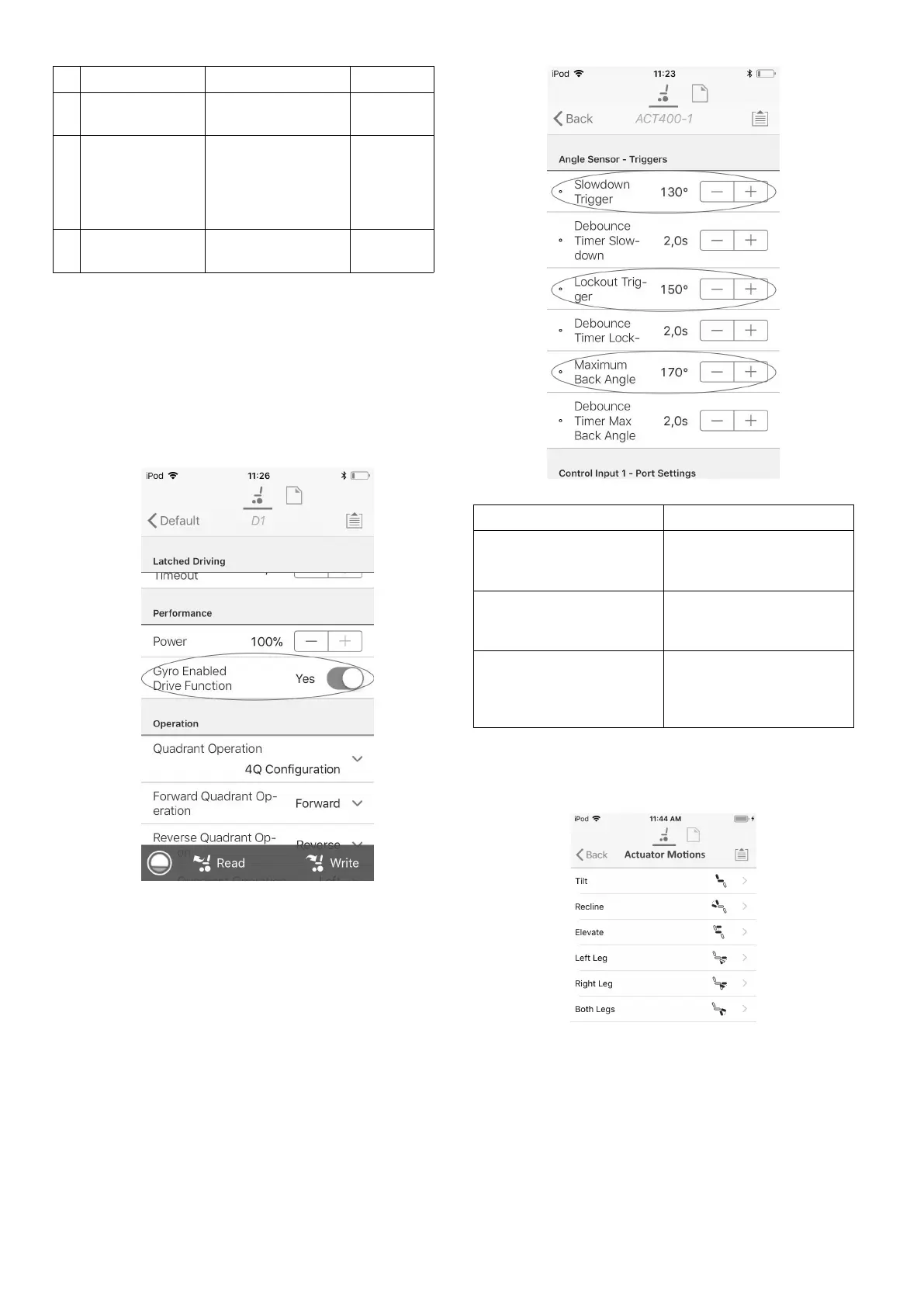
8.6ModifyingGyroSupportinDrive
Functions
Bydefault,Gyrosupportisenabledindrivefunctions.The
followinginstructionsshowyouhowtodisabletheGyro
supportfordrivefunctionsortohidetheGyrosymbolon
screenifnoGyroisinstalledonwheelchair .
1.FromHomescreenopendesireddrivefunction.
2.
Fig.8-11
SetGyroEnabledDriveFunctiontoYes,toprovide
enhancedstabilitycontrolforthisdrivefunction.
Otherwise,settoNotodisablegyrosupportforthis
function.
8.7ModifyingSeatingParameters
TriggerAngles
Anglesensor-triggersallowyoutomodifyfactorydefault
angletriggersofwheelchairtoaccommodatespecicuser
needs.
Fig.8-12
ParameterDescription
SlowdownTriggerSetstheanglesensor’s
triggerangletoslowdown
thedrivingspeed
LockoutTriggerSetstheanglesensor’s
triggerangletolockout
drive
MaximumBackAngleSetstheanglesensor’s
triggerangletostop
furthermovementofthe
backrest.
1.FromHomescreentaponTriggerAngles.
2.Setparameterstouser’sneeds.
SeatingMotion
Fig.8-13
1.FromHomescreentaponActuatorMotion.
2.Selectseatingmotionyouwanttochange.
901605129-G












 To Next Page