Invacare®LiNX
1.
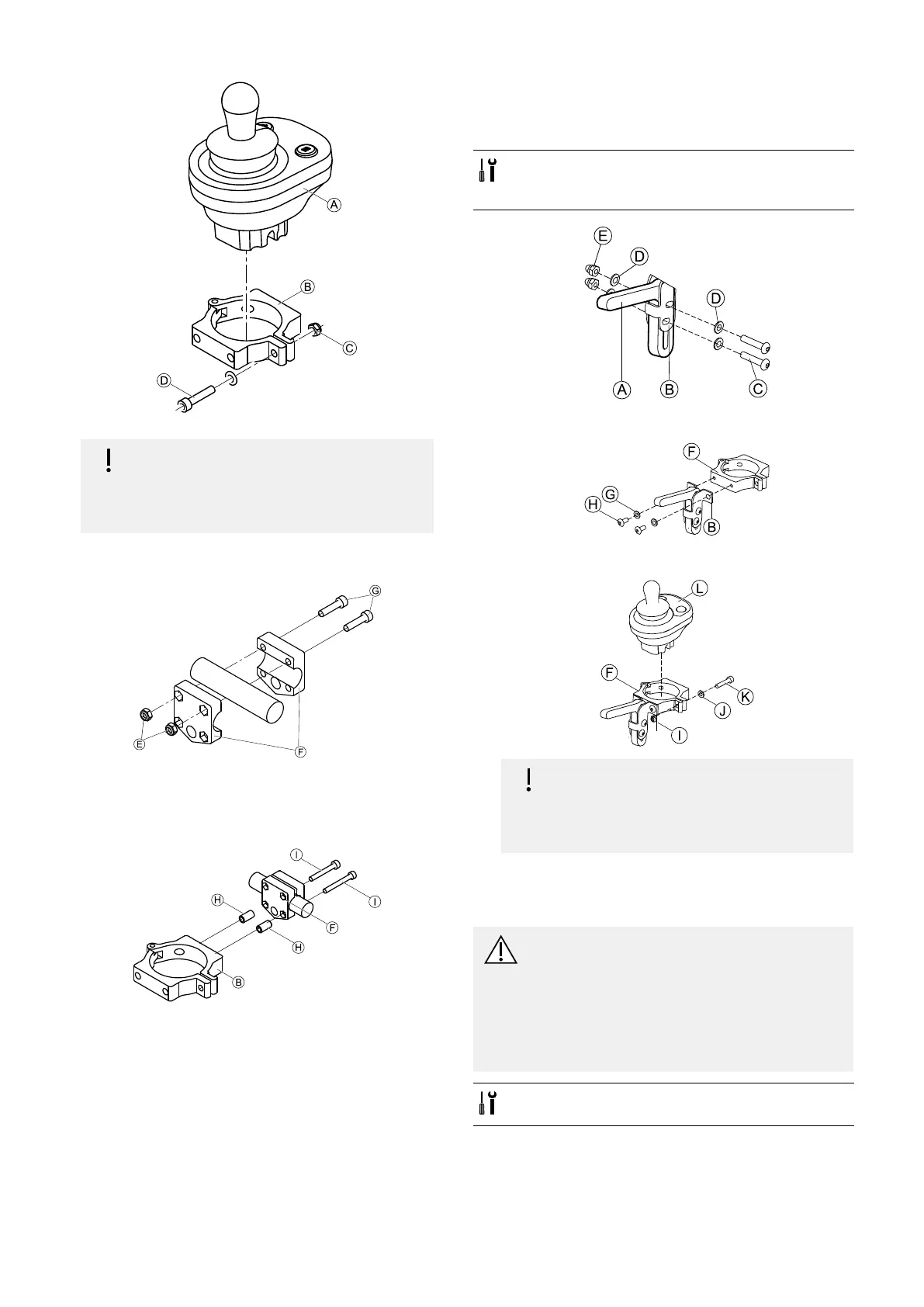
Fig.3-45
Riskofdamagetotheremote
Themaximumtorquetotightenthescrew
is1Nm.
–Donotexceedthisratingasitmay
damagetheremote.
SetremoteAinclampBandtightenscrewDand
nutC.
2.
Fig.3-46
InstallgripperclampFtopushbarusingscrewsG
andnutsE.
Tightenscrewswith10Nm.
3.
Fig.3-47
InsertscrewsIthroughgripperclampFandspacers
HinclampB.
Usethreadlockingadhesiveandtightenscrewswith
10Nm.
3.11.3MountingtheDLX-CR400
alsovalidforDLX-CR400LF
StandardRemoteHolder
•3mmAllenkey
•4mmAllenkey
•8mmwrench
1.
MountjoystickholderAtoDLX-CR400adapterB
withscrewsC,washersDandnutsE.
2.
AttachclampFtoDLX-CR400adapterBwithwashers
GandscrewsH.
3.
Riskofdamagetotheremote
Themaximumtorquetotightenthescrew
is1Nm.
–Donotexceedthisratingasitmay
damagetheremote.
SetremoteLinclampFandtightenscrewKand
washerJwithnutI.
NucleusMidlineHolder
CAUTION!
RiskofInjuryandDamage
Remainingburrsandmissingendcapsafter
modicationsonrods,suchasshortenedrod,
canleadtoinjuryordamage.
–Deburrcutaftercuttingexcessivelength.
–Re-installendcapafterdeburring.
–Checkendcapfortighttting.
•4mmAllenkey
•8mmwrench
42
1605129-G












 To Next Page