ModifyingwheelchaircongurationwithPCtool
A
Timeoutfornavigationentry:Setsinactivitytime
requiredbeforesystementersnavigationmode,for
navigationmodewithNavigationTimeoutonly.
B
MenuScanRate:Setsrateatwhichmenuscan
iteratesthroughmenu,forMenuScanonly.
C
NumberofMenuScanCyclesbeforeIdle:Number
oftimesmenuisiteratedthroughbeforegoingto
idle,assumingnouserselection,forMenuScan
only.
D
ScanSelection:Congureswhichquadrantsof
Primaryinputcanbeusedtomakeselections,for
MenuScanonly.
E
Navigationtype:Selectstypeofnavigation.
F
NavigationEntry:Setsentrypointtomenu.
G
Navigationpreference:Selectswhethernavigation
usingtouchinterfacehaspreferenceovernavigation
usinguserinput.Ifuserinputisselected,display
highlightscurrentselection.
10.11ConguringControlInput/Output(ControlIO)
FordetailedinformationaboutControlIO,referto5.2.3OverviewControlInput/Output(ControlIO),page64.
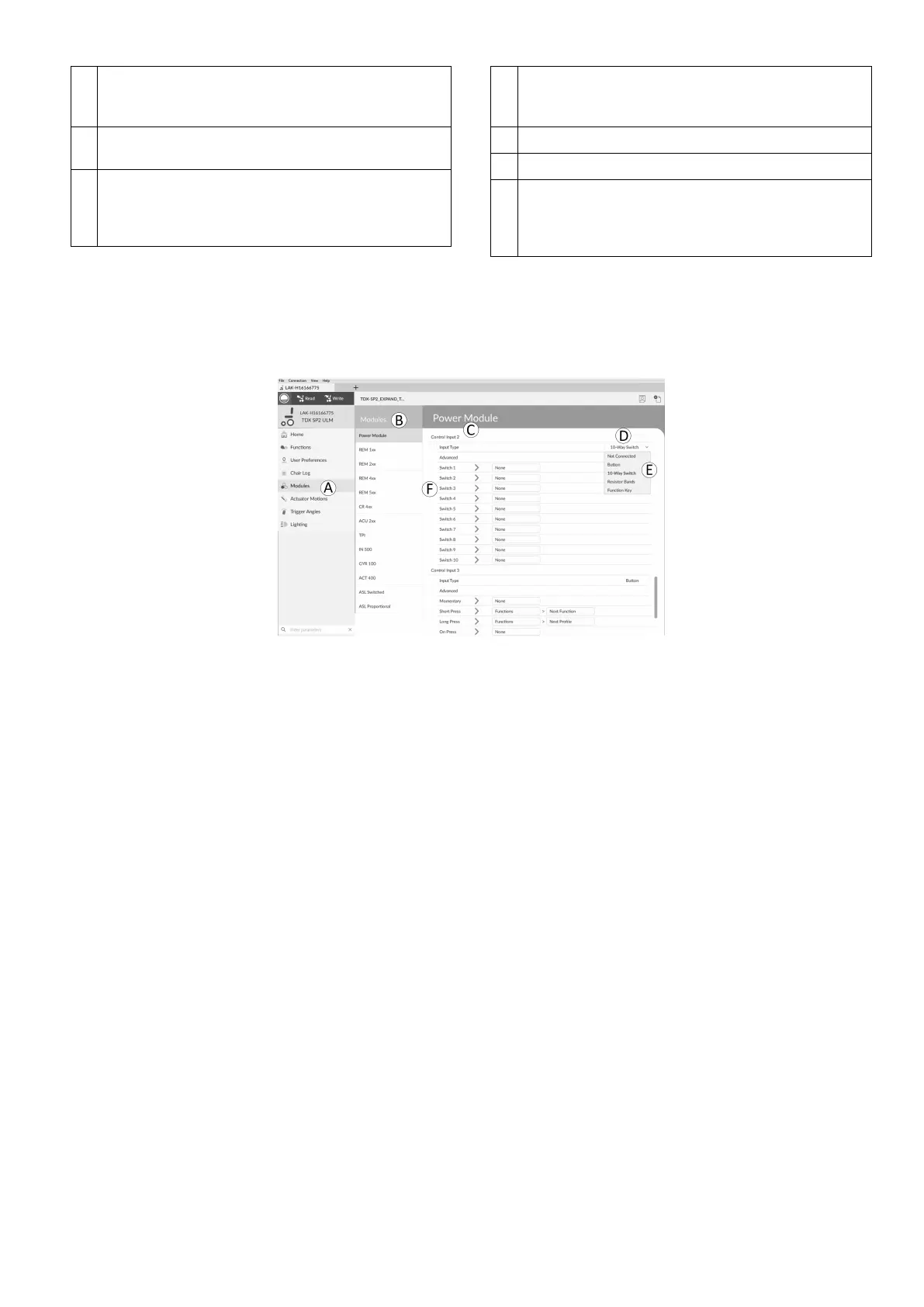
SelectandCongureControlInput
Fig.10-37
1.OpenModulesinrstnavigationsidebarA.
2.FromModulessidebarBselectmoduleyoursystemcontrolinputisconnectedto.
Forexample,ifyouhaveabuddybuttonconnectedtooneofCIpinsonpowermodule,selectPowerModule.If
youwanttouseoneofmultipurposebuttonsonREM400,selectREM4xx.
3.ScrolldowntoPortSettingsCforcontrolinputyouwanttocongure.
Forexample,ifyouwanttoaddapowerbuttontotheleftjacksocketonaREM400,scrolldowntoLeftJack
Socket(J1)Tip—PortSettings.
4.UnderPortSettingsclickonInputTypeDtorevealwhichinputtypesareavailable.
InputtypesdifferdependingonmoduleandyourLiNXAccessKeylevel.Inputtypesavailableareoneormore
offollowing:
•NotConnected
•10–WaySwitch
•ResistorBands
•Button
•PowerButton
•FunctionKey
5.ClickononeofdisplayedinputtypesEtorevealitscontrolIOslot.
•If
10–WaySwitchisselected,tenslotsnamedSwitch1toSwitch10aredisplayed.
•IfResistorBandsisselected,tenslotsnamedBand1toBand10aredisplayed.
•IfButtonisselected,fourslots(buttontypes)aredisplayed:Momentary,ShortPress,LongPressandOnPress.
•IfPowerButtonorFunctionKeyisselected,noslotsaredisplayedandnofurtheractionisrequired.
6.SelectandclickondesiredslotFtobeginassigningoutputandactiontoselectedcontrolinput.
Formoreinformationaboutsloticons,referto5.2.3OverviewControlInput/Output(ControlIO),page64
.
1605129-G133












 To Next Page