UsingtheLiNXAccessPCtool
3.
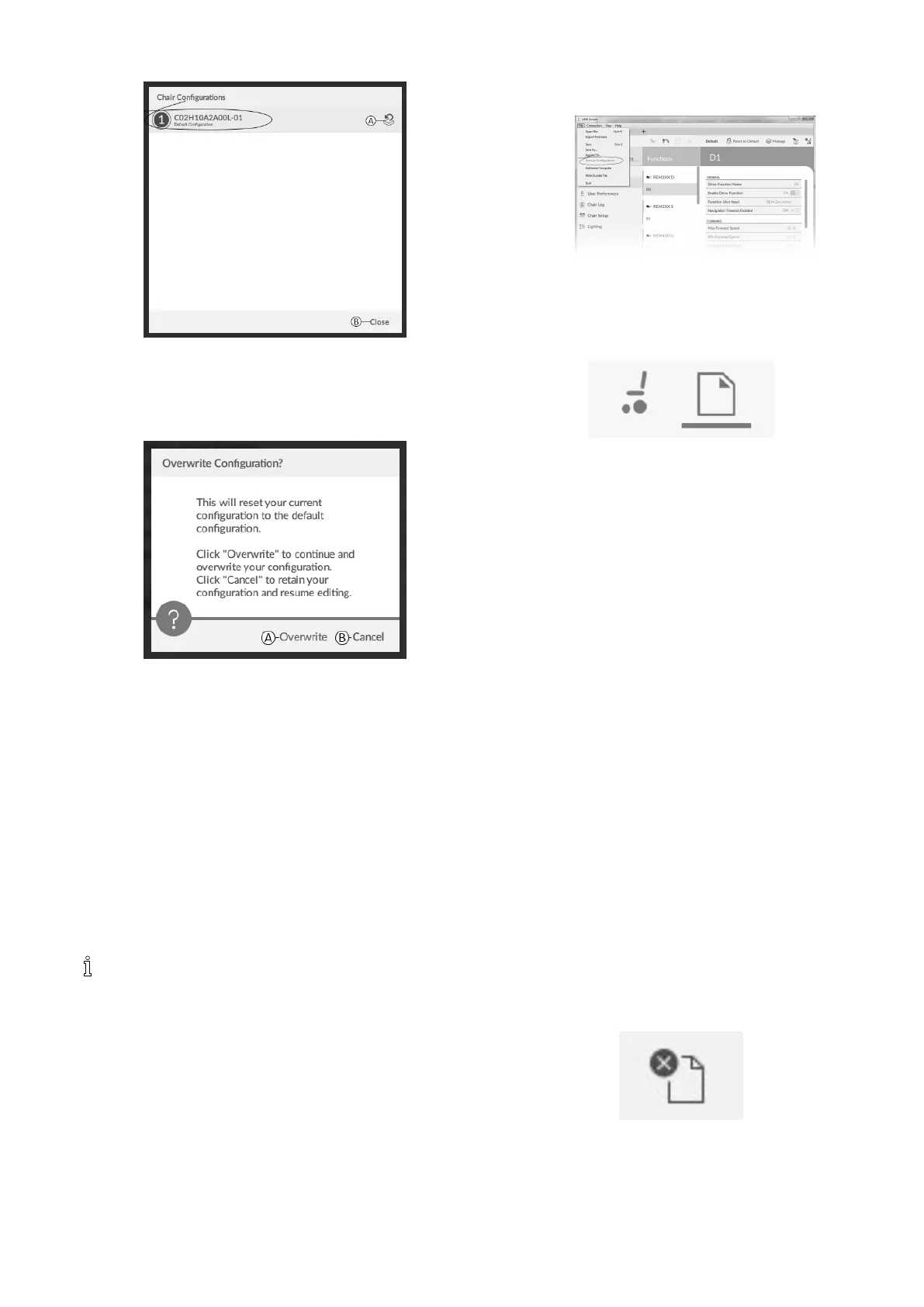
Fig.9-8
IfchosenManage,youwillseealistwithdefault
congurationsstoredonpowermodule.Clickonicon
Abehindthepreferredconguration.Otherwise,click
buttonBtoabort.
4.
Fig.9-9
Amessageboxappears.Conrmtheresetbyclicking
onbuttonOverwrite(A).Otherwise,clickonbutton
Cancel(B)toabort.
5.Modifyparameters,especiallylightingfunctions(see
10.3.1ModifyingLightingParameters,page122 )and
gyrostatus(see10.3.2ModifyingGyroSupportin
DriveFunctions,page123 ).
9.5.9ConvertingCongurationFiles
Usingoldercongurationlesonwheelchairscanresultin
missingfeatureswhichwereintroducedinlaterrevisions
ofrmware,suchasSwitchControl.Inmostcases,
convertingthesecongurationlesallowsyoutoupdate
user’scongurationtolatestreleasetoenableallfeatures.
Incasecongurationleisoncurrentrevisionor
incompatible,menuentryisshowngreyedout.
1.Connectwithwheelchair.
2.ClickonFileinmenubar.
3.
Fig.9-10
SelectentryConvertCongurationandfollowscreen
prompts.
9.6Filecontextactions
ThefollowingtasksareonlyrelevantwhenintheFile
contextmode.FortasksrelatedtotheConnectioncontext
mode,referto9.5Connectioncontextactions,page116 .
9.6.1Open/Closeale
IftheLiNXAccessPCtoolisnotopen
1.OpenLiNXAccessPCtool.
2.FromOpenaletab:
a.selectlefromlist,or
b.clickOpenlebutton(topleft)toopentheOpen
ledialogue,or
c.iflististoolongtoread,enterlenameintoFilter
lestextboxtolocateleinlist.
3.Selectle.
IftheLiNXAccessPCtoolisalreadyopen
1.ClickonNewletab(+).
2.Fromthistab:
a.selectlefromlist,or
b.clickOpenlebutton(topleft)toopentheOpen
ledialogue,or
c.enterlenameintoFilterlestextboxtolocate
leinlist.
3.Selectle.
OpenviaFilemenu
1.ClickonFilemenu.
2.SelectOpenletoopentheOpenledialogue.
3.Selectle.
Afterselectingale,theLiNXAccessPCtoolopensthele
underitsowntab.Thetabisnamedwiththelename.
Closeale
ClosealeusingtheCloselebutton,locatedonthe
right-handsideofthetoolbar.Ifyouattempttoclose
alewithchangespending,adialogueopenswiththe
optionsto:
•Save—savethechangesbeforeclosing
1605129-G119












 To Next Page