Assembly
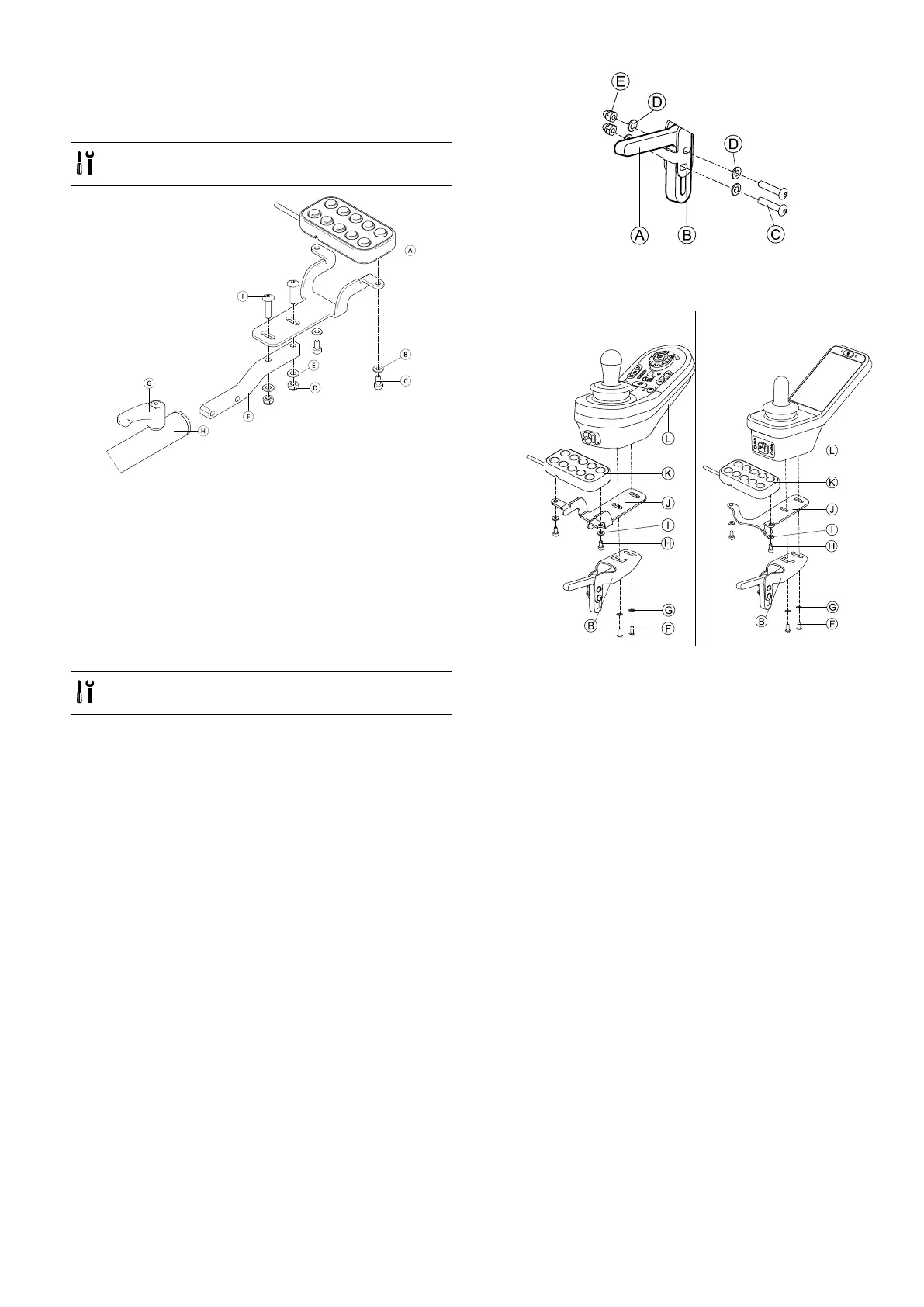
3.13.2Mountingthe10wayswitchforUltra
LowMaxx
Mountingatthefront
•3mmAllenkey
•8mmwrench
Fig.3-87
1.Tighten10wayswitchAtobracketwithscrewsC
andwashersB.
2.TightenbrackettoremotemountingtubeFwith
boltsI,washersEandnutsD.
3.Insertremotemountingtubeinsidemounting
bracketH.
4.Adjust10wayswitchtodesiredposition.
5.TightenleverG.
IncombinationwithDLX-REM2XXorDLX-REM400
•3mmAllenkey
•8mmwrench
1.
MountjoystickholderAtoremoteadapterBwith
screwsC,washersDandnutsE.
2.
DLX-REM2XXDLX-REM400
MountremoteLtoremoteadapterBandsupport
sheetJwithscrewsFandwashersG.
3.Mount10wayswitchKtosupportsheetJwith
screwsHandwashersI.
Formoreinformationaboutmountingthe10wayswitch
forattendants,refertotheservicemanualoftheUltra
LowMaxx.
1605129-G53












 To Next Page