Invacare®LiNX
8.2Modifyingfunctionandprole
names
Functionnames
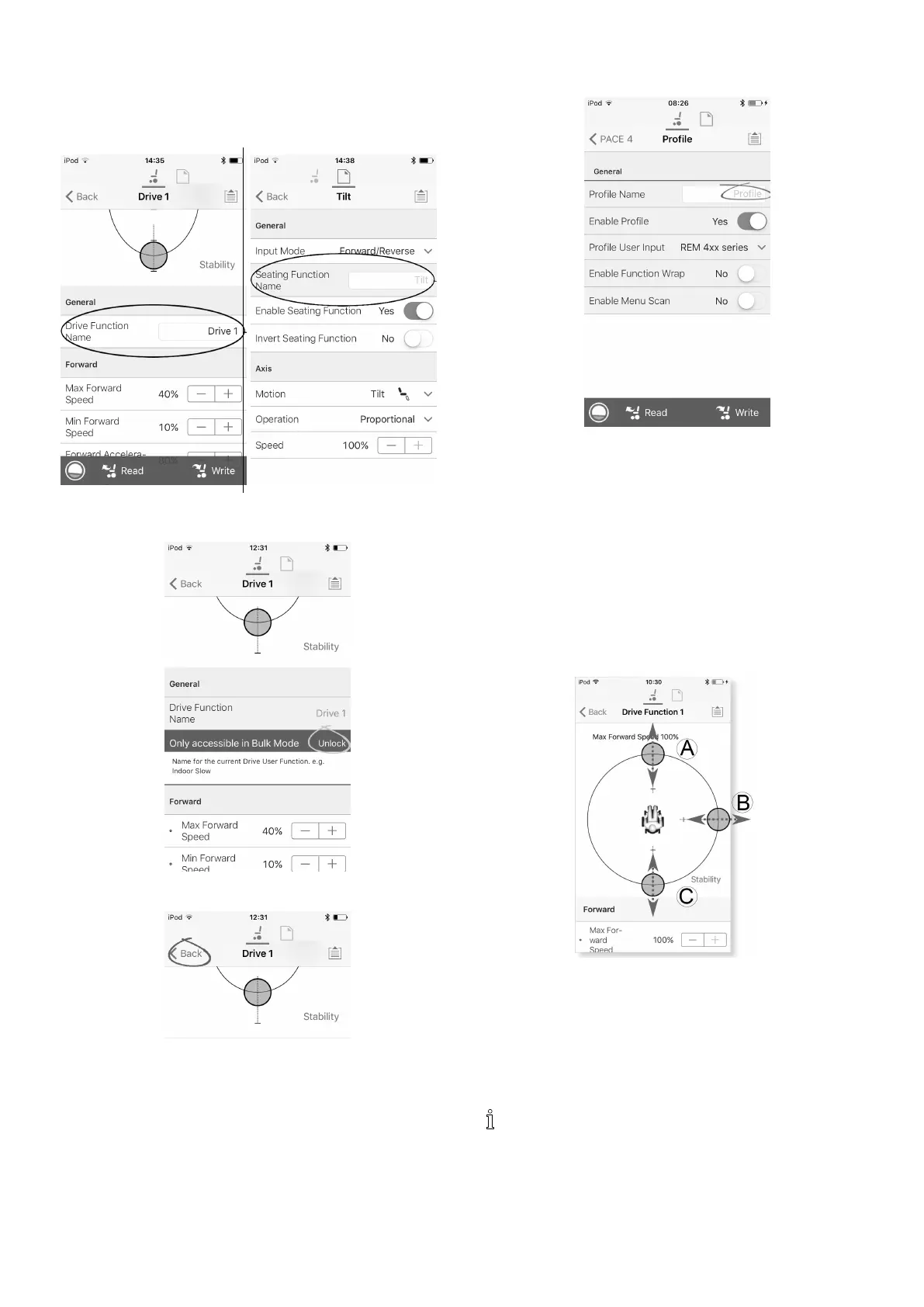
1.OpenDriveorSeatingfunction.Taponeldwith
functionname.
2.
UnlockBulkModebeforemodifyingthename.
3.Enternewname.
4.
TaponBack.
Prolenames
1.
Openprole.Taponeldwithfunctionname.
2.Enternewname.
3.TaponBack.
8.3Modifyingdriveparameters
graphically
Anumberofdriveparameterscanbeeditedgraphically
onlywiththeiOSAccessTool.Thespeedgraphisshownat
thetopoftheparameterlist.Allothergraphsareaccessed
fromthisscreen,asdetailedinthefollowingsections.
Editingspeedsettings
TheSpeedgraphallowsyoutoadjust:
•MaximumForwardSpeedA
•MaximumTurnSpeedB
•MaximumReverseSpeedC
1.Tapanddragthecoloredcirclesinwardsoroutwards
todecreaseorincreaseparametervalues.
Theexactvalueforeachparameterisshownatthe
topofthescreenwhenadjustingtheparameter
anditisalsodisplayedintheparameterlist.
881605129-G












 To Next Page