UsingtheLiNXAccessiOStool
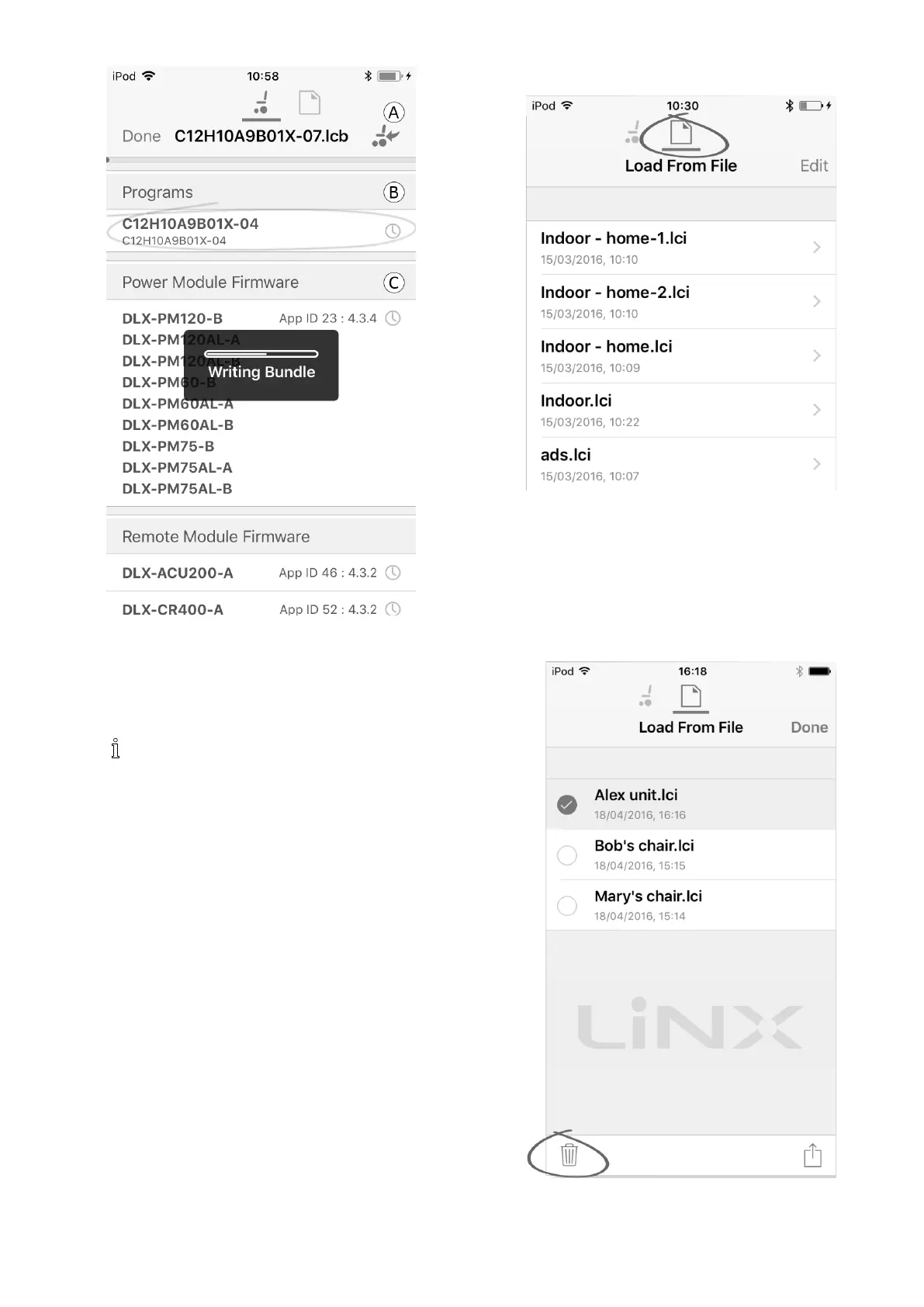
Fig.7-11
1.Connectwheelchair .
2.SelectFileconnectionscreen.
3.ChoosebundlelefromlistdisplayedinLoadFrom
Filescreen.
4.
Ensuretoselectthecorrectconguration.A
wrongcongurationcanleadtounexpected
behaviourandfailures.Formoreinformation
abouttherulesforprogramnaming,see12
StructureofProgramNames,page145 .
SelectpreferredcongurationfromsectionB.
5.Checkincludedrmwareversionsofcomponentsin
sectionCandbelow.
6.Writebundleletowheelchair.ClickbuttonAand
waituntiloverlayWritingBundledisappears.
7.ClickbuttonDonetoreturntoFileconnectionscreen.
7.4.3Openingles
1.SelectFileconnectionscreen.
2.ChooselefromthelistdisplayedintheLoadFrom
Filescreen.
Forinformationaboutsavinglesandwritingtoa
wheelchairreferto9.5.4Saveaprogramasale,page117
and7.3.6Writingaprogramtothewheelchair,page80.
7.4.4Deletingles
1.SelectEditfromLoadfromFilescreen.
2.Selectoneormorelesfromthelelist.
1605129-G83












 To Next Page