Invacare®LiNX
ThisparameterisnotavailablewhenQuadrantOperation
issettoanyofthe3Qmodes.
LeftQuadrantOperation
Thisparametersetsthedirectionthatthewheelchair
moveswhentheleftquadrantoftheuserinputisselected.
Optionsavailableare:
•Forward
•Reverse
•Left
•Right
•Ignored
IfIgnoredisselected,thewheelchairdoesnotmovein
anydirectionwhentheinput’sleftquadrantisselected.
RightQuadrantOperation
Thisparametersetsthedirectionthatthewheelchair
moveswhentherightquadrantoftheuserinputis
selected.Optionsavailableare:
•Forward
•Reverse
•Left
•Right
•Ignored
IfIgnoredisselected,thewheelchairdoesnotmovein
anydirectionwhentheinput’srightquadrantisselected.
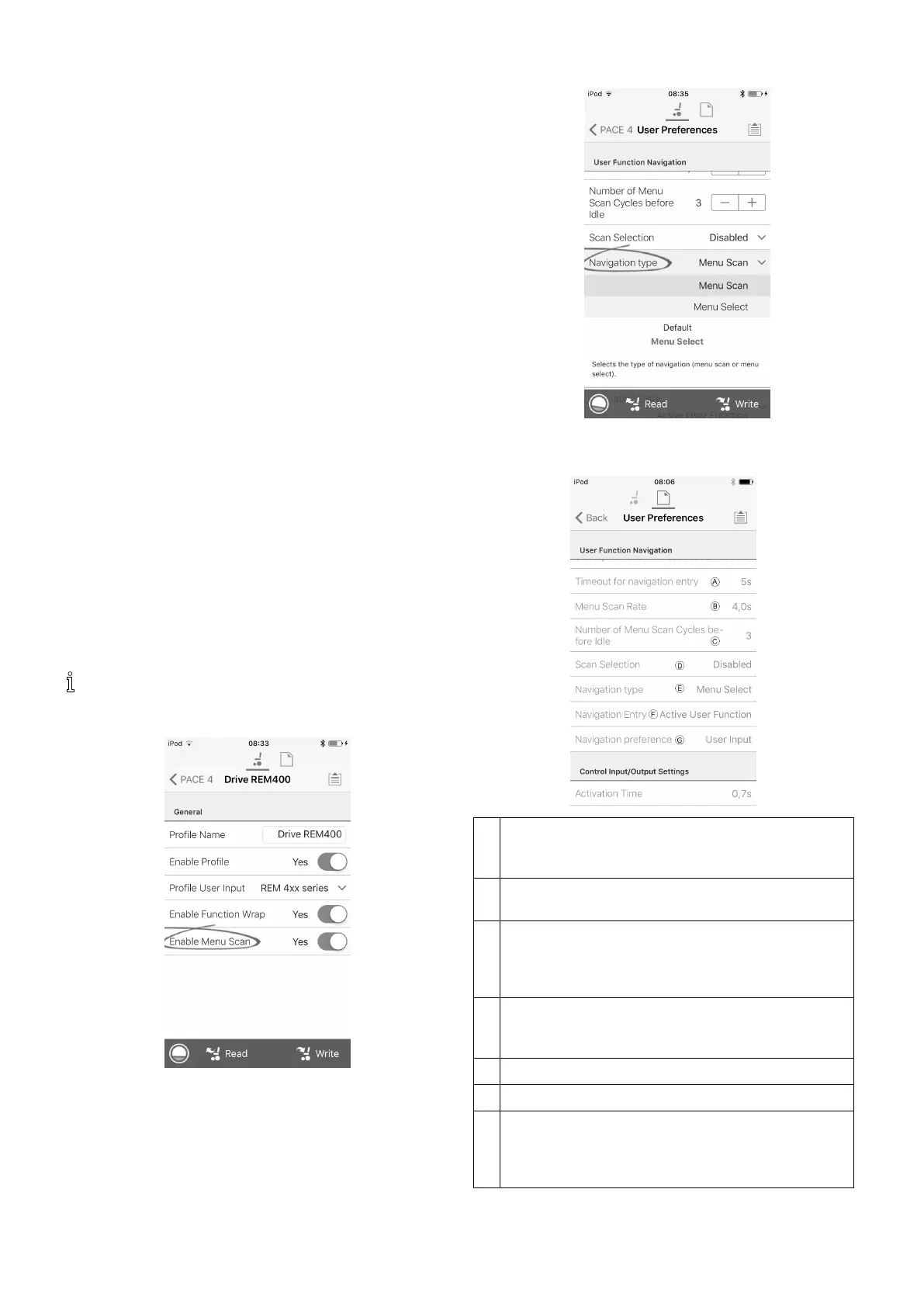
8.12Enableindirectnavigation
FortheiOStool,thereisonlyMenuScanwithNavigation
Timeoutavailableatthemoment.
Steps1and2mustbemadeineachdesiredprole
andfunction.
1.FromHomescreenopendesiredprole.
2.
SetEnableMenuScantoYes.
3.FromHomescreenopendesiredfunction.
4.SetNavigationTimeouttoYes.
5.FromHomescreenopenUserPreferences.
6.
SetNavigationtypetoMenuScan.
Otherparameters
A
Timeoutfornavigationentry:Setsinactivitytime
requiredbeforesystementersnavigationmode,for
navigationmodewithNavigationTimeoutonly.
B
MenuScanRate:Setsrateatwhichmenuscan
iteratesthroughmenu,forMenuScanonly.
C
NumberofMenuScanCyclesbeforeIdle:Number
oftimesmenuisiteratedthroughbeforegoingto
idle,assumingnouserselection,forMenuScan
only.
D
ScanSelection:Congureswhichquadrantsof
Primaryinputcanbeusedtomakeselections,for
MenuScanonly.
E
Navigationtype:Selectstypeofnavigation.
F
NavigationEntry:Setsentrypointtomenu.
G
Navigationpreference:Selectswhethernavigation
usingtouchinterfacehaspreferenceovernavigation
usinguserinput.Ifuserinputisselected,display
highlightscurrentselection.
981605129-G












 To Next Page