157
13 Configuration
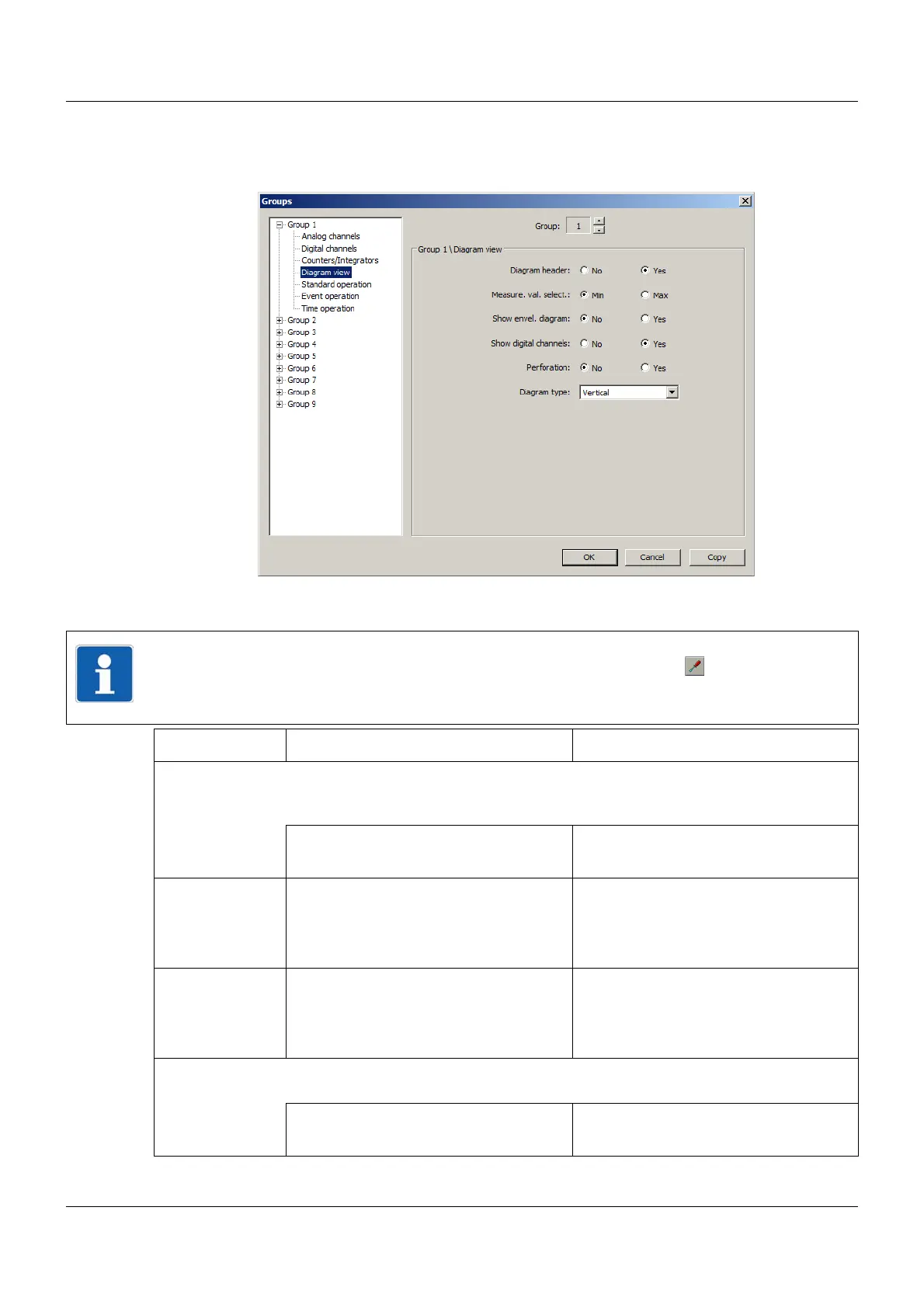
13.11.4 Diagram view
Setup dialog
Parameter
NOTE!
Some of the stated parameters can also be changed by touching the button on the mul-
tifunction panel in the "Diagram" or "Digital" visualization.
The advantage of this is that the configuration is not changed.
Parameter Selection/settings Description
Diagram header This parameter can be used to switch the diagram header on and off. The diagram
header (numerical display of the measured values and/or switch symbols for digital
channels) are available in the Diagram and Digital visualizations.
No Diagram header switched off
Yes Diagram header switched on
Measure. val.
select.
Min The minimum values are displayed in
the diagram header.
Max The maximum values are displayed in
the diagram header.
Show envel. dia-
gram
No The min./max. values are displayed as a
line.
Yes The min./max. values are displayed as
an envelope diagram.
Show digital
channels
This parameter determines whether the digital channels (digital signals) in the dia-
gram display are to be displayed together with the analog signals.
No The digital signals are not displayed.
Yes Digital and analog signals are displayed.



 To Next Page