7 Visualization
58
Home button
This function calls up a defined visualization. The function must be activated and configured
via the setup program.
Setup program:
HMI > C
ONFIGURATION LEVEL > SCREEN > USER OPERATING LEVEL
7.3 Bar graph
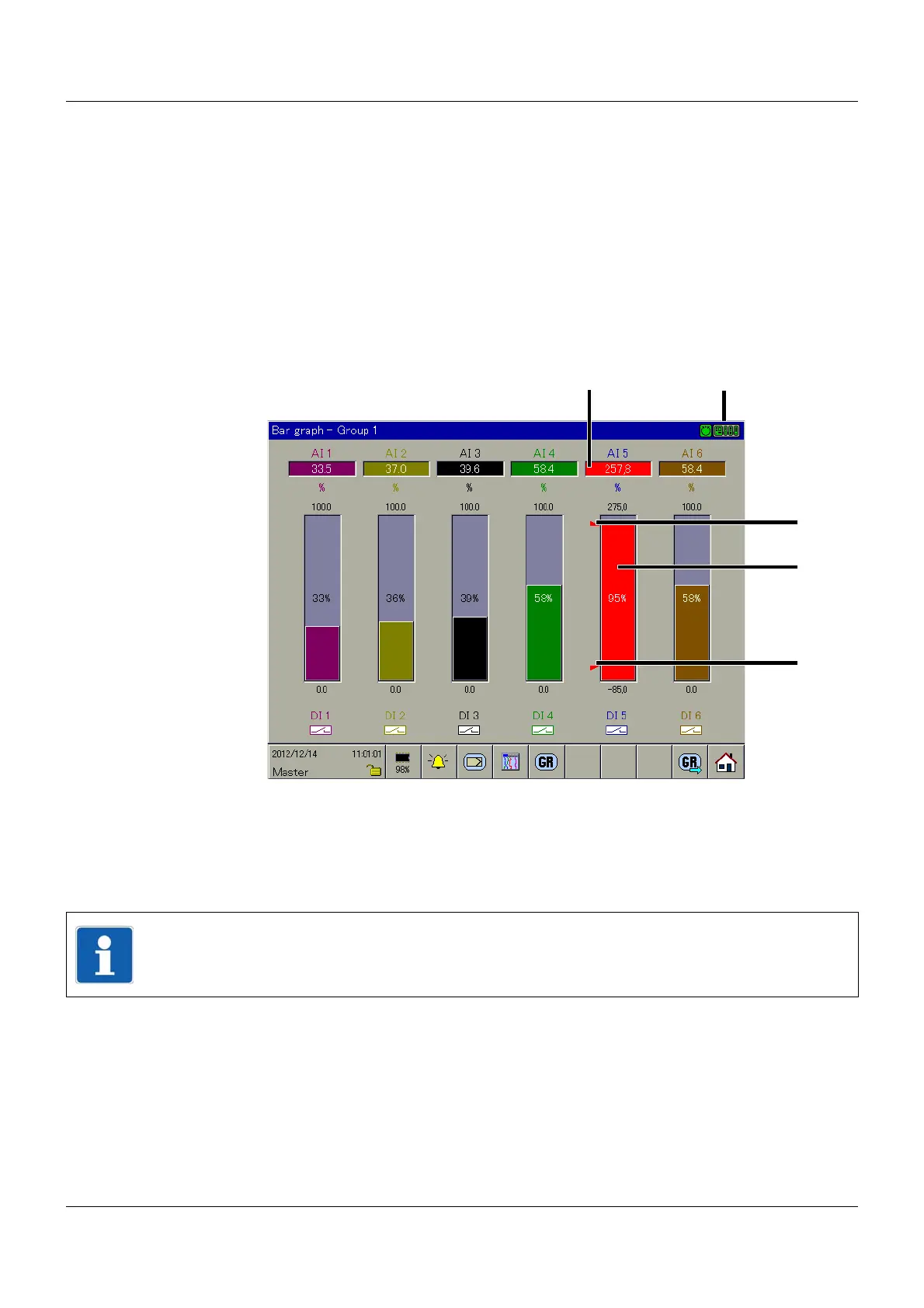
In this visualization, the analog channels are displayed numerically and as a bar graph (col-
umns). In addition to the analog channels, the digital channels are displayed at the bottom of
the screen.
Alarm
An alarm (Alarm1 or Alarm2) is marked with an orange or red background and an orange or
red bar. The colors can be configured in the setup program and using the multifunction panel.
Communication status
Chapter 5.1.1 "Status line and Title line", page 44
(1)
(3)
(6) (7) (8)
(2)
(5)
(4)
(1) Alarm (2) Communication status
(3) Limit value 1 (4) Alarm
(5) Limit value 2 (6) Group selection
(7) Group rotation (8) Home button
NOTE!
If only the digital channels are to be shown, the "Digital" visualization is recommended.
Chapter 7.6 "Digital", page 65



 To Next Page