14 Configuration – in setup program only
216
14.6.3 Background
In addition to the background color, a background image can also be used for the background
of the process screen. The background image is selected from the list of available screens in
the setup program. If the background color is to be visible, the background image must not cov-
er the entire area of the process screen or it must be transparent (option when replacing a
screen).
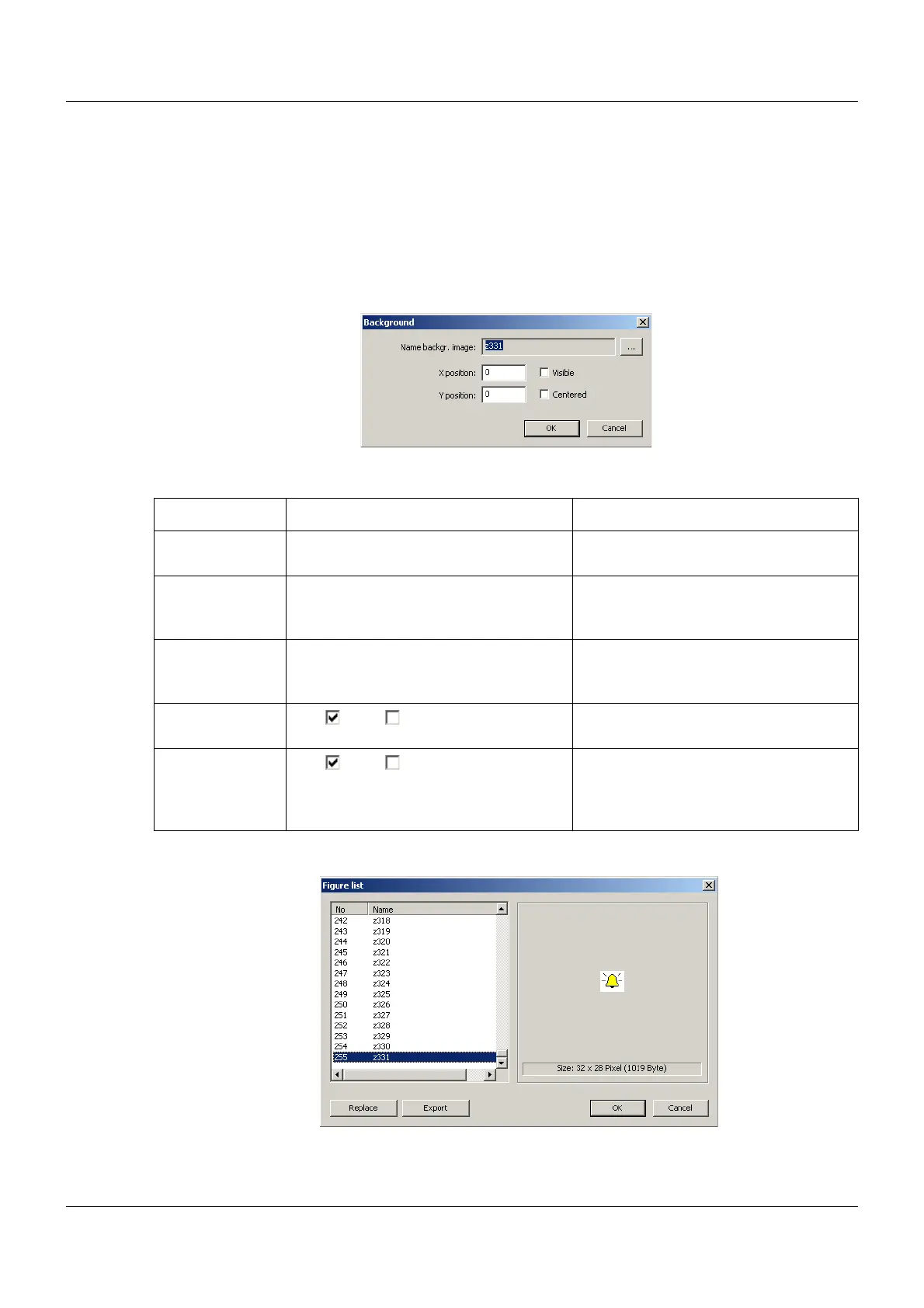
Setup dialog
Parameter
The "..." button is used to open the list of the available images in the setup program:
"Replace" button: The selected image is replaced by a different image, which must be selected
from a file directory as a graphic in BMP format (max. 636 × 404 pixels (
as of system version 02:
Parameter Selection/settings Description
Name backgr.
image
Selection from list of images Background image for the process
screen
X position 0 to 635 X coordinate of the upper left corner of
the background image in the process
screen
Y position 0 to 403 (as of system version 02: 452) Y coordinate of the upper left corner of
the background image in the process
screen
Visible Yes ( ), No ( ) "Yes" releases the display of the back-
ground image in the process screen.
Centered Yes ( ), No ( ) "Yes" horizontally and vertically centers
the background image in the process
screen (X and Y position are then unim-
portant).



 To Next Page