3 Installation
34
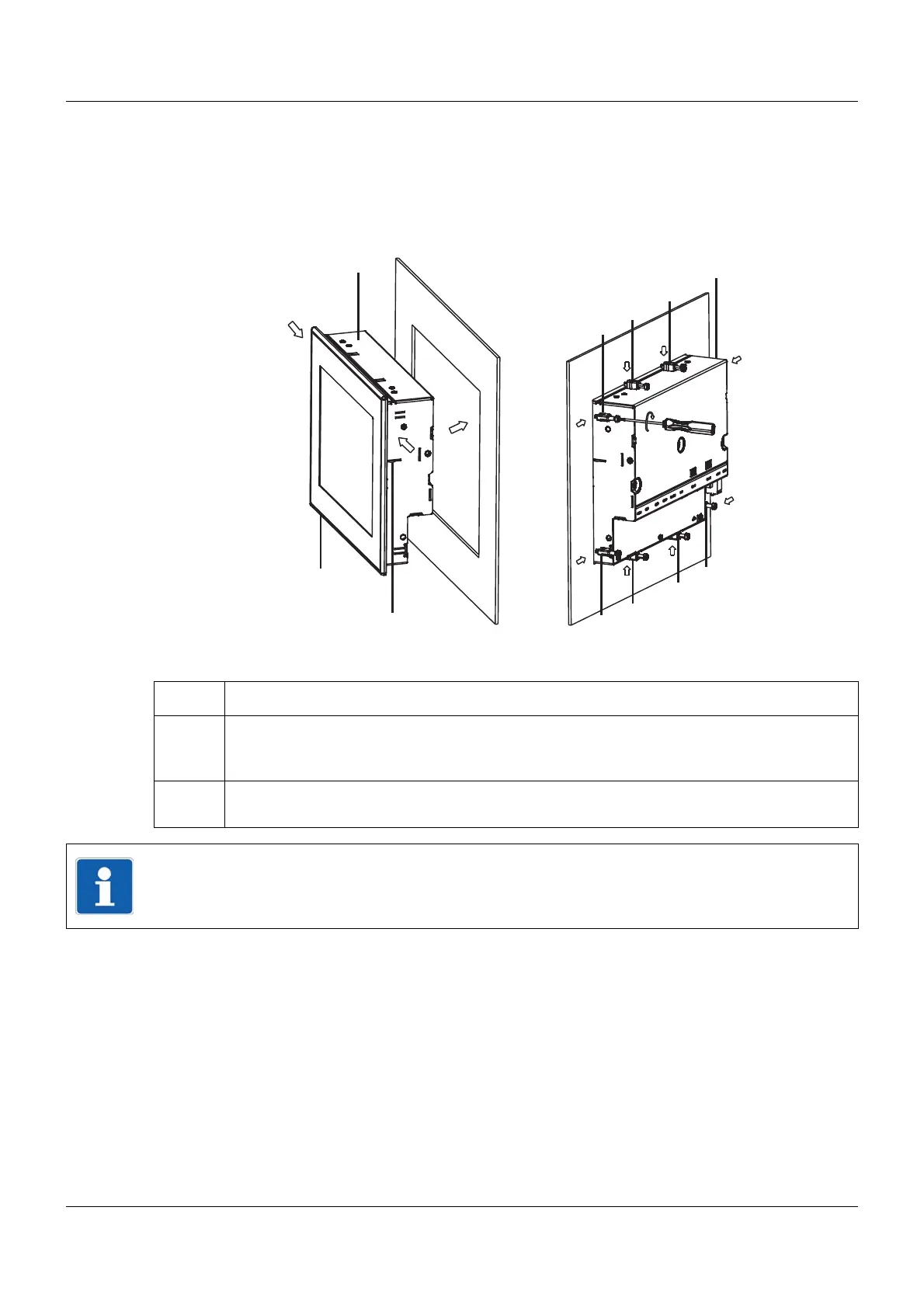
3.2 Mounting in a panel
3.2.1 Multifunction panel
Mounting a multifunction panel 840 (705060)
Procedure:
Step Activity
1 Insert the device (A) into the panel cut-out (A1) from the front until the two side springs (B)
click into place (B2). The springs facilitate the mounting, but do not replace the fastening
elements (step 2).
2 Insert the fastening elements (C) into the recesses of the case (C3) and use a screwdriver
(D) to evenly clamp them against the rear side of the panel with a torque of 0.5 Nm (D4).
(A)
(B)
(B2)
(A1)
(C)
(C)
(C3)
(C3)
(D)
(D4)
(C)
(C)
(C)
(C)
(C)
(C)
(C3)
(C3)
(C3)
(C3)
(C3)
(C3)
(B2)
(B)
NOTE!
The provided template is to be used to create the panel cut-out. This is the only way to guar-
antee optimum positioning of the multifunction panel.



 To Next Page