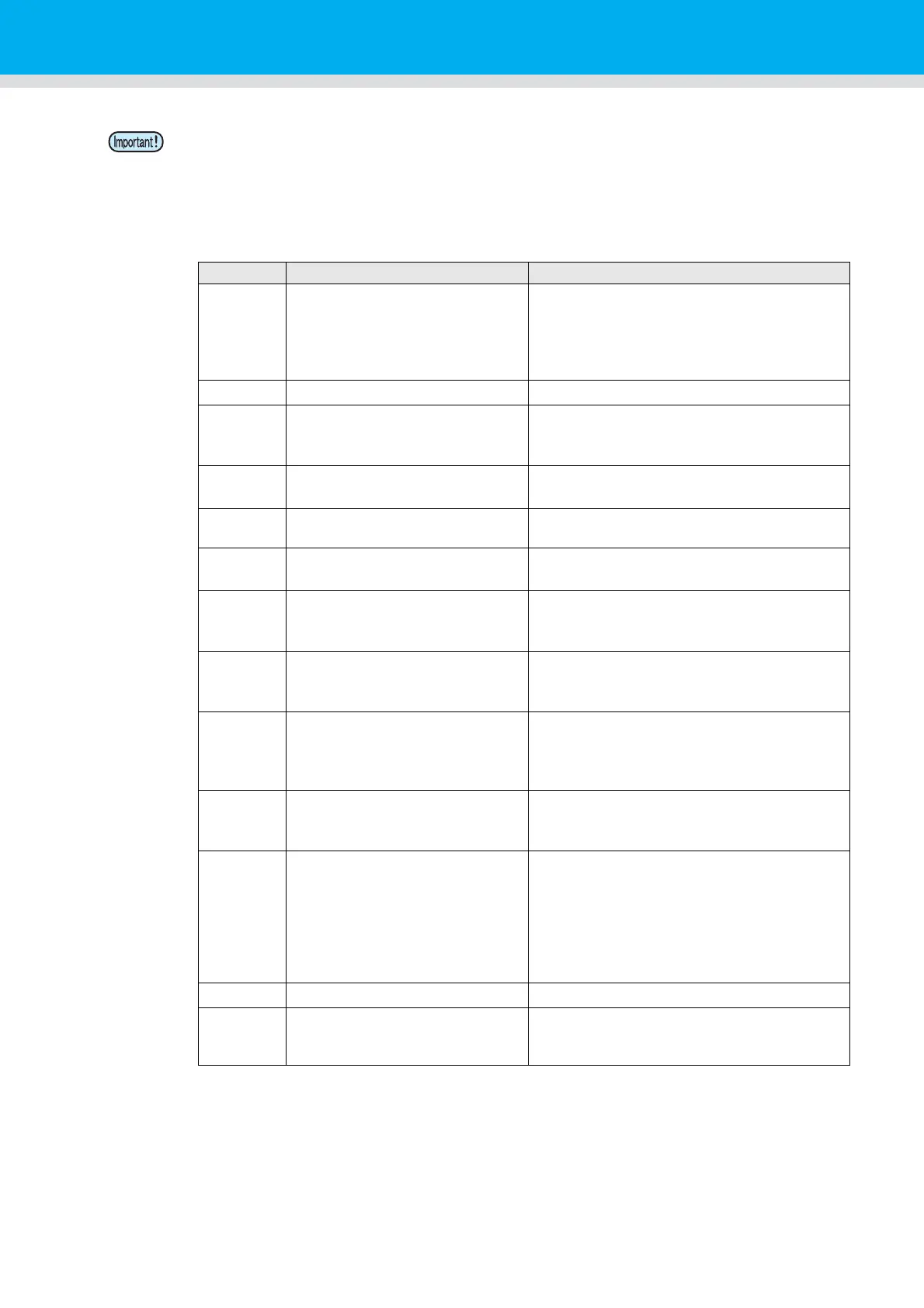
“***” is the error code returned from the e-mail server.
Error Code Error contents Remedy
10 Network connection error
• Check that the machine is connected with the
network.
• Check that the machine IP address is correct.
• Check that the machine is in the environment
where DNS is available.
20 No valid e-mail address.
• Enter the correct e-mail address.
11003
11004
The POP server cannot be found.
Or cannot access DNS server.
• Check the POP server address.
• Check that the machine is in the environment
where DNS is available.
11021
Cannot connect with the POP
server.
• Check the POP server setting.
• Check the firewall setting.
12010
An error returns from the POP
server.
• Check the POP server setting.
13000
The POP authentication has
failed.
• Check the user name and the password.
• Check the APOP setting.
10013
10014
The SMTP server cannot be
found. Or cannot access DNS
server.
• Check the SMTP server address.
• Check that the machine is in the environment
where DNS is available.
10021
Cannot connect with the SMTP
server.
• Check the SMTP server setting.
• Check the SMTP port number.
• Check the firewall setting.
10
11
20
21
An error returns from the SMTP
server.
Or, there was no response.
• Check the SMTP server setting.
• Cannot communicate with a server that
requires mandatory SSL communication.
• Check protocol filter settings.
12 It is invalid sender address.
• Check that the e-mail address supporting the
account entered in the user name/ the
password is set in “Sender mail Adr.”.
13
The e-mail address cannot be
found.
Or, it is invalid sender address.
• Check the e-mail address.
• Even if there is a mistake in the e-mail
address, this error cannot be detected in some
cases.
• Check that the e-mail address supporting the
account entered in the user name/ the
password is set in “Sender mail Adr.”.
22008 SMTP authentication error
• The authentication method is not supported.
23
24
25
The SMTP authentication has
failed.
• Check the user name and the password.


 To Next Page