3-47
1
1
3
Useful Function
5
6
Switch the User
You can save the setting value (cutting condition and main body setting) by five users from the User 1 to 4,
Temp . use r.
By changing the user number depending on the user, you can change the environment without resetting these
parameters.
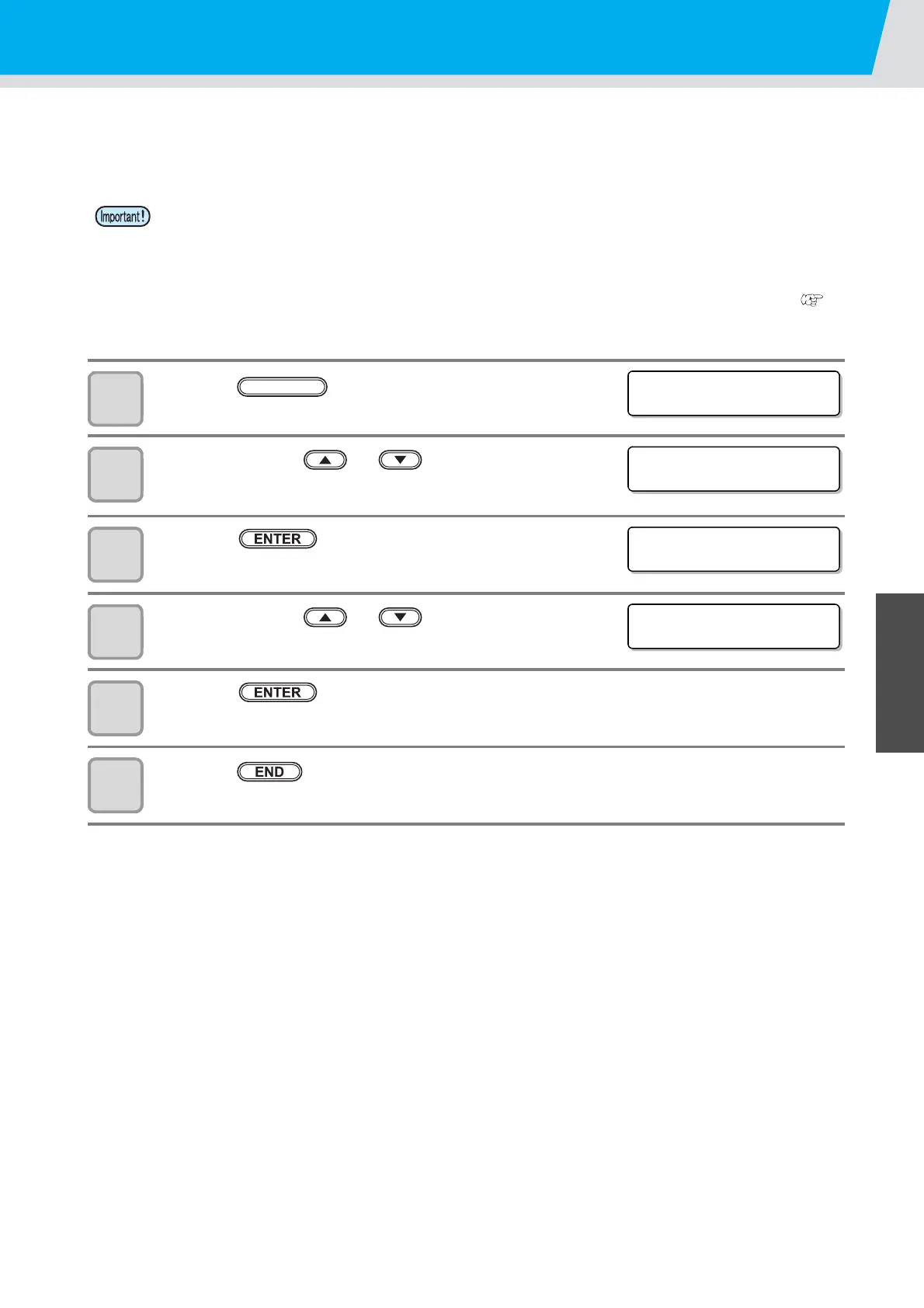
1
Press the key in the local mode.
2
Press the jog key or to select [USER
CHANGE] .
3
Press the key.
4
Press the jog key or to select a user.
• Set values: 1 to 4, Temp.
5
Press the key.
6
Press the key twice for terminating this function.
• You cannot change the user while the cutting operation stops. First, clear data and then change the
user.
• Temp. user does not save the settings.
Please use if you do not want to change the existing settings such as a temporary test cut.
• Setting of Temp. user is initialized when the power is turned on again.
• If copy the settings of other users, execute the “Copy the set value from the other user setting (
P.3-45)”.
<FUNCT ION>
SET UP [ ENT ]
<FUNCT ION>
CHANGE USER [ ENT ]
<USER CHANGE>
SELECT USER : 1
<USER CHANGE>
SELECT USER : 3


 To Next Page