3-45
1
1
3
Useful Function
5
6
Other Useful Functions
Copy the set value from the other user setting
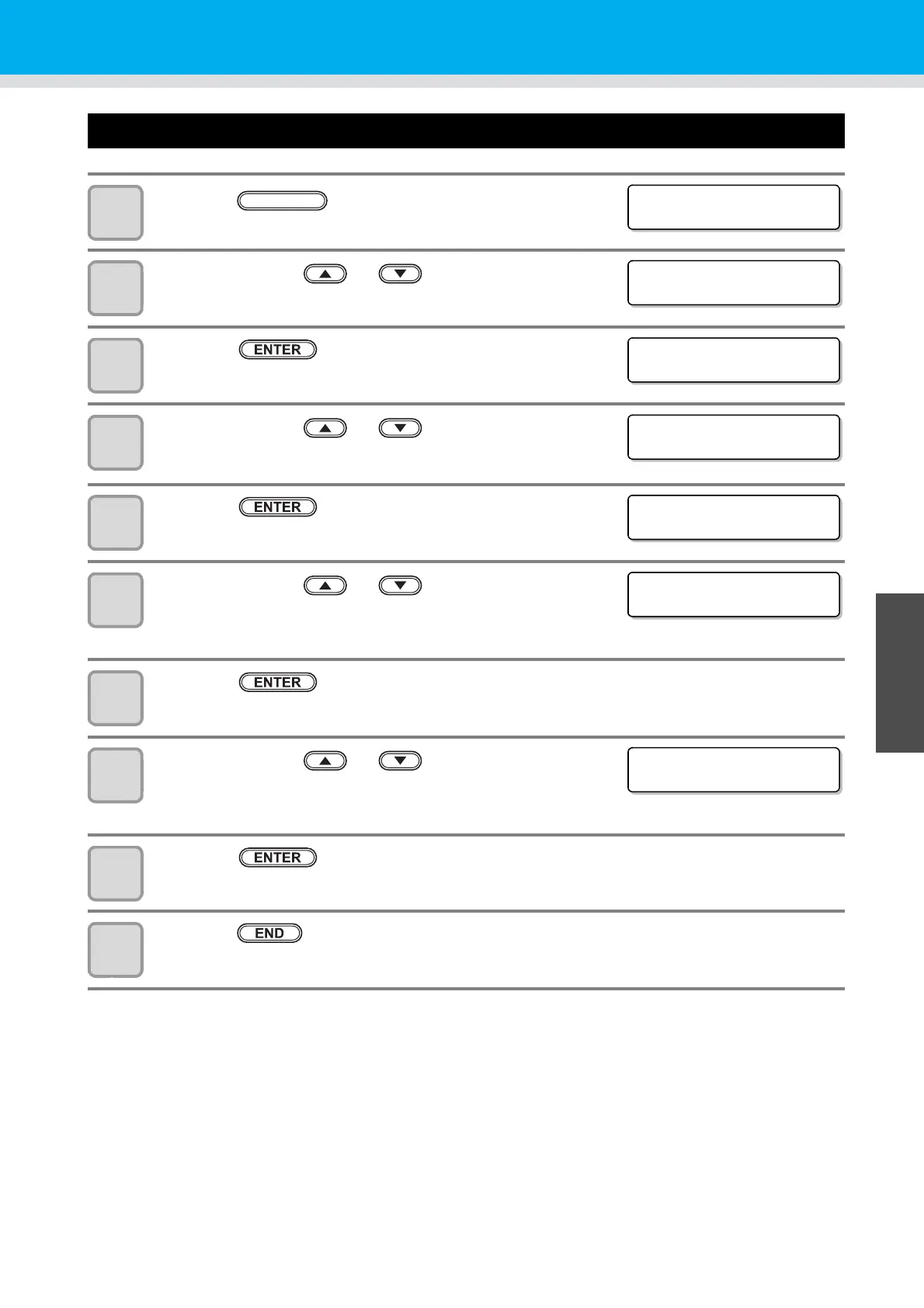
1
Press the key in the local mode.
2
Press the jog key or to select [SET UP] .
3
Press the key.
4
Press the jog key or to select [CONFIG
COPY].
5
Press the key.
6
Press the jog key or , and choose the
parameter you wish to copy
• Set values: CONFIG, CUT COND, MULTI PASS
7
Press the key.
8
Press the jog key or to select the user
setting number to copy.
• Set values: 1 to 4, Temp.
9
Press the key.
• From the selected user, copy the settings that you selected in step 4.
10
Press the key two times for terminating this reset operation.
<FUNCT ION>
SET UP [ ENT ]
<FUNCT ION>
SET UP [ ENT ]
<SET UP>
PLOT SETT ING [ ENT ]
<SET UP>
SETT I NG COPY [ ENT ]
< SE T T I NG COPY >
SELECT PARAM: CONF I G
< SE T T I NG COPY >
SELECT PARAM: CUTCOND
< SE T T I NG COPY >
SELECT PARAM: CUTCOND
< SE T T I NG COPY >
SELECT USER : 1


 To Next Page