3-2
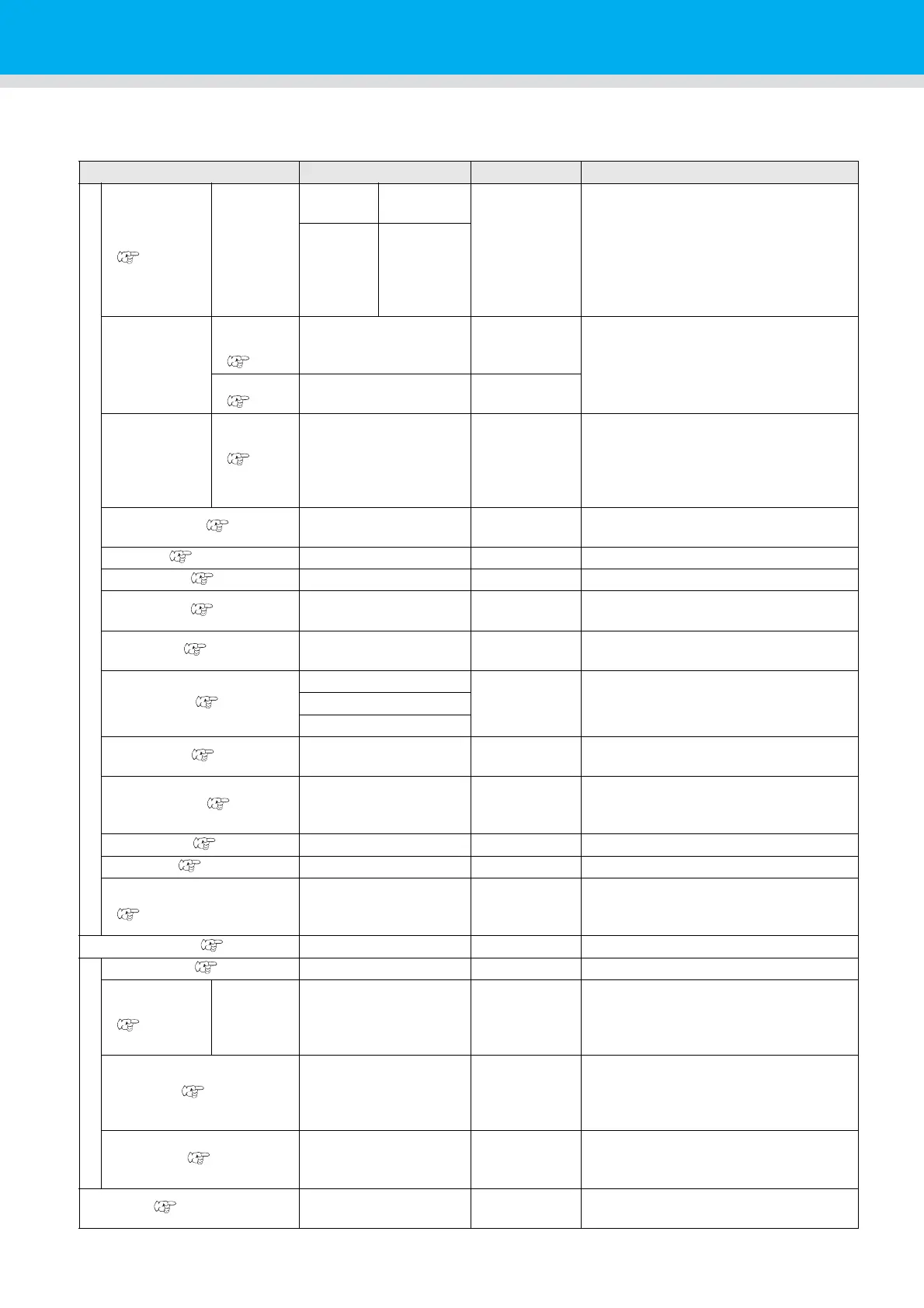
List of SET UP Functions
This section describes the overview of each function to be set and set values that can be registered in user
types.
Function name Set value Default Outline
PLOT SETTING
PEN ASSIGN
(P.3-9)
PEN No.:
1~6
Unit: A
PEN,
SWIVEL
No.1
B:REC.CUTTER1
No.2 B:ROLLOR1
No.3 B:
CUTTER
No.4 B:ROLLOR2
No.5 A:SWIVEL
No.6 A:PEN
This section describes how to assign
pen numbers in the data to tools on the
unit.
Unit: B
REC.CUTT
ER1~2,
CUTTER,
ROLLER1
~3
AFTER PLOT
AUTO
VIEW
(
P. 1- 2 4
)
OFF, KOW-LEFT, LOW-RIGHT,
UP-LEFT, UP-RIGHT
OFF
Set the operation after the plot end.
VACUUM
(
P. 1- 2 5
)
N/C, AUTO OFF
N/C
BEFORE
PLOT
VACUUM
ON
(P.1-
26)
N/C, REMOTE ON N/C
The vacuum can be turned on and off
by interlocking with the remote key.
CLOSE TIME( P.3-20) 3~30sec 3 sec
set the time to determine the end of the
plotting data.
ORIGIN( P.1-22)
LOW-LEFT, CENTER
LOW-LEFT Sets the position of command origin.
ROTATION( P.3-15) ON, OFF OFF Switch the cutting direction.
Z STROKE( P.3-16) 4~10mm, FULLUP 7mm
Set the height that the tool of B unit
rises.
SORTING( P.3-14) ON, OFF OFF
This setting changes the cutting
orderand performs cutting.
CUT MODE( P.3-21)
NORMAL
NORMAL This is to set the cutting quality.SHARP
FAST
UP SPEED( P.3-22)
AUTO, 5, 10, 20, 30
cm/s
AUTO
Set the speed in which the carriage is
moved when the tool is lifted.
DUMMY CUT( P.3-18) ON, OFF ON
The blade edge of swivel cutter is made to
turn to a specific direction before starting
cutting, which allows dummy cutting.
OVER CUT( P.3-25) OFF, 0.1 ~ 1.0mm OFF Make the media without uncut area.
UP HIGH( P.3-23) 50%, 75%, 100% 50% Set the height when lifting the pen.
ADJ-PRSOFFSET
(P.3-24)
-9~+9 0
This is used to expand the value in such
a case as when the beginning and end
part of the cut are left cut.
MARK DETECT( P.4-7)
Set when cut the data with a register mark.
COMMAND SETTING
COMMAND( P.3-29) MGL-IIc3 MGL-IIc3
PRIORITY
(P.3-29)
SP, VS, AS,
FS, ZF, ZA,
ZO
HOST, PANEL HOST
When this plotter and the host computer
make different settings on a same item,
this function is used to set about which
of the two must be given priority to.
OH UNIT ( P.3-30) INITVAL, SETVAL SETVAL
Sets which value to return to the CAD
system when the unit receives the
effective area coordinate output
command from the CAD system.
GDP UNIT( P.3-31) 0.025mm, 0.010mm 0.025mm
This setting aligns the resolution of the
unit with the resolution of the CAD
system used.
BUZZER( P.3-26) ON, OFF ON
With this you can control the key-
pressing sound.


 To Next Page